Create a Workspace
A workspace is an environment where you organize and create your analytics. It contains information about a database, logical data model, dashboards, insights, and measures.
You can create a workspace:
You are now going to create a workspace called demo that you will be using later throughout the tutorials.
Create a Workspace in Your Browser
Steps:
Open GoodData.CN in the browser, and click Create Workspace.
Enter
demofor the name of the workspace, and click Create.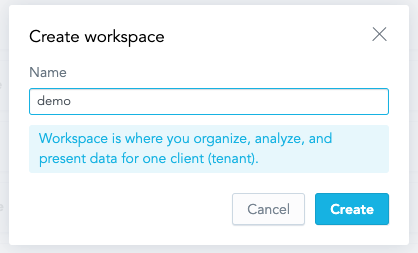
The workspace called
demois created and appears in the list of workspaces on the home page.
Create a Workspace by Using the API
To create a workspace called demo with the identifier of demo, submit a POST request to /api/entities/workspaces.
curl http://localhost:3000/api/entities/workspaces \
  -H "Content-Type: application/vnd.gooddata.api+json" \
  -H "Accept: application/vnd.gooddata.api+json" \
  -H "Authorization: Bearer YWRtaW46Ym9vdHN0cmFwOmFkbWluMTIz" \
  -X POST \
  -d '{
      "data": {
          "attributes": {
              "name": "demo"
          },
          "id": "demo",
          "type": "workspace"
      }
  }' | jq .
Invoke-RestMethod -Method Post -Uri 'http://localhost:3000/api/entities/workspaces' `
-ContentType 'application/vnd.gooddata.api+json' `
-H @{
'Accept' = 'application/vnd.gooddata.api+json'
'Authorization' = 'Bearer YWRtaW46Ym9vdHN0cmFwOmFkbWluMTIz'
} `
-Body '{
"data": {
"attributes": {
"name": "demo"
},
"id": "demo",
"type": "workspace"
}
}' | ConvertTo-JsonTo confirm that the workspace has been created, the server returns the following response:
{
  "data": {
    "id": "demo",
    "type": "workspace",
    "attributes": {
      "name": "demo"
    }
  },
  "links": {
    "self": "http://localhost:3000/api/entities/workspaces/demo"
  }
}
You can now continue with connecting data.