Set Up AKS Resources on Azure
In this section, you will configure and deploy the Azure Kubernetes Service (AKS) resources needed to run GoodData.CN. You will install and configure essential components like Apache Pulsar and NGINX Ingress, which are critical for the proper functioning and scalability of your GoodData.CN deployment.
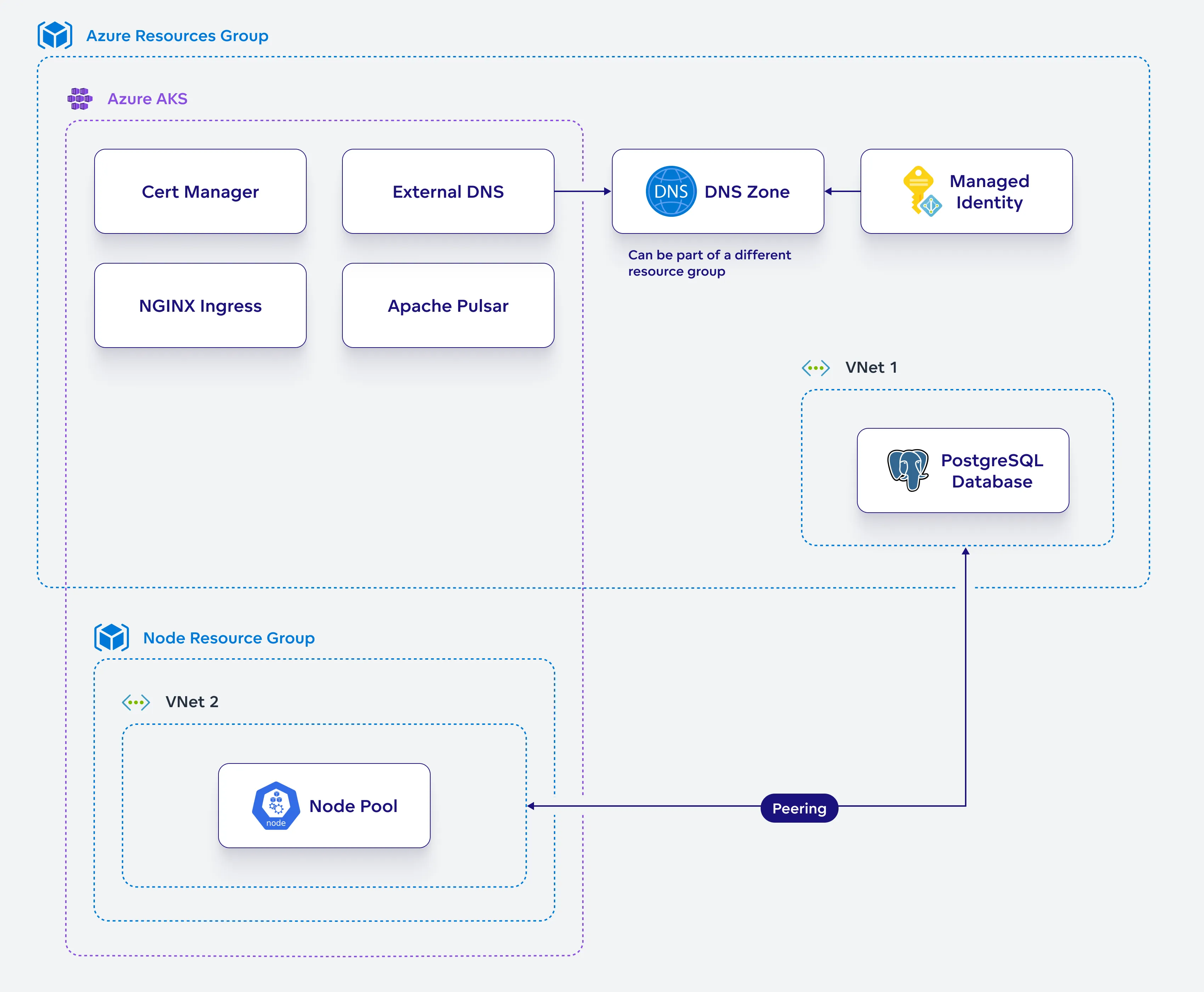
Install Apache Pulsar
Configure and install Apache Pulsar in your Kubernetes cluster.
Steps:
Create a helm chart configuration file for Pulsar:
cat <<EOF > pulsar-values.yaml
components:
  functions: false
  proxy: false
  toolset: false
  pulsar_manager: false

# default image tag for pulsar images
# uses chart's appVersion when unspecified
defaultPulsarImageTag: 3.1.2

images:
  zookeeper:
    repository: apachepulsar/pulsar
  bookie:
    repository: apachepulsar/pulsar
  autorecovery:
    repository: apachepulsar/pulsar
  broker:
    repository: apachepulsar/pulsar

zookeeper:
  replicaCount: 3
  podManagementPolicy: OrderedReady
  podMonitor:
    enabled: false
  restartPodsOnConfigMapChange: true
  annotations:
    # Needed on deployments that don't set custom annotations and use restartPodsOnConfigMapChange=true
    foo: bar
  volumes:
    data:
      name: data
      size: 2Gi
      storageClassName: default

bookkeeper:
  replicaCount: 3
  podMonitor:
    enabled: false
  restartPodsOnConfigMapChange: true
  resources:
    requests:
      cpu: 0.2
      memory: 128Mi
  volumes:
    journal:
      name: journal
      size: 5Gi
      storageClassName: default
    ledgers:
      name: ledgers
      size: 5Gi
      storageClassName: default

  configData:
    PULSAR_GC: >
      -XX:+UseG1GC
      -XX:MaxGCPauseMillis=10
      -XX:+ParallelRefProcEnabled
      -XX:+UnlockExperimentalVMOptions
      -XX:+DoEscapeAnalysis
      -XX:ParallelGCThreads=4
      -XX:ConcGCThreads=4
      -XX:G1NewSizePercent=50
      -XX:+DisableExplicitGC
      -XX:-ResizePLAB
      -XX:+ExitOnOutOfMemoryError
      -XX:+PerfDisableSharedMem
    PULSAR_MEM: >
                        -Xms128m -Xmx256m -XX:MaxDirectMemorySize=128m

autorecovery:
  podMonitor:
    enabled: false
  restartPodsOnConfigMapChange: true
  configData:
    BOOKIE_MEM: >
                        -Xms64m -Xmx128m -XX:MaxDirectMemorySize=128m

pulsar_metadata:
  image:
    repository: apachepulsar/pulsar

broker:
  replicaCount: 2
  podMonitor:
    enabled: false
  restartPodsOnConfigMapChange: true
  resources:
    requests:
      cpu: 0.2
      memory: 256Mi
  configData:
    PULSAR_MEM: >
                        -Xms128m -Xmx256m -XX:MaxDirectMemorySize=128m
    managedLedgerDefaultEnsembleSize: "2"
    managedLedgerDefaultWriteQuorum: "2"
    managedLedgerDefaultAckQuorum: "2"
    subscriptionExpirationTimeMinutes: "5"
    systemTopicEnabled: "true"
    topicLevelPoliciesEnabled: "true"

proxy:
  podMonitor:
    enabled: false

kube-prometheus-stack:
  enabled: false
EOF
Create a Kubernetes namespace for Pulsar:
kubectl apply -f - <<EOF
apiVersion: v1
kind: Namespace
metadata:
  name: pulsar
  labels:
    app: pulsar
EOF
Install Pulsar:
helm upgrade --install pulsar pulsar \
  --repo https://pulsar.apache.org/charts \
  -n pulsar --version 3.3.1 --values pulsar-values.yaml
Wait for all pods to be running:
kubectl get pods -n pulsar
Install NGINX Ingress
Configure and install NGINX Ingress in your Kubernetes cluster.
Steps:
Create a helm chart configuration file for NGINX Ingress:
cat <<EOF > ingress-values.yaml
controller:
  ingressClass: "nginx"
  config:
    allow-snippet-annotations: "true"
    force-ssl-redirect: "true"
    client-body-buffer-size: "1m"
    client-body-timeout: "180"
    large-client-header-buffers: "4 32k"
    client-header-buffer-size: "32k"
    proxy-buffer-size: "16k"
    brotli-types: application/vnd.gooddata.api+json application/xml+rss application/atom+xml
      application/javascript application/x-javascript application/json application/rss+xml
      application/vnd.ms-fontobject application/x-font-ttf application/x-web-app-manifest+json
      application/xhtml+xml application/xml font/opentype image/svg+xml image/x-icon
      text/css text/javascript text/plain text/x-component
    enable-brotli: 'true'
    use-gzip: "true"
    gzip-types: application/vnd.gooddata.api+json application/xml+rss application/atom+xml
        application/javascript application/x-javascript application/json application/rss+xml
        application/vnd.ms-fontobject application/x-font-ttf application/x-web-app-manifest+json
        application/xhtml+xml application/xml font/opentype image/svg+xml image/x-icon
        text/css text/javascript text/plain text/x-component
  service:
    type: LoadBalancer
    externalTrafficPolicy: Local
    targetPorts:
      http: http
      https: https
    annotations:
      service.beta.kubernetes.io/azure-load-balancer-internal: "false"
      service.beta.kubernetes.io/azure-dns-label-name: "azurelb"
      service.beta.kubernetes.io/azure-load-balancer-health-probe-request-path: /healthz
      service.beta.kubernetes.io/port_443_health-probe_protocol: "http"
    containerPort:
      http: 80
      https: 443
  metrics:
    enabled: true
  replicaCount: 3
  addHeaders:
    Permission-Policy: geolocation 'none'; midi 'none'; sync-xhr 'none';
      microphone 'none'; camera 'none'; magnetometer 'none'; gyroscope 'none';
      fullscreen 'none'; payment 'none';
    Strict-Transport-Security: "max-age=31536000; includeSubDomains"
serviceAccount:
    automountServiceAccountToken: true
EOF
Create a Kubernetes namespace for the NGINX Ingress Controller:
kubectl apply -f - <<EOF
apiVersion: v1
kind: Namespace
metadata:
  name: ingress-nginx
  labels:
    app: ingress-nginx
EOF
Install the NGINX Ingress Controller:
helm upgrade --install ingress-nginx ingress-nginx \
  --repo https://kubernetes.github.io/ingress-nginx \
  -n ingress-nginx --values ingress-values.yaml
Wait for all pods to be running:
kubectl get pods -n ingress-nginx
Set Up Encryption
Set up encryption in your Kubernetes environment, ensuring the security of your GoodData.CN deployment.
Steps:
Create a Kubernetes namespace for Cert Manager:
kubectl apply -f - <<EOF
apiVersion: v1
kind: Namespace
metadata:
  name: cert-manager
  labels:
    app: cert-manager
EOF
Install Cert Manager:
helm upgrade --install cert-manager cert-manager \
  --repo https://charts.jetstack.io --namespace cert-manager \
  --set installCRDs=true --wait
Apply the following ClusterIssuer configuration to the Cert Manager:
kubectl apply -f - <<EOF
apiVersion: cert-manager.io/v1
kind: ClusterIssuer
metadata:
  name: letsencrypt-prod
spec:
  acme:
    email: $ACME_EMAIL
    privateKeySecretRef:
      name: letsencrypt-prod-cluster-issuer
    server: https://acme-v02.api.letsencrypt.org/directory
    solvers:
    - http01:
        ingress:
          ingressClassName: nginx
          serviceType: ClusterIP
      selector:
        dnsZones:
        - $DNS_ZONE
EOF
Create a namespace for GoodData.CN installation:
kubectl apply -f - <<EOF
apiVersion: v1
kind: Namespace
metadata:
  name: gooddata-cn
  labels:
    app: gooddata-cn
EOF
Create an encryption keyset for GoodData.CN metadata:
Generate new keyset and store it in file:
./tinkey create-keyset --key-template AES256_GCM \
  --out output_keyset.json
Create Kubernetes secret containing the keyset:
kubectl -n gooddata-cn create secret \
  generic $GD_ENCRYPTION_KEYSET_SECRET \
  --from-file keySet=output_keyset.json
Save the Keyset!
Keep the encryption keyset
output_keyset.jsonon secure location. If you lose it, you will be unable to decrypt values from metadata.
Create a secret for Postgresql credentials:
kubectl -n gooddata-cn create secret generic $PG_CREDENTIALS_SECRET \
  --from-literal postgresql-password=$PG_ADMIN_PASSWORD
Create a cecret for GoodData.CN license key:
kubectl -n gooddata-cn create secret generic $GD_LICENSE_KEY_SECRET \
  --from-literal=license=$GD_LICENSE_KEY