Create Organization on Azure
In this last section, you will set up an organization within your GoodData.CN deployment on Azure. This organization will serve as the core structure for managing users, permissions, and analytics workspaces, allowing you to fully utilize and administer your GoodData.CN environment.
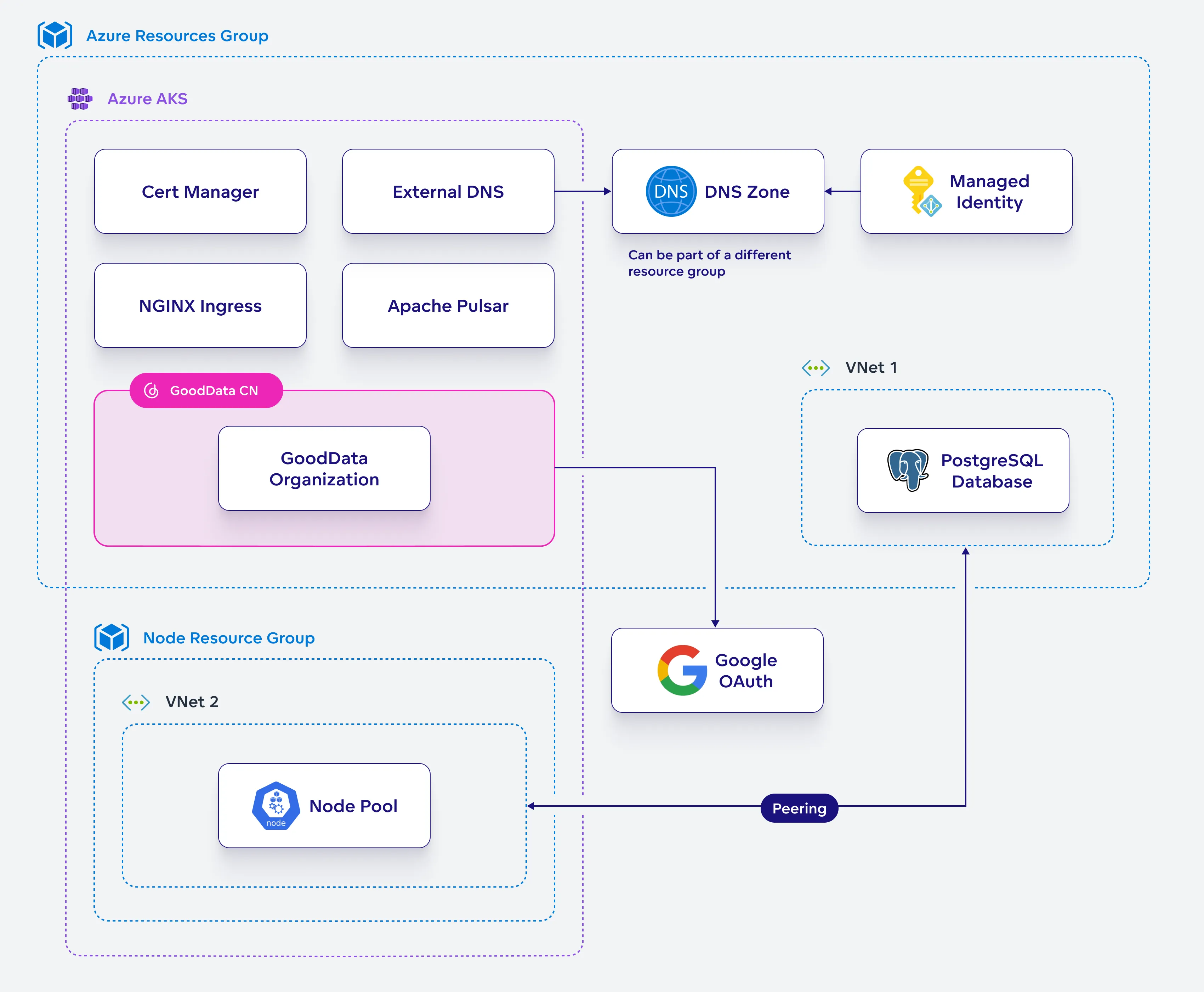
Create Organization
Set up an organization that will define the subdomain where your GoodData.CN environment can be accessed.
Steps:
Generate a salted hash of the administrator password:
GD_ADMIN_USER_PASSWORD_SALTED=$(openssl passwd -6 $GD_ADMIN_USER_PASSWORD)

echo "GD_ADMIN_USER_PASSWORD_SALTED=$GD_ADMIN_USER_PASSWORD_SALTED"
Create a helm chart configuration file for your GoodData organization:
cat <<EOF > gooddata-org-definition.yaml
apiVersion: controllers.gooddata.com/v1
kind: Organization
metadata:
  name: $GD_ORGANIZATION_NAME
spec:
  id: $GD_ORGANIZATION_ID
  name: $GD_ORGANIZATION_DISPLAY_NAME
  hostname: $GD_ORGANIZATION_HOSTNAME
  adminGroup: adminGroup
  adminUser: $GD_ADMIN_USER_NAME
  adminUserToken: $GD_ADMIN_USER_PASSWORD_SALTED
  tls:
    secretName: $GD_CERT_SELF_SIGNED_SECRET
    issuerName: letsencrypt-prod
    issuerType: ClusterIssuer
EOF
Generate the organization resource:
kubectl -n gooddata-cn create -f gooddata-org-definition.yamlCheck that you can see your organization as one of your Kubernetes resources:
kubectl -n gooddata-cn get orgThe external-dns component will automatically create the appropriate DNS record in your DNS zone.
Check that your DNS zone was updated:
az network dns record-set list \
  --resource-group $AZ_RESOURCE_GROUP \
  --zone-name $DNS_ZONE \
  --query "[].{Name:name, Type:type, TTL:ttl}" \
  --output table
You should see new
ext-dns-...text records and an A record pointing to the subdomain defined by$GD_ORGANIZATION_HOSTNAME:Name Type ------------------ ------------------------------ @ Microsoft.Network/dnszones/NS @ Microsoft.Network/dnszones/SOA ext-dns-a-gooddata Microsoft.Network/dnszones/TXT ext-dns-gooddata Microsoft.Network/dnszones/TXT gooddata Microsoft.Network/dnszones/AEnsure that your
$GD_ORGANIZATION_HOSTNAMEis reachable.Create bootstrap token to be able to administer your GoodData.CN by encoding the following string using base64:
GD_BOOTSTRAP_API_TOKEN=$(echo \
  -n "$GD_ADMIN_USER_NAME:bootstrap:$GD_ADMIN_USER_PASSWORD" | base64)

echo "GD_BOOTSTRAP_API_TOKEN=$GD_BOOTSTRAP_API_TOKEN"
Save this token somewhere safe.
Set Up Authentication
Configure external authentication for your GoodData.CN organization, enabling secure user access through your chosen identity provider.
Steps:
Update organization settings to use externa OIDC identity provider:
curl --request PUT \
  --header "Authorization: Bearer $GD_BOOTSTRAP_API_TOKEN" \
  --header 'Content-Type: application/vnd.gooddata.api+json' \
  --data '{
  "data": {
    "id": "'"$GD_ORGANIZATION_ID"'",
    "type": "organization",
    "attributes": {
      "name": "'"$GD_ORGANIZATION_DISPLAY_NAME"'",
      "hostname": "'"$GD_ORGANIZATION_HOSTNAME"'",
      "oauthSubjectIdClaim": "sub",
      "oauthIssuerLocation": "'"$OAUTH_ISSUER_LOCATION"'",
      "oauthClientId": "'"$OAUTH_CLIENT_ID"'",
      "oauthClientSecret": "'"$OAUTH_CLIENT_SECRET"'"
    }
  }
}' https://$GD_ORGANIZATION_HOSTNAME/api/v1/entities/admin/organizations/$GD_ORGANIZATION_ID
Create a new admin user and map it to your own user in your external OIDC identity provider:
curl --request POST \
  --header "Authorization: Bearer $GD_BOOTSTRAP_API_TOKEN" \
  --header 'Content-Type: application/vnd.gooddata.api+json' \
  --data '{
      "data": {
        "id": "admin",
        "type": "user",
        "attributes": {
          "authenticationId": "'"$USER_SUB_CLAIM"'"
        },
        "relationships": {
          "userGroups": {
            "data": [ {
              "id": "adminGroup",
              "type": "userGroup"
            } ]
          }
        }
      }
}' https://$GD_ORGANIZATION_HOSTNAME/api/v1/entities/users
Log into your GoodData.CN deployment to start using it.