GoodData Architecture
GoodData.CN is a set of microservices that run in your own Kubernetes cluster and work together to serve analytics at scale. For a detailed breakdown of the microservices and their roles, see GoodData Microservices.
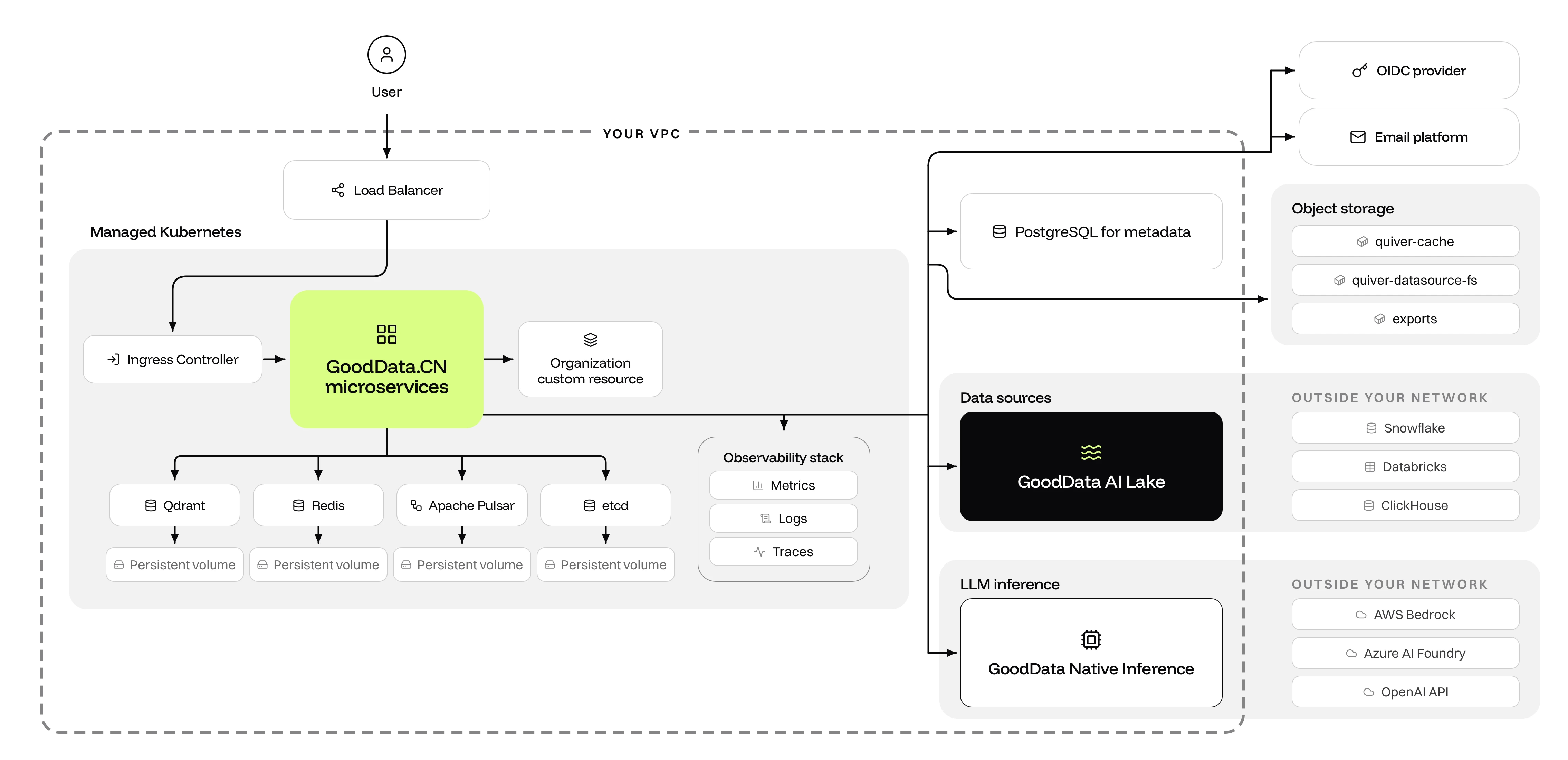
The diagram below shows a typical production deployment in a cloud environment. To stand it up, follow the Production Deployment guide.
Traffic flow
When a user opens a dashboard, the request travels through the diagram like this:
- Load balancer. Each organization has its own hostname, and you point its DNS record at the load balancer in your VPC. The load balancer forwards the request to the ingress controller of your Kubernetes cluster. GoodData.CN works with any ingress controller.
- Microservices. The ingress controller routes the request to the GoodData.CN microservices, which resolve the hostname to the matching Organization custom resource and apply that tenant’s settings and permissions.
- Login. If the user has no session yet, GoodData.CN redirects the browser to your OIDC provider and issues a session cookie when the user returns. Scripts and integrations use API tokens or JWTs instead of a browser login.
- Dashboard and model. The dashboard layout, metrics, and logical data model load from your PostgreSQL metadata database. Everything users create (workspaces, models, dashboards, permissions) persists there.
- Query execution. For each visualization, the microservices translate the metric definitions into SQL and run it against your data source. Results return to the browser and are cached for the next request.
Where your data lives
GoodData.CN runs queries against your data source where the data already lives, so the platform never holds a copy of it. What the platform does store is cached result sets and the files users export, such as CSVs and PDFs. Your sources can sit inside your network, such as GoodData AI Lake, or outside it, such as Snowflake, Databricks, and ClickHouse. Files that users upload as data sources, such as CSVs, are the exception: those are stored in the quiver-datasource-fs bucket.
Caching, exports, and background work
Repeated queries are served from cache instead of hitting your data source again. Redis holds hot state such as cache metadata, model caches, and rate limits, the quiver-cache bucket holds the query result cache, and etcd coordinates the caching layer. Apache Pulsar carries the work that outlives a single request: populating caches, generating exports, and evaluating alerts. Finished exports land in the exports bucket, and scheduled exports and notifications go out through your email platform.
AI features
Qdrant indexes your metadata as vectors so that AI features can find the right datasets and metrics by meaning rather than by name. Prompts then go to the LLM provider you choose: run GoodData Native Inference inside your VPC to keep them on your own infrastructure, or point GoodData.CN at AWS Bedrock, Azure AI Foundry, or the OpenAI API.
Observability
The microservices emit metrics, logs, and traces to your observability stack. Deploy and monitor GoodData.CN the same way you monitor your other applications.