GoodData.CN Microservices
GoodData.CN is built as a collection of microservices, each running in its own Kubernetes pods so that they can be scaled and operated independently.
The services below are grouped conceptually. The grouping does not reflect any physical grouping in the installation. Services that the Helm chart does not deploy by default are marked with the value that enables them.
API
The API services consist of:
afm-exec-api
AFM stands for attributes, filters, and measures. The service is the REST entry point for report computation and related use cases:
- Report execution: computation of reports.
- Valid objects: returns Logical Data Model (LDM) entities (attributes, facts, metrics) compatible with the current context (AFM).
- Label elements: returns label values (distinct values in the mapped table column).
- AI actions: the
/api/v1/actions/workspaces/{id}/ai/*and/api/v1/ai/*endpoints, which delegate to gen-ai.
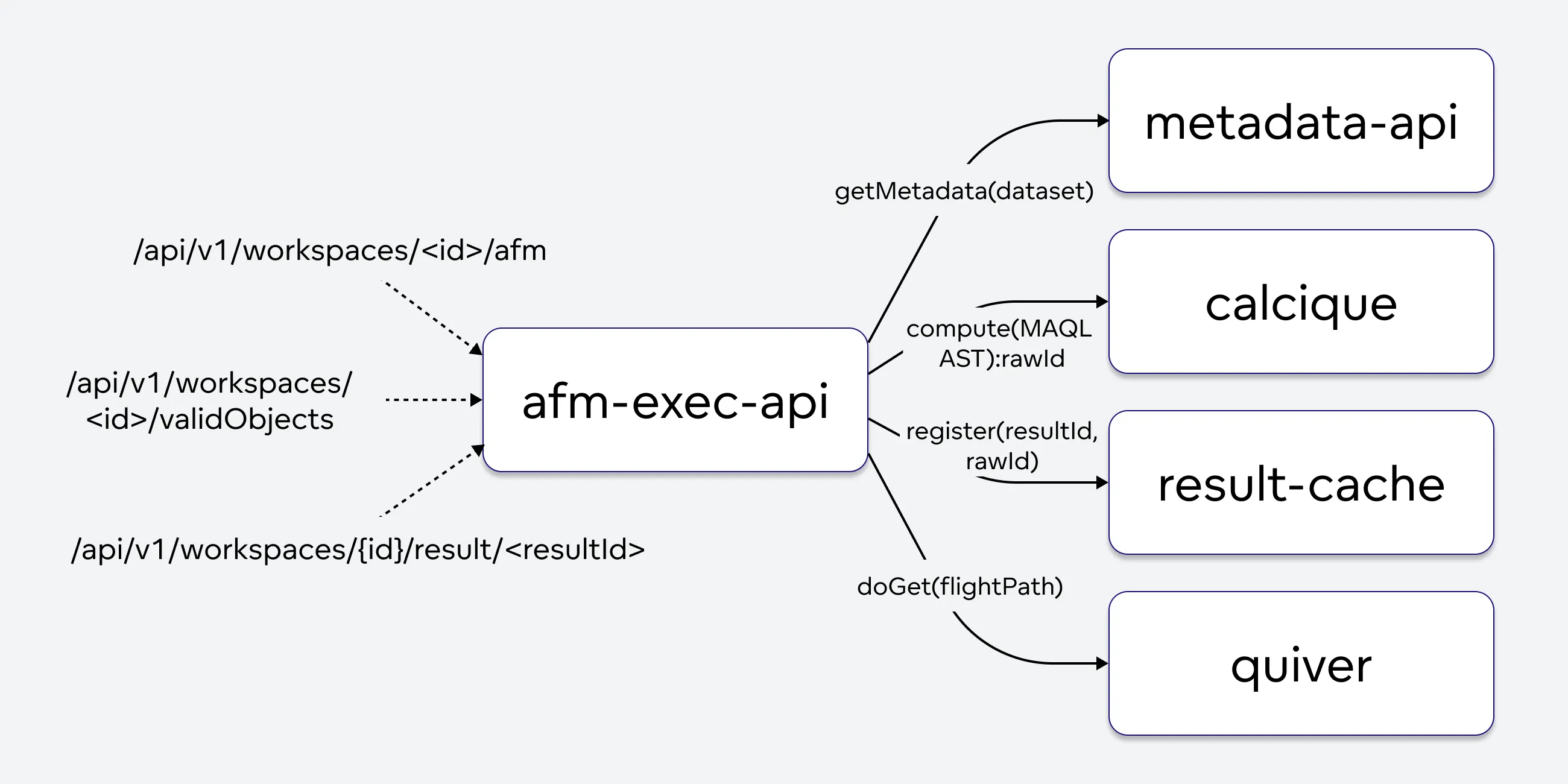
The service uses the MAQL parser, collects metadata from metadata-api, and transforms AFM requests into MAQL ASTs. calcique turns those ASTs into SQL.
api-gateway
A Spring Cloud reverse proxy that serves only the frontend URL paths. It proxies them to the UI pods and adds Content Security Policy (CSP) and CORS headers, combining static directives set at deployment time with per-organization settings read from metadata-api over gRPC.
It no longer receives ingress traffic directly. api-gw forwards the UI paths to it. The service is being deprecated and takes no new functionality.
api-gw
A Ktor service and the single ingress backend: the Organization ingress (or Istio VirtualService) routes / to api-gw, which then routes internally. Responsibilities:
- Routing to backend services, plus configurable API extension routes.
- OIDC authentication for enabled organizations. It issues the stateful
GD_SESSION_IDcookie and stores session data in thegwPostgres database maintained by gateway-forge. - Call-context propagation: resolves organization/workspace and feature flags and passes them downstream in the
X-GDC-CALL-CONTEXTheader. - Rate limiting, license checks, CORS, telemetry, and logging.
- Proxying map tiles, glyphs, and styles for geo charts (AWS Location by default, Mapbox optionally).
- Optional user management for the internal dex OIDC provider: a CRUD REST API at
/api/v1/auth/users, described by the schema at/api/v1/schemas/auth. Disabled by default.
Requests for the UI paths (/analyze, /dashboards, /components, /metrics, /organization, /workspace, and the catch-all /) are forwarded to api-gateway, which adds CSP and CORS and proxies them to the UI pods.
export-controller
Export Controller accepts export requests, dispatches them, and serves the results. It exposes REST endpoints to:
- Start a tabular export (CSV, XLSX, HTML, PDF) of a computed result by
executionResultID, or of a visualization object by ID (HTML and PDF only). - Start a visual export of a dashboard (slides, image, PDF) by dashboard ID.
- Start a raw export.
- Pick up a finished export by
exportId.
Each request returns an exportId immediately. The service records the status in Redis, publishes a message to a dedicated Pulsar topic, and calls tabular-exporter (tabular exports) or export-builder (visual exports) over gRPC, passing a short-TTL API token. Results are written to the configured export storage (an S3 bucket, an Azure Blob Storage container, or the local filesystem).
Pickup responses by exportId:
- Not ready yet: HTTP 202
- Ready: HTTP 200 with the export data
- User error or unknown export: HTTP 404
- Server error: HTTP 500
Users need the EXPORT (or MANAGE) permission; EXPORT_TABULAR and EXPORT_PDF allow finer granularity.
metadata-api
Manages all GoodData metadata, including report and metric definitions, and stores it in PostgreSQL. Its public REST API has three groups:
/api/entities: CRUD operations following the JSON:API standard./api/layout: declarative documents such as Logical Data Models (LDM), workspaces, or whole organizations./api/actions: RPCs, such as generating a logical model.
It also serves /api/v1/profile, which returns context about the authenticated user and their organization, and /api/v1/actions/invite.
calcique, sql-executor, and gateway-forge cache metadata, so metadata-api publishes change notifications to Apache Pulsar to keep them current. It also exposes gRPC calls for services that need metadata in real time.
When data source metadata is stored, metadata-api calls sql-executor to validate the jdbcUrl with validations specific to the data source type.
scan-model
Scans data sources and tests their availability. From a scan request (data source, schema, table prefixes) it produces a Physical Data Model (PDM), a declarative definition of the scanned structure that can be stored in metadata-api and mapped to an LDM.
Two availability-test APIs are available: one for data sources already registered in metadata-api, and one for unregistered data sources, whose request must carry the full definition including the jdbcUrl.
scan-model forwards all requests to sql-executor, the only service that talks to data sources directly, and converts the returned internal format into a PDM.
Frontend
The frontend services consist of:
- UI Applications which consist of:
- analytical-designer
- dashboards
- home-ui
- host-application
- apidocs
- web-components
UI Applications
Each of these services runs an NGINX server that serves the web frontend for a set of URL paths. api-gateway maps the paths to the services:
| Microservice | Serves content for |
|---|---|
| analytical-designer | <your-hostname>/analyze/ |
| dashboards | <your-hostname>/dashboards/ |
| host-application | <your-hostname>/organization/, <your-hostname>/workspace/, and <your-hostname>/embedded/workspace/ |
| home-ui | everything else, including <your-hostname>/ |
host-application is the shell application. It is deployed when deployUI and hostApplication.enabled are true (both default). Which screens the shell renders is controlled by the enableShellApplication* feature flags.
These services do not communicate with other services directly. The web applications call the API services based on user actions.
apidocs
Serves Swagger-based API documentation generated from the codebase at <your-hostname>/apidocs.
web-components
Runs an NGINX server that serves the JavaScript files for embedding GoodData web components into external applications, at <your-hostname>/components/<some-component-id>. See Embed Visualization Using Web Components. The service does not interact with other microservices.
Compute and Cache
The compute and cache services consist of:
- automation
- calcique
- db-postgresql
- etcd
- redis-ha-server
- result-cache
- sql-executor
- Quiver which consists of:
- quiver-cache
- quiver-xtab
- quiver-ml
- quiver-datasource
- quiver-policy
automation
Executes actions on behalf of users: scheduled tasks and alerts.
Tasks are persisted in Postgres using the db-scheduler library and polled at a fixed interval, so the polling interval is the minimum schedule granularity. Automation state is kept in sync with metadata-api through Pulsar messages.
Task execution flow:
- A trigger condition is met (a scheduled time, or an alert threshold on a metric).
- The service runs all actions of the automation. For exports it publishes to the
export-tabular-scheduledorexport-visual-scheduledPulsar topic (separate from manual exports) and polls export-controller over gRPC. - It waits for completion or times out.
- It sends the result to the configured notification channel (webhook, SMTP, or in-platform), whether the action succeeded or failed.
calcique
Built on Apache Calcite, calcique manipulates SQL trees and generates valid SQL for all supported data sources. It is implemented in Kotlin and is the successor to AQE (Analytical Query Engine).
- SQL generation from the MAQL AST produced by afm-exec-api, metadata from metadata-api, and cached LDM/PDM resolvers.
- Caching: LDM and PDM resolvers are cached in Redis under keys starting with
calcique. Model and data source changes arrive on themodelUpdateanddataSourceChangePulsar topics and invalidate the caches. rawIdmanagement: calcique hashes the MAQL AST, the model versions (LDM, PDM, metrics), anddataSource.uploadId(the version of data in the data source, typically changed by the customer’s ETL) into arawIdand registers it with result-cache. If the raw cache already exists, no SQL is generated or executed and only post-processing runs.- If the raw cache is missing, calcique publishes the generated SQL to a Pulsar topic that sql-executor consumes.
db-postgresql
GoodData.CN stores metadata, automations, gateway state, and other operational data in PostgreSQL. The database is an external prerequisite: the bundled postgresql-ha subchart, which used to deploy the db-postgresql and db-pgpool pods, was removed in 4.0. Provision PostgreSQL yourself and point the chart at it with service.postgres.*. See Installation and Configuration and Upgrade to GoodData.CN 4.0.
etcd
A key-value store deployed as a StatefulSet (3 replicas by default, customEtcd.replicaCount). It is used solely by Quiver, which keeps all of its cluster state there and watches it for changes. quiver.limitFlightCount (default 50000) caps the total number of flights registered in etcd.
redis-ha-server
A highly available Redis instance from the redis-ha subchart, deployed when deployRedisHA is true (default). It holds ephemeral data such as export status entries and calcique’s model resolver caches.
result-cache
result-cache is the liaison between Quiver and the rest of GoodData.CN. Quiver has no REST API and is never exposed to clients directly; result-cache translates REST and gRPC calls into Arrow Flight RPC. It:
- Registers raw caches (from calcique) and result caches (from afm-exec-api).
- Receives raw result rows streamed over gRPC from sql-executor and stores them in Quiver.
- Orchestrates post-processing in Quiver once the raw data is ready: cross-tabulation and alerting on
quiver-xtab, and forecasting, clustering, anomaly and outlier detection, key driver analysis, and change analysis onquiver-ml. This orchestration is expected to move into Quiver itself. - Exposes Quiver capabilities such as cache usage policies, and handles Quiver-based data sources such as CSV (
GD_STORAGE).
Clients poll afm-exec-api for a result by its identifier until the result is ready, or until the request times out.
Cached data is held in Quiver’s cache, which is backed by durable storage (Amazon S3, Azure Blob Storage, or a shared filesystem) as described in Configure Quiver. resultCache.totalCacheLimit (default: 32 GiB) sizes the durable-storage volume. Caches are not permanent and can be invalidated or evicted according to Quiver’s caching policies.
Cross-tabulation inside result-cache itself still exists as an opt-in legacy fallback, but Quiver handles it by default.
sql-executor
The only service that connects to data sources. It executes queries, scans database metadata (schemas, tables, columns, constraints), and tests data source configuration correctness.
It receives work in two ways: SQL SELECT statements from the Pulsar topics populated by calcique, and gRPC calls for model scanning and data source tests. Executed results are streamed over gRPC to result-cache.
Connections are pooled and cached per data source and organization: HikariCP for JDBC, the Google Cloud BigQuery Client for Java for BigQuery. Pools are invalidated through a Pulsar topic when a data source configuration changes, and are recreated on the next request.
Quiver
Quiver (internally also called FlexQuery) is a service suite for reading, writing, manipulating, and managing data caches from customer data sources. Quiver:
- Stores raw caches: raw data from SELECT queries, used for further computation.
- Stores result caches: data from cross-tabulations, served via the AFM Result API and displayed in the UI.
- Stores element caches: raw data served via the AFM Valid Elements API, often shown in attribute filter drop-downs.
- Computes result caches and ML results using its dataframe services.
- Analyzes CSV files and runs SQL queries on Quiver-handled data sources.
- Supports hierarchical caching backed by durable storage such as S3. Caches are not permanent and can be invalidated or removed according to policies.
The Quiver suite consists of five services:
| Microservice | Function |
|---|---|
| quiver-cache | Stores and fetches data caches. Each pod holds up to quiver.cacheCountLimit caches (default 5000) in memory and on disk. |
| quiver-xtab | Dataframe service for cross-tabulation and alerting. |
| quiver-ml | Dataframe service for machine-learning operations: forecasting, clustering, anomaly detection, outlier detection, key driver analysis, and change analysis. |
| quiver-datasource | Runs SQL queries against Quiver-handled data sources, currently CSV/file storage only. Deployed only when deployQuiverDatasource is true (default false). |
| quiver-policy | Enforces cache limit and eviction policies and reports cache usage. |
The Quiver services are stateless. All important state is stored in etcd; the services load it at startup and stay current using etcd watches.
Gateway
The Gateway group contains services that handle edge routing, request processing, and fast metadata lookups used during authentication and organization/workspace resolution.
gateway-forge
gateway-forge is a core (non-optional) Spring Boot service that replaces the former optional gateway-md-sink. It synchronizes metadata from metadata-api into a local Postgres database (gw) optimized for api-gw, so that api-gw can resolve organizations and workspaces and authenticate requests without calling metadata-api on every request.
- Maintains organization/workspace contexts, identity providers, users, API tokens, JWKs, allowed origins, settings, and gateway sessions in the
gwdatabase. - Consumes synchronization events from metadata-api on the
metadata.syncPulsar topic (with a dead-letter queue). - Owns the
gwdatabase: it manages the schema through Liquibase and performs all writes. api-gw has read access. - Cleans up expired tokens (enabled by default, interval configurable).
- Optionally encrypts identity provider secrets, aligned with
metadataApi.encryptor.*.
Configuration lives under the gatewayForge.* Helm values. Defaults: CPU request 100m / limit 500m, memory request 450Mi / limit 1200Mi, JVM options -XX:ReservedCodeCacheSize=60M -Xms200m -Xmx700m -XX:MaxMetaspaceSize=210M.
Metrics are exposed at /actuator/prometheus on port 9099. In addition to the standard Micrometer JVM, gRPC, DB pool, and Pulsar metrics, the service publishes the counter forge.sync.entity.count with the tags entity_type and operation.
Export
The export services consist of:
tabular-exporter
A Python service that converts visualization result data into CSV, XLSX, or HTML. It exposes a gRPC endpoint that receives an executionResult ID or a visualizationObject ID (the latter for HTML and PDF only).
It uses the GoodData Pandas library to fetch the result into a pandas data frame, applies custom metric formatting with the gooddata-formatter library and further styling with the pandas dataframe styler, then generates the file with pandas’ native to_csv, to_excel, and to_html and streams it back to the gRPC client.
Tabular PDF is not produced here: tabular-exporter renders the HTML and export-controller passes it to export-builder, which prints it to PDF with headless Chromium.
Requests are synchronous and admission-controlled: the service estimates the memory each export needs from the execution result size and queues or rejects requests that would exceed MEMORY_LIMIT_BYTES.
export-builder
The Export Builder microservice handles browser-driven exports. It powers export as slide deck (PDF and PPTX), the headless-browser capture used for dashboard and widget image and PDF exports, and the HTML-to-PDF step of tabular PDF exports. It replaces the former Visual Exporter service. Deployed when deployExportBuilder is true (default).
The service uses Playwright for Java. With the default exportBuilder.playwright.browser.type: cdp, Playwright connects to a dedicated Chromium container over the Chrome DevTools Protocol (CDP) to:
- Capture screenshots
- Print web pages to PDF
- Collect any other required artifacts, such as extracted text or rendered HTML
Chromium requires several shared system libraries. If any are missing, the Chromium container fails to start and reports which dependencies are needed. The Nunito Sans font family is required for correct PDF rendering.
After collecting the artifacts, Export Builder assembles them into PDF documents or PPTX slideshows, depending on the requested output format.
The pod runs three containers:
export-builder:resources: limits: cpu: 2000m memory: 1600Mi requests: cpu: 200m memory: 550Michromium:resources: limits: cpu: 6000m memory: 6000Mi requests: cpu: 2000m memory: 4000Miproxy, a Squid HTTP(S) egress proxy that mediates the outbound connections made by the headless browser:limits: cpu: 100m memory: 215Mi requests: cpu: 50m memory: 215Mi
Limits are expected to be approached only in the most intensive use cases. Under normal usage, with a single export running at a time, the export-builder pod as a whole (including the Chromium container) uses about 500 millicores of CPU and stays below 1.5 GiB of memory; the higher per-container requests in the table are headroom for large or concurrent exports.
The proxy is configured through the visualExporterProxy.* Helm values (legacy naming), see Helm Chart Options. By default it blocks private address ranges; use visualExporterProxy.permittedDestinations to allow specific RFC1918 addresses.
AI
The AI services are optional and disabled by default unless stated otherwise:
gen-ai
A Python service that implements the AI features (chat, semantic search, summaries, and the AI skills). Deployed when deployGenAIService is true (default false), together with the TEI services below. It keeps its own Postgres database, and optionally a Qdrant vector store deployed by the bundled qdrant subchart when deployQdrant is true.
The public AI endpoints are served by afm-exec-api, which calls gen-ai over gRPC.
gen-ai-metadata-sync
Keeps the gen-ai indexes in step with metadata changes. Deployed when both deployGenAIService and deployGenAIMetadataSync are true.
tei-embedder and tei-reranker
Text Embeddings Inference servers that generate embeddings and rerank search results for gen-ai. They are deployed together with gen-ai and are reachable only from gen-ai and gen-ai-metadata-sync.
mcp-server
A Model Context Protocol server that exposes GoodData functionality as MCP tools to AI clients. Deployed when deployMCPServer is true (default). api-gw routes /api/v1/actions/workspaces/{workspaceId}/ai/mcp to it.
ai-lake
Provisions isolated StarRocks databases backed by Iceberg catalogs and object storage for analytics workloads, and runs an Iceberg REST catalog proxy. Deployed as a service plus a worker deployment when deployAILake is true.
agentic-workflows
Runs long-lived, API-triggered agentic AI workflows. Deployed when deployAgenticWorkflows is true. A legacy Temporal-based pilot (agentic-workflows-pilot) can be deployed separately with deployAgenticWorkflowsPilot.
Miscellaneous
Other miscellaneous services are:
dex
Dex is an OpenID Connect (OIDC) identity provider used for authentication in GoodData.CN, primarily in test and development environments. It handles user login, token management, and identity assertions. Deployed when deployDexIdP is true, which is the chart default, so a plain helm install brings Dex up. Because Dex is meant for test and development use, the Production Deployment guide sets deployDexIdP: false and connects an external identity provider instead. See Set Up Dex.
organization-controller
A Kubernetes operator (Kopf-based) that manages the Organization custom resource: create, update, and delete. It generates the Ingress objects for organization hostnames from the org-controller-ingress-tpl ConfigMap, and reconciles them whenever that ConfigMap changes. All generated routes point at api-gw.
Multiple replicas coordinate through a KopfPeering custom resource so that only the highest-priority instance processes events.
When Istio support is enabled, the controller manages tenant edge routing instead: one shared Istio Gateway per installation or namespace, and a VirtualService per organization hostname that delegates to the shared VirtualService.
spicedb
An authzed SpiceDB authorization service used by metadata-api for permission checks. Deployed when deploySpiceDB is true (default false). spicedb.mode selects whether SpiceDB runs alongside the metadata permission model (ENABLED) or is the sole authority (FULL).
tools
A utility pod with no server process. It ships command-line tools for interacting with the platform’s dependencies (for example Pulsar and Redis) and is used by administrators for troubleshooting and manual maintenance.