OIDC Authorization Code Flow
In this article, we look at the authorization code flow with OpenID Connect (OIDC) for a web app. We break the process into five stages. Each stage explains how the browser, UI app, GoodData backend, and OIDC provider work together. This guide helps you learn about the steps for safely logging in and using an app. We cover everything from the start to the smooth ongoing use of the app. By reading this article, developers and architects can better understand how to create strong login solutions with OIDC.
During browser login, GoodData uses two cookies:
GD_OAUTH_FLOWis a short-lived, opaque value that ties the browser to the current login attempt.GD_SESSION_IDis an opaque reference to the authenticated session after login completes.
Authentication state, including access, refresh, and ID tokens, remains on the GoodData backend. The tokens are not stored in browser cookies.
Initial UI Interaction
In this stage, the user opens the app in their browser without an active session, and the UI application attempts to access the GoodData backend, which results in an unauthorized response, prompting the app to redirect the user to the login endpoint.
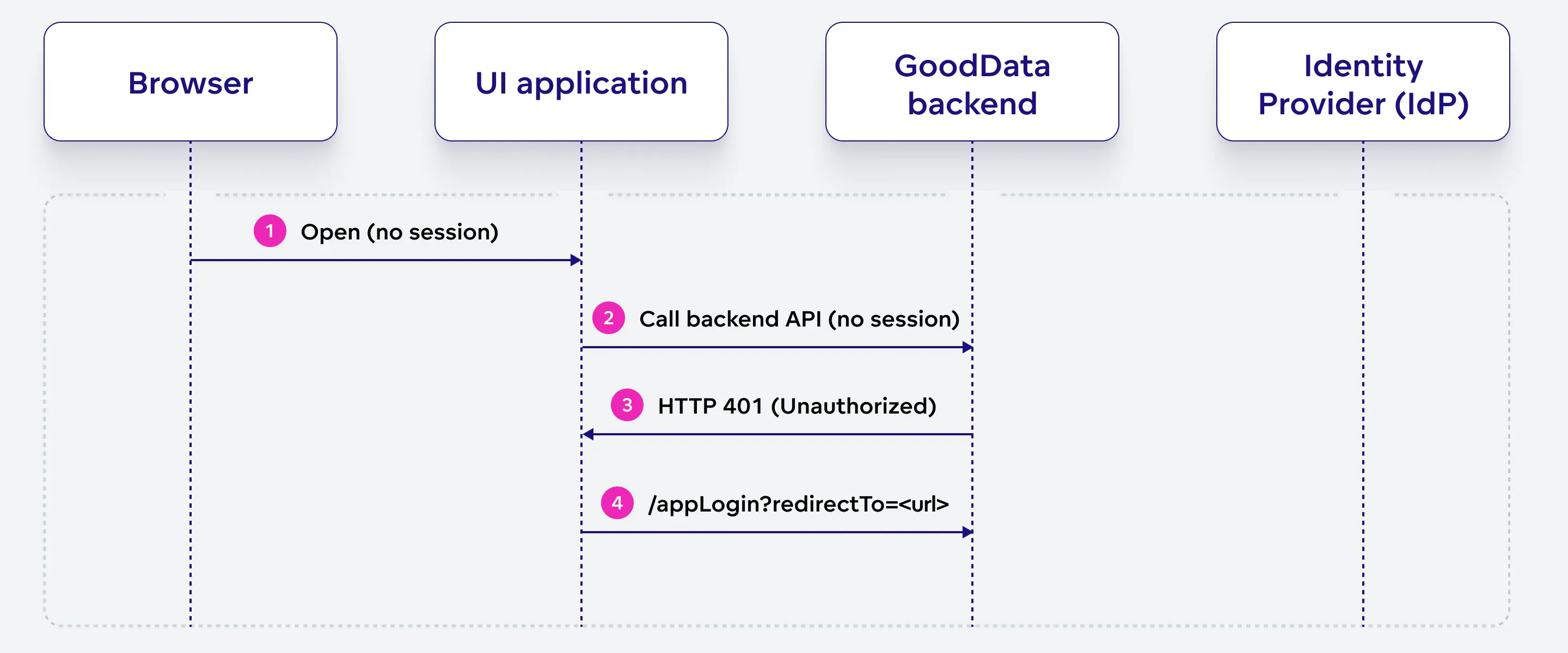
Open (no session)
The user initiates the process by opening the app in their browser. At this point, no session has been established.
Call backend API (no session)
The UI application, running in the browser, sends a request to GoodData backend API without an active session or authentication information.
HTTP 401 (Unauthorized)
GoodData backend API responds to the UI application’s request with an HTTP 401 status code, indicating that the user is not authorized to access the requested resource due to the lack of a valid session.
/appLogin?redirectTo=
The UI application redirects the user to the GoodData backend’s app login endpoint, including a “redirectTo” query parameter that specifies the URL the user should be redirected to after a successful authentication process.
Initialize Authentication
The GoodData backend sends the browser a redirect to the authentication entry point, and retrieves the OIDC identity provider’s configuration. The browser initiates the authentication process by sending a request to the specified entry point.
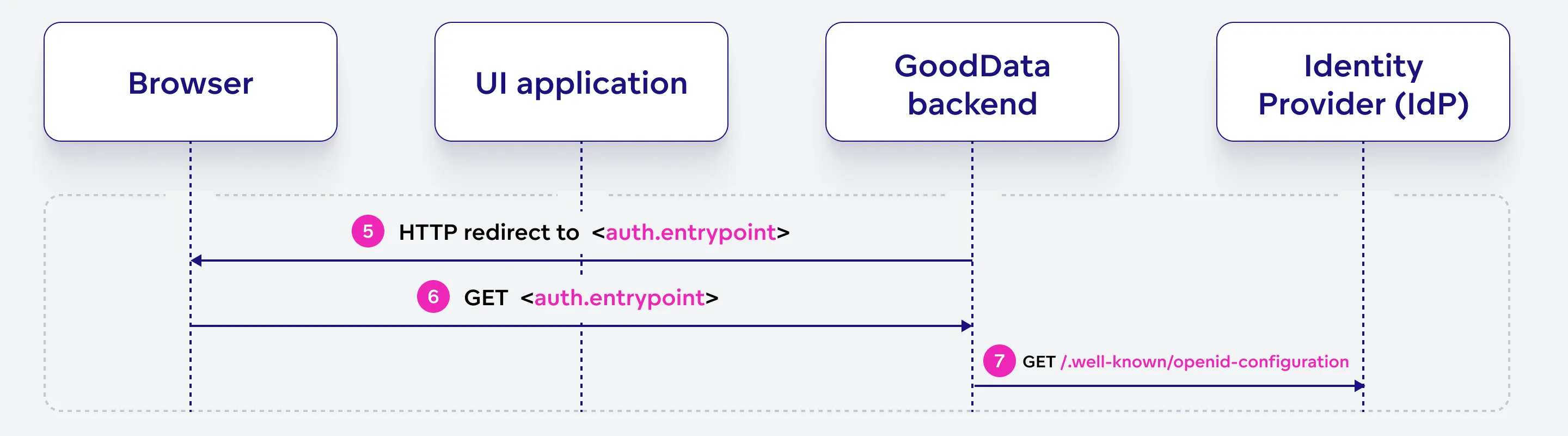
HTTP redirect to <auth.entrypoint>
GoodData backend sends an HTTP redirect response to the browser, directing it to the OIDC identity provider’s authentication entry point.
No redirect cookie is created. GoodData keeps the
redirectTovalue on the backend as part of the short-lived login attempt, together with the values needed to validate the authentication response.GET <auth.entrypoint>
Following the redirect received in step 5, the browser sends a GET request to the authentication entry point specified by the GoodData backend.
GET /.well-known/openid-configuration
GoodData backend retrieves the OIDC identity provider’s configuration by sending a GET request to the provider’s
.well-known/openid-configurationendpoint. This configuration contains necessary information about the provider’s endpoints and supported features.
Authenticate With IdP
Authenticate With OIDC Identity Provider (IdP) The user authenticates with the OIDC identity provider using a supported authentication method. Upon successful authentication, the provider issues an authorization code and redirects the browser to the GoodData backend’s callback URL.
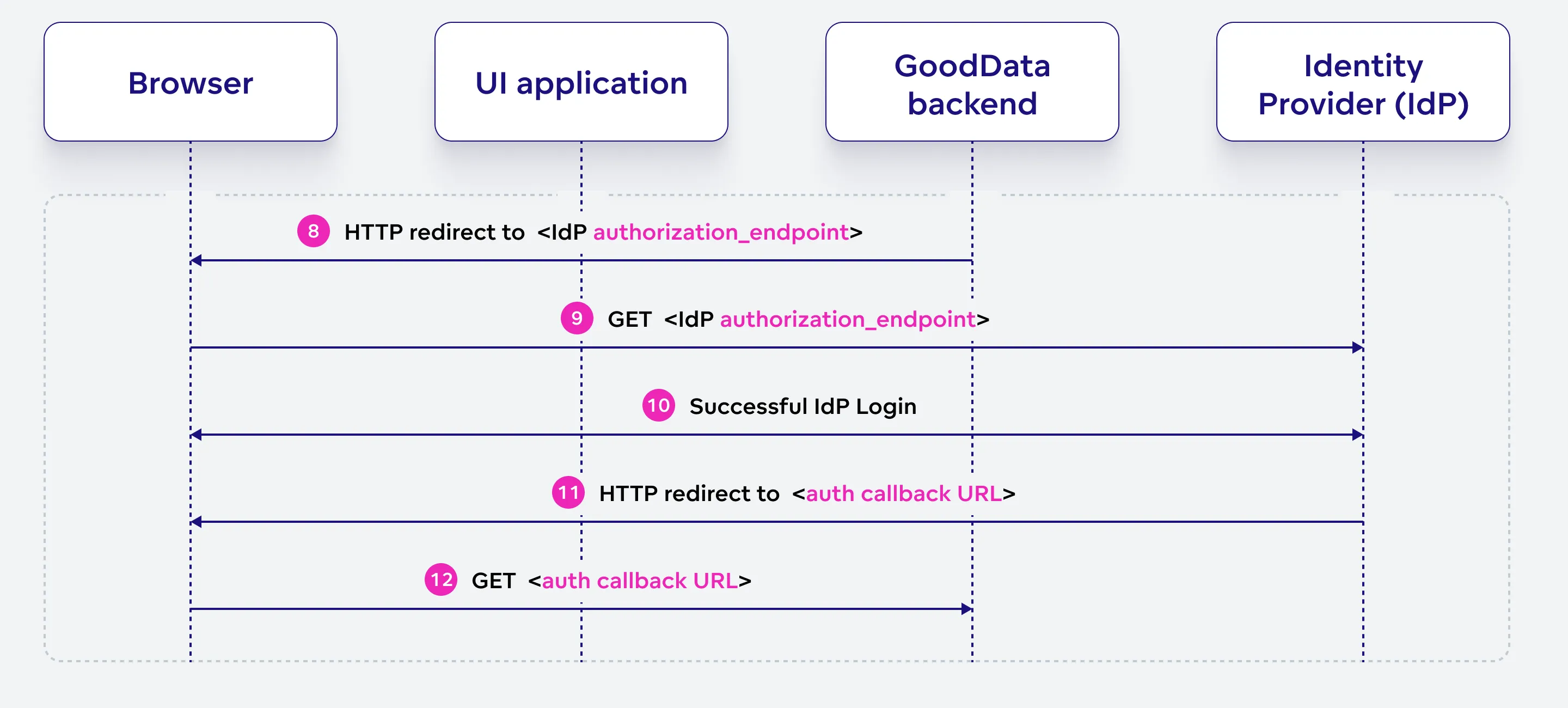
HTTP redirect to <IdP authorization_endpoint>
GoodData backend sends another HTTP redirect response to the browser, directing it to the OIDC identity provider’s authorization endpoint.
GoodData sets the
GD_OAUTH_FLOWcookie. This cookie contains an opaque, single-use value that ties the browser to the login attempt. It does not contain readable authentication data and remains valid only until the login completes or the login attempt expires.GET <IdP authorization_endpoint>
The browser sends a GET request to the OIDC identity provider’s authorization endpoint, which includes the following query parameters:
response_type = codeclient_id = <IdP client ID>scope = openid.profilestate = <opaque value>nonce = <opaque value>redirect_uri = <callback URL>
Successful IdP Login
The user directly interacts with the OIDC identity provider using any supported authentication method, such as user-password login, social login, identity federation, etc.
HTTP redirect to <auth callback URL>
Upon successful authentication, the OIDC identity provider sends an HTTP redirect response to the browser, directing it to the callback URL specified in the initial authentication request.
GET <auth callback URL>
The browser sends a GET request to the GoodData backend’s callback URL, which includes the following query parameters:
code = <authorization code>state = <value from the request>
Process Successful Authentication
The GoodData backend validates the received parameters and exchanges the authorization code for tokens and user information from the OIDC identity provider. It keeps the tokens on the backend, creates the authenticated session, and gives the browser an opaque session reference in the GD_SESSION_ID cookie.
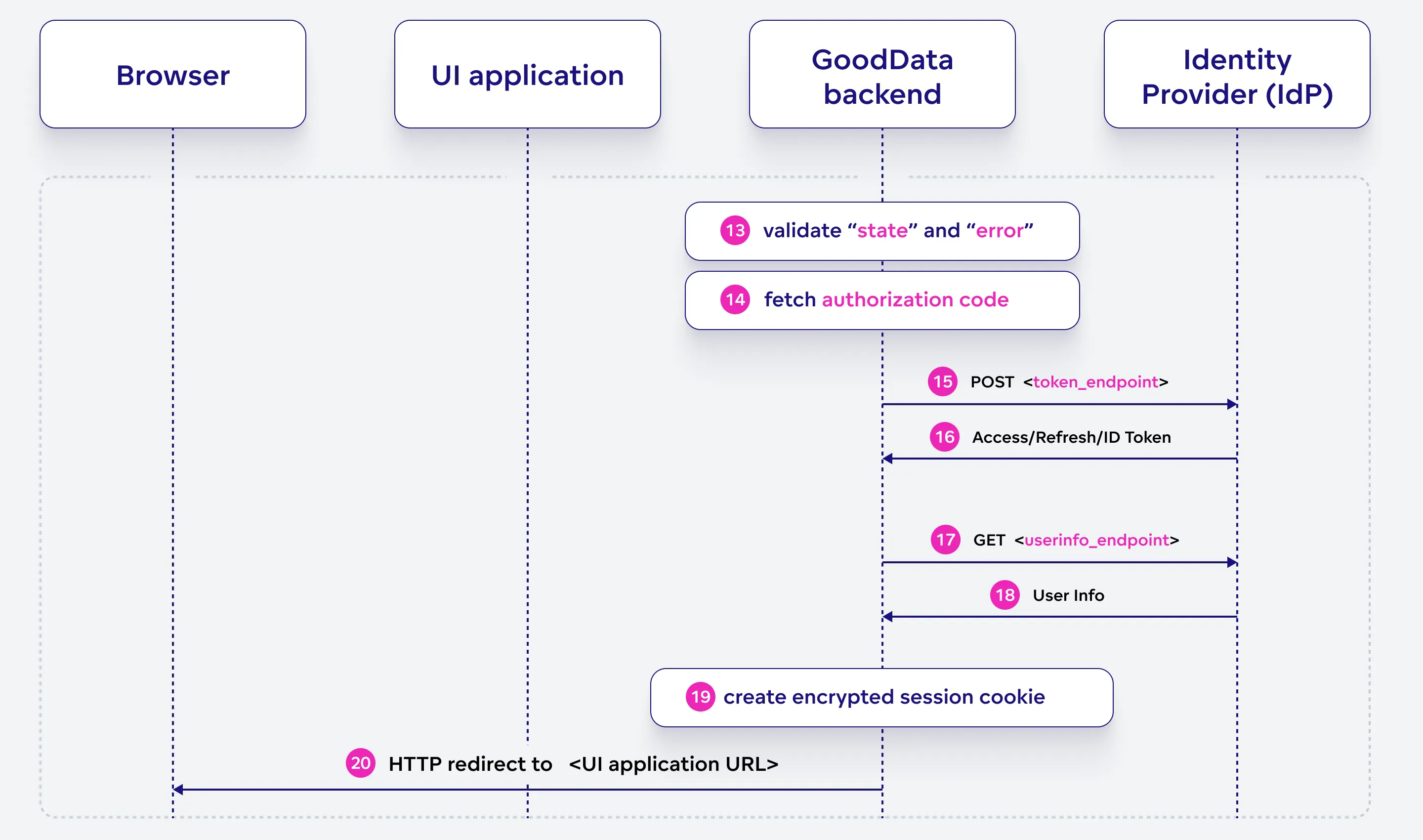
Validate “state” and “error”
GoodData backend validates the “state” and “error” parameters received. If the optional “error” parameter contains an authorization error, it is translated to an HTTP 401 status.
Fetch autorization code
GoodData backend retrieves the authorization code received in the previous stage.
POST <token_endpoint>
GoodData backend sends a POST request to the OIDC identity provider’s token endpoint to exchange the authorization code for access, refresh, and ID tokens.
Access/Refresh ID token
The OIDC identity provider responds with the access, and ID tokens, optionally also refresh tokens, which are sent to the GoodData backend. The user’s name is extracted from this data.
GET <userinfo_endpoint>
The GoodData backend sends a GET request to the OIDC identity provider’s userinfo endpoint to obtain the user’s information.
User info
The OIDC identity provider responds with the user’s information, which is sent to the GoodData backend. This is just to verify the validity of the ID token returned in the previous stage.
Create the authenticated session
GoodData creates the authenticated session on the backend. Access, refresh, and ID tokens remain on the backend and are not placed in browser cookies.
HTTP redirect to
<UI application URL>GoodData sets the
GD_SESSION_IDcookie, which contains an opaque reference to the authenticated session. TheGD_OAUTH_FLOWcookie is expired because the login attempt is complete.GoodData then redirects the browser to the
redirectToaddress recorded for the login attempt. The address is checked against the organization’s allowed origins before the redirect is performed.
Browser Cookie Details
The browser login flow uses the following cookies:
| Cookie | Purpose | Lifetime |
|---|---|---|
GD_OAUTH_FLOW | Ties the browser to a specific login attempt. The value is opaque and contains no readable authentication data. | Until the login completes or the login attempt expires. |
GD_SESSION_ID | References the authenticated session stored on the GoodData backend. | For the remaining lifetime of the session. |
Both cookies are HttpOnly, use SameSite=Lax, and have path /. They use the Secure attribute on HTTPS deployments.
The value of GD_SESSION_ID can change during an authenticated session, for example when GoodData renews an expiring access token. Clients and intermediaries should not assume that the cookie value remains fixed for the entire session.
Continue UI Interaction
With a secure, authenticated session in place, the user can now interact with the UI application seamlessly. The UI application sends requests to the GoodData backend, which in turn responds with authenticated responses, granting the user access to protected resources and functionalities.
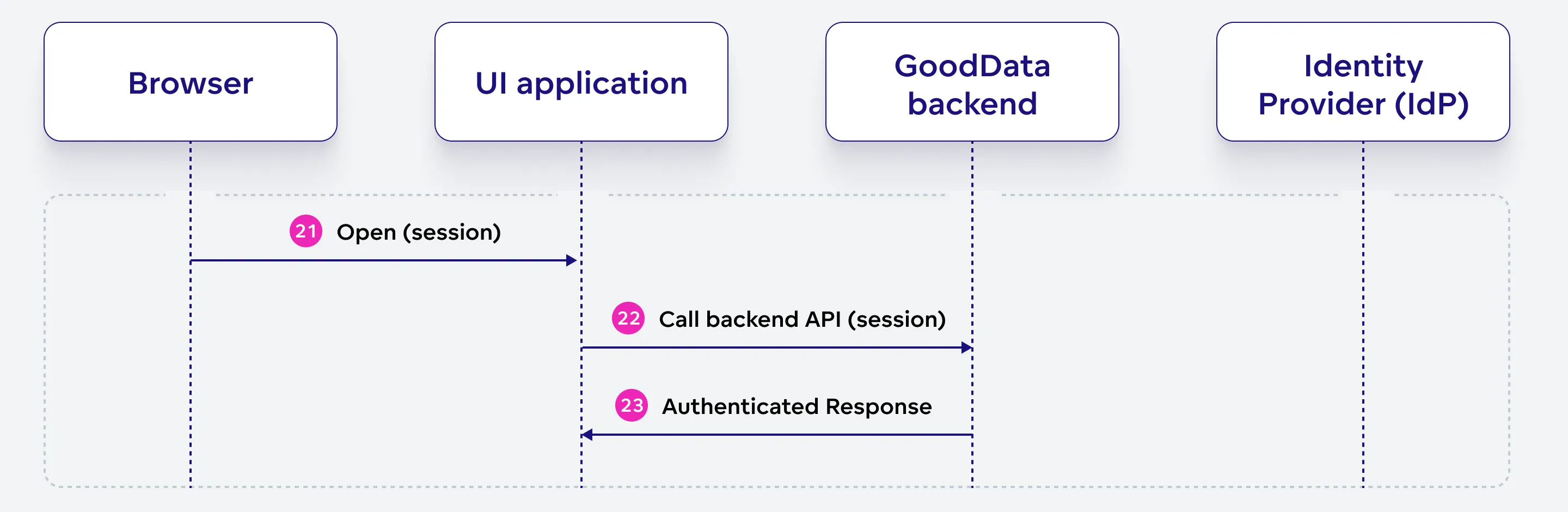
Open (session)
With an active session, the user reopens the app in their browser or continues using it.
Call backend API (session)
The UI application sends requests to the GoodData backend API with the
GD_SESSION_IDcookie. GoodData uses this opaque value to resolve the authenticated session on the backend.Authenticated response
GoodData backend responds to the UI application’s requests with authenticated responses, allowing the user to access the requested resources and interact with the app seamlessly.
MCP Interactive Login Consent
The standard browser login flow described above does not use GD_OAUTH_CONSENT.
When an MCP client uses interactive OAuth login and user consent is required, GoodData displays a consent page before issuing the authorization code. The page identifies the requesting client and shows information such as the redirect URI and the duration of the requested access. The user can approve or deny the request.
During this separate consent step, GoodData uses the short-lived GD_OAUTH_CONSENT cookie to tie the browser to the pending consent request. The cookie is expired as soon as the user submits the decision.
This consent flow is specific to OAuth authorization for MCP clients and is separate from the browser session flow described in this article.