AI Memory
AI Memory gives you a way to fine-tune how the GoodData AI Assistant understands and answers business questions. It lets you define additional instructions that guide the Assistant’s tone, terminology, and logic so users get accurate and consistent responses.
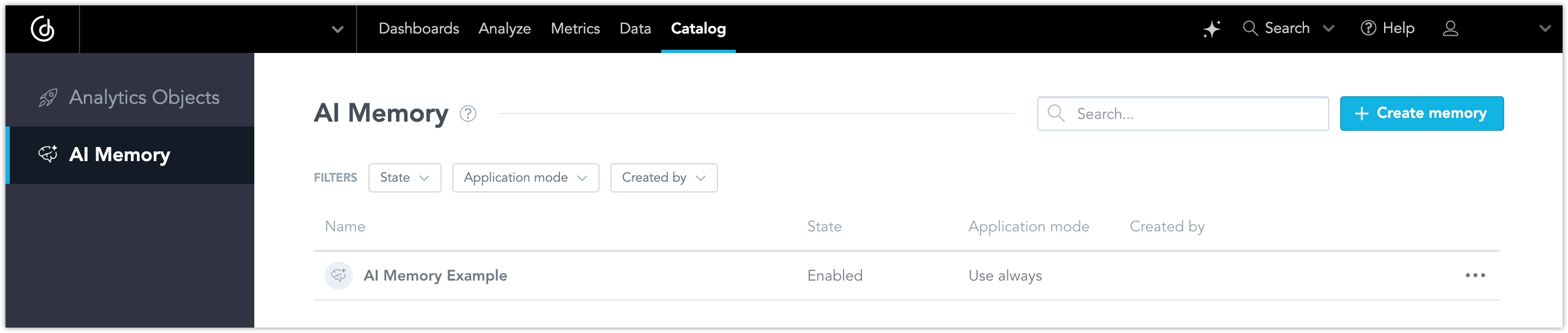
Example:
If users often ask for “sales performance,” but your semantic model does not include a metric with that exact name, you can create an instruction that tells the AI to use Total Sales and Net Sales together whenever someone asks about “sales performance.”
This ensures consistent, predictable behavior without modifying the underlying data model.
Note
AI Memory supplements your semantic layer but does not override its logic or permissions. It adds guidance and interpretation, not new data definitions.
Memory Scope and Visibility
AI Memory supports both organization-level and workspace-level memory items. Organization-level memory provides shared instructions for all workspaces in the organization, while workspace-level memory adds instructions for a specific workspace.
Organization Admins can manage organization-level memory from AI Hub. Organization Admins or Workspace Admins with the AI_ASSISTANT permission can access workspace-level memory from Catalog → AI Memory.
Important Notice
More memory items, and especially longer memory items, increase the prompt size. This can increase cost, increase response latency, and reduce answer quality. Keep memory items few, focused, and short. Use organization-wide always rules sparingly because they apply to every workspace’s chat.
Organization-level memory
Organization-level memory items are automatically available in every workspace in the organization. Use them for shared terminology, common reporting conventions, organization-wide instructions, or other guidance that should apply consistently across all workspaces.
Important Notice
Organization-level memory is shared with the AI Assistant chat in every workspace and can affect every user who uses the Assistant in those workspaces. Do not store private, sensitive, or tenant-specific information in organization-level memory unless it is appropriate for all workspaces and users in the organization.
Workspace-level memory
Workspace-level memory items work independently and can add workspace-specific context on top of inherited organization-level memory. They are available only in the workspace where they are defined. Use them for workspace-specific terminology, local business context, or behavior that should not apply to other workspaces.
When the AI Assistant runs in a workspace, it can use both inherited organization-level memory and local workspace-level memory. Workspace-level memory can add more specific context for that workspace.
Inheritance is downward from the organization to all workspaces. A workspace does not share its local memory with other workspaces.
How AI Memory Works
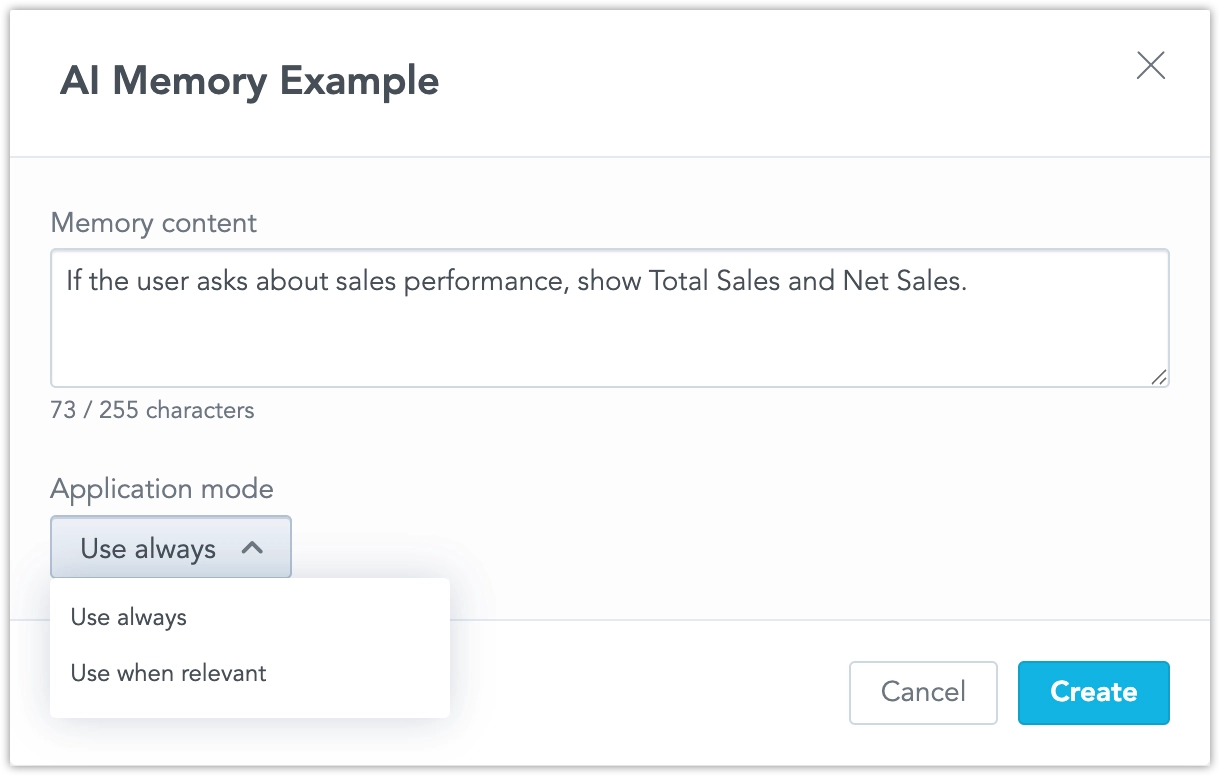
You can use AI Memory to give the AI Assistant Instructions. These are rule-based mappings that define how the AI should respond to specific types of questions. These can be simple mappings or conditional rules that apply only when relevant.
Examples
- If the user asks about sales performance, show
Total SalesandNet Sales. - If the user asks about regional performance, filter by
EuropeandNorth America. - Use a professional tone in all responses.
Instructions can control both content (what information is returned) and style (how responses are written).
Each instruction includes:
- Short name: A clear identifier for easy management.
- Memory content: The text of the rule or behavior.
- Application mode: Choose whether the rule applies “always” or “when relevant.”
When you choose always, the memory item is added to the Assistant context without waiting for a relevance match. This is useful for short rules that should apply to every conversation in the applicable scope.
There is no hard limit on how many memory items you can create. However, when the AI Assistant prepares a response, it uses only the first 100 always memory items across organization-level and workspace-level memory combined. Additional always items are not used. If this limit is reached, organization-level items are dropped before workspace-level items.
Note
You can temporarily disable an instruction to test changes or adjust how the Assistant responds to queries.
Suggested AI Memories
Suggested AI Memories help you improve AI Assistant responses based on user feedback. When users give negative feedback on an answer, GoodData can generate suggested memory items that you can review and enable.
Suggestions appear as disabled memory items with a name that starts with Suggestion:. Disabled suggestions do not change AI Assistant behavior.
How Suggestions Are Created
- A user asks the AI Assistant a question in a workspace.
- The AI Assistant answers.
- The user gives negative feedback if the answer is incorrect or misleading.
- GoodData automatically evaluates feedback and creates suggested memory items.
- An admin reviews the suggestions in Analytics Catalog → AI Memory and decides what to enable.
Example
A user asks: What was our best-selling product last month?
If the AI Assistant answers using the wrong definition, the user can give negative feedback. Later, the system may suggest memories such as:
Suggestion: When users ask about best-selling product, prefer Units Sold over Revenue.Suggestion: Interpret last month as the previous calendar month.
You can enable the suggestions that match your definitions. After that, the AI Assistant uses the enabled workspace-level memories for similar questions in the same workspace.
What You Might See
No New Suggestions
After a feedback run, the suggestions list can remain empty.Similar Suggestions
Multiple feedback events can produce overlapping suggestions. Enable the best one and keep the rest disabled, merge them into one, or dismiss them all.
Suggested AI Memories is an experimental feature that is still under active development. Its behavior may change in future releases.
Current Limitations
- AI Memory entries are static and must be updated manually.
- Too many overlapping entries may reduce AI flexibility.
- Workspace-level entries apply globally within a workspace and may cause conflicts in multi-team environments.
- Organization-level entries apply globally across all workspaces in the organization and may cause conflicts if different workspaces need different behavior.
- Fallback visualization settings are not stored.
- There is no hard limit on how many memory items can be created, but at retrieval time, only the first 100 always memory items are used across organization-level and workspace-level memory combined. Additional always items are not used, and organization-level items are dropped before workspace-level items.
- Per-user and per-user-group memory is not supported.
- The workspace-level view does not provide a comparison of inherited organization-level memory and local workspace-level memory.
Frequently Asked Questions
Q: Who can define AI Memory entries?
A: Organization Admins can define organization-level memory entries. Organization Admins or Workspace Admins with the AI_ASSISTANT permission can define workspace-level memory entries.
Q: How is AI Memory different from data modeling? A: Data modeling defines structure, while AI Memory defines interpretation and expected behavior.
Q: Will AI Memory override semantic layer rules? A: No. It supplements the semantic layer but cannot override logic or permissions.
Q: Who can use organization-level memory? A: Organization-level memory is available to the AI Assistant in every workspace in the organization. Any user who can use the Assistant in a workspace can receive answers influenced by organization-level memory.