AI Assistant
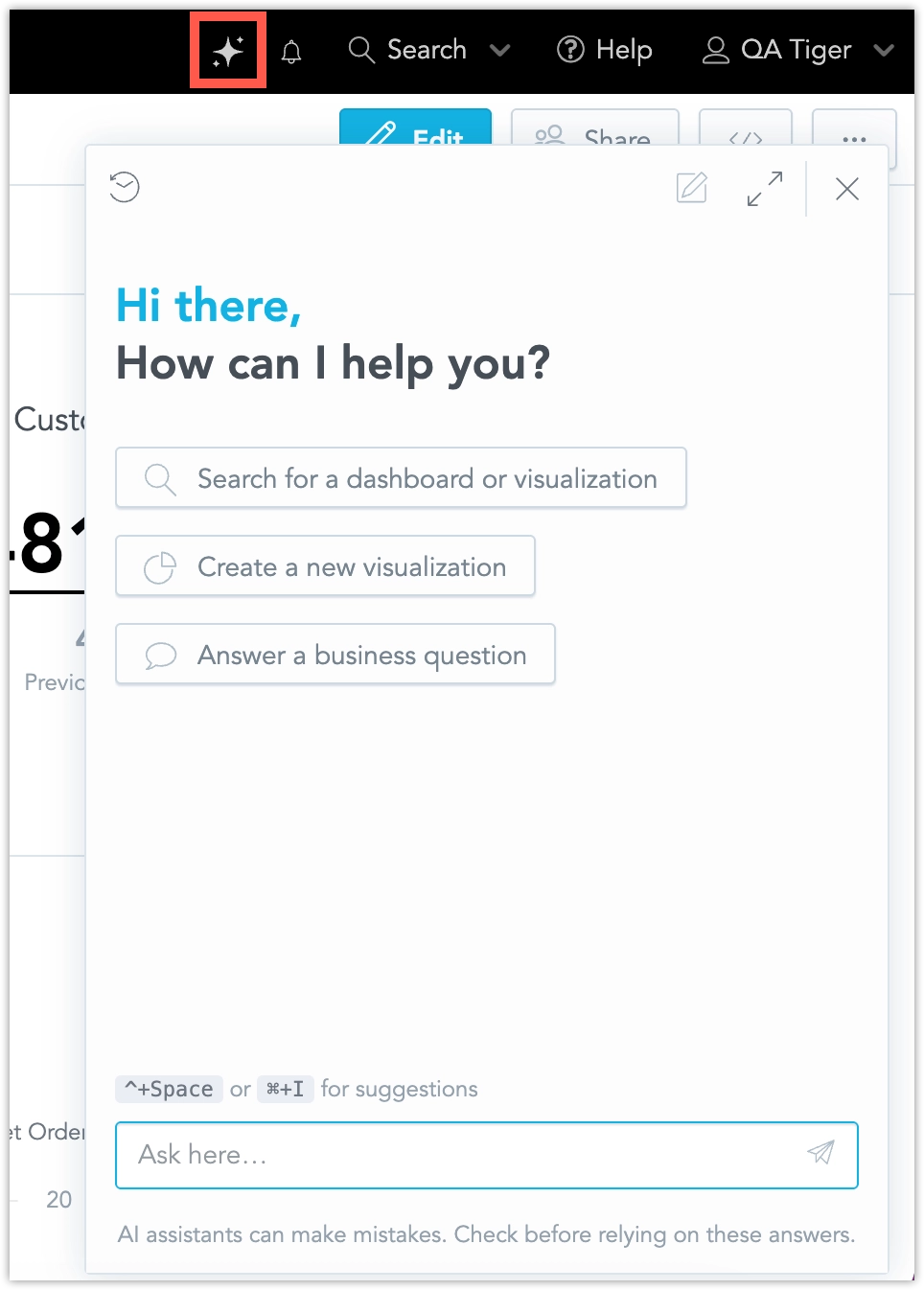
The Agentic AI Assistant is a new generation of the GoodData AI Assistant. It is designed for more guided interactions and more complex analytical tasks. It can ask follow-up questions, help narrow down ambiguous requests, and combine multiple analytical steps into one response.
Metadata Synchronization
The Agentic AI Assistant depends on an updated metadata synchronization process, and GoodData verifies the synchronization status for each customer environment before enabling the new experience. As a result, the feature may not be available to all customers at the same time.
Before You Start
An administrator must enable the Agentic AI Assistant before users can use it.
You also need:
- Agentic AI Assistant configured for your organization
- permission to use AI Assistant in the workspace
- a supported reasoning-capable model configured for the Agentic AI Assistant
- data sharing configured according to the use cases you want to enable
For the AI Assistant setup, see Configure AI Assistant.
Data Sharing
The Agentic AI Assistant supports an opt-in data sharing setting. It can be turned on in the AI Hub. For administrators who manage settings through API, the setting name is enableAiOnData.
When data sharing is enabled, the assistant can use richer skill composition for more advanced analytical tasks. This includes workflows where the assistant creates a visualization, evaluates the result, and then uses additional skills such as anomaly detection or Key Driver Analysis to continue the analysis.
When data sharing is disabled, which is the default, the assistant still supports simpler use cases, such as creating visualizations, but some more advanced multi-step workflows may not be available.
For more information about individual skills and their data-sharing behavior, see Agentic Capabilities.
Recommended Models
The Agentic AI Assistant is designed to work with reasoning-capable models. See the Supported and Recommended Models section for detailed information.
Use the Agentic AI Assistant
The Agentic AI Assistant is useful when your request needs clarification or when the answer requires several analytical steps.
Clarify Ambiguous Requests
If your question can mean several different things, the assistant may ask you to choose what you want before it creates a result.
For example, if a business term can map to several objects in your semantic model, the assistant may explain the ambiguity, offer a small set of choices, and continue only after the intent is clear.
Example:
The user asks: What is the total ecom spend for Q1 2025?
The AI Assistant then:
- explains that
ecommay be ambiguous - offers a few possible mappings
- continues after the user selects one
Guide the Next Step
Instead of returning a generic response, the assistant can guide you through what it needs next.
Example:
The user asks: Create a new visualization.
The AI Assistant then:
- asks what to measure
- asks how to break it down
- asks for an optional time period
Suggest Alternatives
If a result is empty or a requested output is not supported, the assistant may explain the issue and suggest a better option.
For example, it may:
- suggest a wider date range when a query returns no data
- explain when a requested visualization type is not supported and offer alternatives
Ask for Missing Context
If the assistant does not have enough context, it can ask for the missing detail before continuing.
For example, if it cannot determine which person, metric, or period you mean, it may ask you to specify that detail.
Find Attribute Values for Filters
When you ask the AI Assistant to create a filter or visualization using a particular attribute value, it can search the existing values of that attribute to find a match. The search is case-insensitive and supports approximate matching, so the value in your request does not have to exactly match its spelling or capitalization in the data.
Example:
The user asks: Show revenue for california.
The AI Assistant then:
- searches the relevant attribute for matching values
- matches
californiatoCalifornia, if that value exists in the data - uses the existing value in the filter for the requested visualization
This lookup happens when the Assistant needs to resolve an attribute value to build a filter or visualization. It is not performed for every message in a conversation.
Combine Multiple Skills
The Agentic AI Assistant can combine multiple skills in a single request.
Example:
The user asks: Help me understand why revenue dropped last month.
The AI Assistant then:
- creates the relevant visualization
- checks the result for anomalies
- runs Key Driver Analysis for detected anomalies
- returns a summarized explanation in one response
This can help with tasks such as understanding why a metric changed, identifying unusual behavior, and summarizing the likely explanation in one response. If the assistant already has enough information, it can perform this analysis directly without asking for confirmation first.
Create and Manage Alerts
The Agentic AI Assistant can help you create metric alerts from a conversation. Use this when you want to monitor a metric and receive a notification when a condition is met.
For example, after creating a revenue visualization or completing a follow-up analysis, you can ask:
- Watch revenue and let me know if it goes below 50,000.
- Set an alert when revenue drops below the current value.
- Send me an email when conversion rate goes above 5%.
The assistant then starts creating the alert. If the request is ambiguous, it asks for the missing details before creating the alert. For example, it may ask which metric to use, which destination to use, or who should receive the notification.
Alert creation requires an existing notification destination in the organization. If more than one destination is available, the assistant asks you to choose one.
By default, alerts are triggered whenever the condition is met. You can ask the assistant to change this behavior, for example by saying that the alert should trigger only once.
The assistant generates an alert title automatically. You can ask it to change the title before the alert is created.
Create an Alert From an Existing Visualization
When you create an alert from an existing visualization, the assistant can use the metric and applicable context from that visualization. If the metric is unclear, the assistant asks you to select the metric. Explicit MAQL metrics can be used immediately.
Create or open a visualization (for example: Revenue by month).
Ask the AI Assistant to create an alert, for example:
Watch revenue and tell me if it goes below 90K.Set an alert for revenue.Send me an email when revenue goes below 90K.
When the setup is complete, the Assistant confirms that the alert was created.
How The Assistant Chooses the Metric
- The Assistant uses the metric from the visualization you are working with.
- If the visualization contains multiple metrics (or the metric is unclear), the Assistant asks you to choose one.
- Only explicit MAQL metrics can be used immediately. These are metrics defined in MAQL and stored as saved metrics (the ones you can see and edit in the Metric Editor), such as
Total Revenue,Net Sales,Margin. - Ad-hoc metrics created directly from facts or attributes, such as
Sum of Revenue,Avg of Price,Min/Maxof a fact, orCountof an attribute may not work. If your visualization uses only ad-hoc metrics, the Assistant may ask you to pick a saved metric, or to create a saved metric first.
Alerts for Attribute Values
If a metric in the source visualization is sliced by one or more attributes, the assistant creates the alert for all metric slices by default.
You can also ask for a specific attribute value. For example:
- Alert me when revenue for Product A goes above 500.
Alert Recipients
During alert creation, the assistant can help you choose who should receive the alert. Depending on the selected notification destination, your permissions, and the current data sharing setting, recipients can include:
- yourself
- other workspace users
- external email addresses
If data sharing is disabled, AI-created alerts can be sent only to yourself.
If the destination supports workspace users and data sharing is enabled, you can ask the assistant to list available users or select a user by name.
Pause or Resume Alerts
You can ask the assistant to list your alerts. The list shows whether each alert is active or paused. You can then ask the assistant to pause or resume an alert by its name or by its position in the list.
Current Alert Limitations
The following limitations apply:
- Alert creation depends on the available notification destinations in the organization.
- Recipient options depend on the selected destination, user permissions, and the current data sharing setting.
- If data sharing is disabled, AI-created alerts can be sent only to yourself.
- Aggregated facts cannot be used directly for alert creation.
- If the assistant cannot use the requested metric, it explains the limitation and suggests the next step.
- You can edit the alert setup, but you cannot change the metric of an AI-created alert. The metric is normally tied to a dashboard widget. AI-created alerts are not assigned to a widget, so the metric cannot be changed in the user interface.
Reasoning Effort in AI Assistant
Reasoning effort controls how much time and computation AI Assistant uses to work through a request. It helps balance response speed and depth of reasoning.
Default Reasoning Effort for Agents
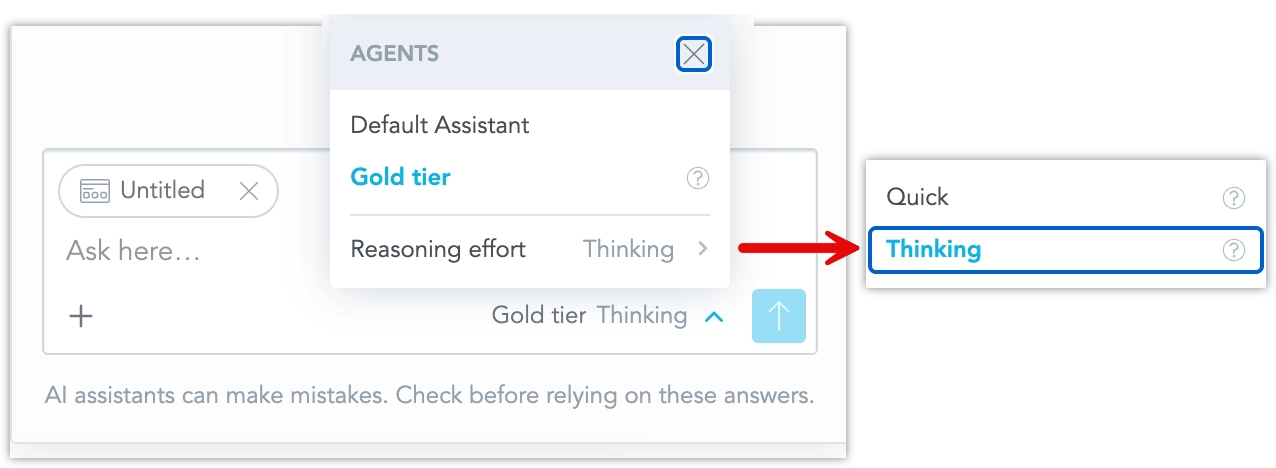
Analytics engineers can set the default reasoning effort for each agent in Agent Hub. The default effort is used when a user sends a message without changing the effort level in the chat. This lets each agent use the effort level that best matches its purpose.
Select Reasoning Effort in Chat
Users can choose the reasoning effort for their next AI Assistant message directly in the chat UI. The current agent and selected reasoning effort are shown next to the send button, for example Default Agent · Thinking.
The selected effort is sent with the next message. If no effort is selected, AI Assistant uses the default behavior configured for the agent.
How Reasoning Effort Works
AI Assistant does not automatically choose the effort based on the complexity of the question. The effort level is set either by the agent default or by the user’s selection for a specific message.
The exact effect of an effort level can vary depending on the active LLM provider and model. LLM providers support different reasoning settings, so GoodData maps the selected effort to the closest supported provider behavior.
Current Limitations
- Reasoning effort is applied per message.
- Reasoning effort is not selected automatically based on question complexity.
- The Assistant does not show a separate confirmation on each response indicating which effort was used.
- Reasoning effort may not be restored when returning to an earlier conversation.
- Organization administrators cannot enforce a maximum effort level for users.
- The effect of the selected effort may vary between LLM providers and models.
API Changes for Integrations
The chat API for the Agentic AI Assistant differs from the earlier AI Assistant chat API.
If you integrate the assistant through HTTP API, check the current API reference in your GoodData environment:
/apidocs/?urls.primaryName=Gen-AI+%28v1%29
The earlier chat APIs continue to work during the transition period for the previous AI Assistant experience. They are deprecated together with the previous AI Assistant. If you maintain an existing integration, review the new API before enabling the Agentic AI Assistant.
Current Limitations
At this time:
- some previous AI Assistant features may not yet be available in the Agentic AI Assistant
- some requests may return fewer interaction shortcuts than users expect
- unsupported requests may require a simpler prompt or a different workflow
- advanced skill composition depends on the current data sharing setting
- the Agentic AI Assistant requires supported reasoning-capable models
gpt-4ois deprecated and is not supported for the Agentic AI Assistant- the Agentic AI Assistant uses a different chat API than the previous AI Assistant