Computed Attributes for Bucketing
Computed attributes let you create reusable attribute values from MAQL expressions. In this Beta release, the documentation focuses on bucketing with defined breakpoints, such as grouping values into revenue bands, aging ranges, score ranges, or other business-defined categories. Computed attributes can also support other transformations and context-dependent categorizations.
Beta Feature
Computed Attributes for Bucketing is currently in Beta. The Beta focuses on bucketing with defined breakpoints and has the limitations described in Current Limitations.
Computed attributes are not part of the logical data model. They are analytics objects that you can use for slicing and filtering similarly to regular attributes.
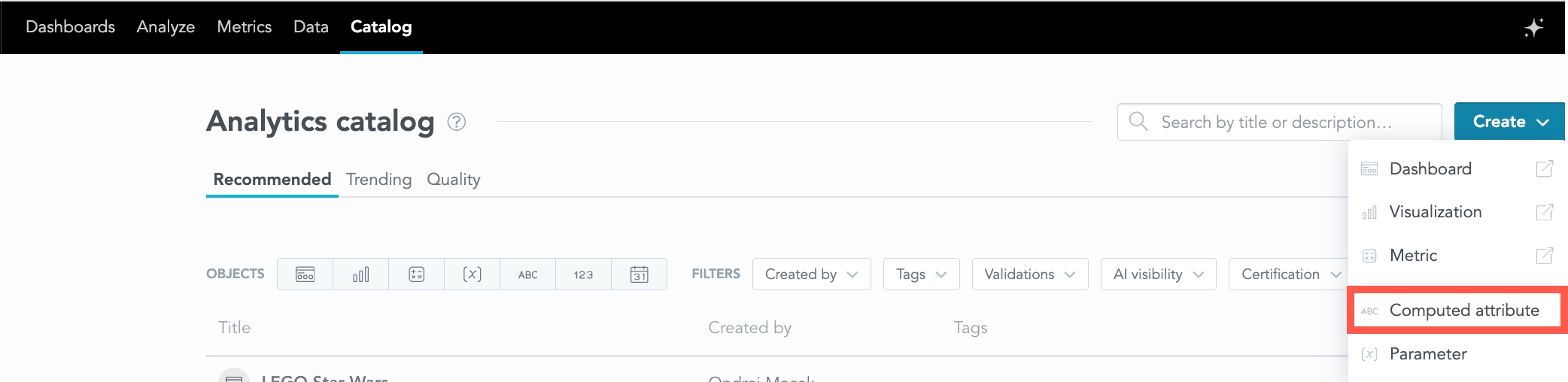
Use Computed Attributes
You can use computed attributes to:
- Slice visualization results.
- Filter analytics by computed attribute values.
- Reuse bucket definitions across analytics that use the computed attribute.
Computed attributes support MAQL syntax unless a specific limitation is listed below.
Common Use Cases
In addition to simple bucketing, computed attributes can support use cases such as:
- Grouping attribute values. Organize related dimension values into higher-level categories. For example, map individual regions to a territory group.
- Grouping fact values. Bin raw, unaggregated values into categorical ranges. For example, group row-level Order Amount values into $0-$50, $51-$100, and $100+.
- Grouping metric values. Categorize aggregated metric results into qualitative groups. For example, classify Customer Lifetime Value as High, Medium, or Low.
- Histograms. Create interval-based categories for continuous values and use them to visualize a distribution. For example, group response times into 0-5, 6-10, and 11-15 minute intervals.
- Pivoting key-value custom fields. Turn selected values stored as key-value pairs into attributes that are easier to use in analytics. For example, expose the value associated with Shirt Size as a dedicated computed attribute.
- Cohort analysis. Create a month-offset attribute that represents the number of months between a cohort start date and subsequent activity. For example, analyze retention using Month 0, Month 1, Month 2, and later periods.
- Value mapping. Translate raw numeric key codes into human-readable text values directly in the semantic layer without modifying the logical data model or creating separate dimension tables. For example, map status codes 1, 2, and 3 to Pending, Approved, and Rejected.
The exact MAQL expression depends on the objects and relationships in your logical data model.
Create a Computed Attribute
Define a computed attribute with a MAQL expression that returns an attribute value. For example, you can group a numeric fact into manually defined ranges:
SELECT
  CASE
    WHEN {fact/order_value} < 100 THEN "Under 100"
    WHEN {fact/order_value} < 500 THEN "100-499"
    WHEN {fact/order_value} >= 500 THEN "500+"
  END
The first matching WHEN condition is used. If no condition matches, the computed attribute has an empty value. Add an ELSE branch only when you intentionally want otherwise unmatched values, including missing values, to be assigned to a specific category.
You can also base a computed attribute on a metric. For example:
SELECT
  CASE
    WHEN {metric/customer_revenue} < 1000 THEN "Low"
    WHEN {metric/customer_revenue} < 5000 THEN "Medium"
    WHEN {metric/customer_revenue} >= 5000 THEN "High"
  END
BY {label/customer.id}
YAML Definition
You can define a computed attribute in YAML with the following properties:
id: order_value_bucket
type: computed_attribute
title: Order Value Bucket
description: Groups order values into business-defined ranges.
data_type: STRING
maql: |
  SELECT
    CASE
      WHEN {fact/order_value} < 100 THEN "Under 100"
      WHEN {fact/order_value} < 500 THEN "100-499"
      WHEN {fact/order_value} >= 500 THEN "500+"
    END
The properties are:
id: The identifier of the computed attribute.type: Must becomputed_attribute.title: The display title of the computed attribute.description: An optional description of what the computed attribute represents.data_type: The data type returned by the MAQL expression. This property is optional and is not included in the generated YAML template. If you omit it, the default isSTRING. Supported values for computed attributes areSTRING,INT,NUMERIC,BOOLEAN,DATE, andTIMESTAMP.maql: The MAQL expression that defines the computed attribute.
Set data_type explicitly when the computed attribute does not return a string. For example, use INT or NUMERIC for numeric values and BOOLEAN for Boolean values. DATE and TIMESTAMP can be used when the computed attribute returns a value derived from an attribute of the corresponding type.
The data_type property also determines how literal values are interpreted in comparisons. For example, a literal such as "123" must be interpreted differently when the computed attribute is a string versus an integer or numeric value. Similarly, "true" can represent text or a Boolean value depending on the computed attribute type.
Evaluation Context
When a computed attribute is based on a metric, category assignment depends on the visualization context. You can control the dimensionality and filter context in the MAQL expression.
Dimensionality Context
- Default, without
BY: Evaluation is fully context-dependent. The computed attribute recalculates according to the attributes that break down the metric in the visualization. BY [Attribute]: The specified attribute is always included in the evaluation grain, while other attributes in the visualization still affect the result. For example, withBY Product, adding Year to the visualization categorizes each product independently within each year.BY [Attribute], ALL OTHERorALL IN ALL OTHER DIMENSIONS: The computed attribute is evaluated at the specified attribute level and ignores other dimensional attributes in the visualization. For example,BY Product, ALL OTHERcan assign a category to each product based on its value across the full period even when the visualization is also broken down by Year.
Filter Context
- Default: Category assignment respects active dashboard and visualization filters.
WITHOUT PARENT FILTERorWITHOUT PF: Active dashboard and visualization filters do not affect category assignment. The filters can still affect metrics displayed in the visualization.WITH PF ... EXCEPT ...andWITHOUT PF ... EXCEPT ...: Selectively control which filters affect category assignment and which are ignored.
Syntax Quick Reference
| Clause | Evaluation Behavior | Common Use Case |
|---|---|---|
| None | Depends on the current visualization attributes and active filters. | Dynamic segmentation |
BY [Attribute] | Evaluates at the specified attribute level together with the current visualization attributes. | Per-entity categorization across visualization dimensions |
BY [Attribute], ALL OTHER | Evaluates at the specified attribute level and ignores other visualization attributes. | Fixed categorization across time or other breakdowns |
WITHOUT PF | Ignores active dashboard and visualization filters during category assignment. | Unfiltered baseline categorization |
WITH PF ... EXCEPT ... / WITHOUT PF ... EXCEPT ... | Selectively includes or excludes filters from category assignment. | Controlled filter context |
Current Limitations
The following limitations apply to the Beta:
- Nested computed attributes are not supported.
- Sorting a computed attribute by another attribute, fact, or computed attribute is not supported.
- Dedicated logical ordering of bucket values is not included in this Beta milestone.
- Compatibility with date dimensions is not supported. This includes period-over-period calculations applied to computed attributes.
FOR EACHand Show missing values are only partially supported. If there is no data for a computed attribute value, that value may be missing from the result even when one of these options is used.- Computed attributes are not integrated with GoodData AI capabilities in this Beta. Key Driver Analysis does not fully support them.
- Parameters in computed attribute definitions are not supported reliably in all cases.
- Exports and scheduled exports of visualizations or dashboards that contain computed attributes are not supported.
- Object-level permissions can be managed for computed attributes, but newly created computed attributes currently default to Public instead of Private.
- Avoid using a computed attribute ID that is identical to an attribute or label ID used in the same visualization.
Important Notice
Some unsupported combinations can still return a result instead of an error. The result may be incorrect. Do not rely on combinations listed as unsupported above.