AI Interaction Intelligence
Experimental Feature
AI Interaction Intelligence is an experimental feature. Its behavior, available details, and user interface may change in future releases.
AI Interaction Intelligence helps you understand how AI agents arrive at their answers. In the current experimental version, you can inspect the processing steps behind responses generated during live testing from an agent configuration in AI Hub.
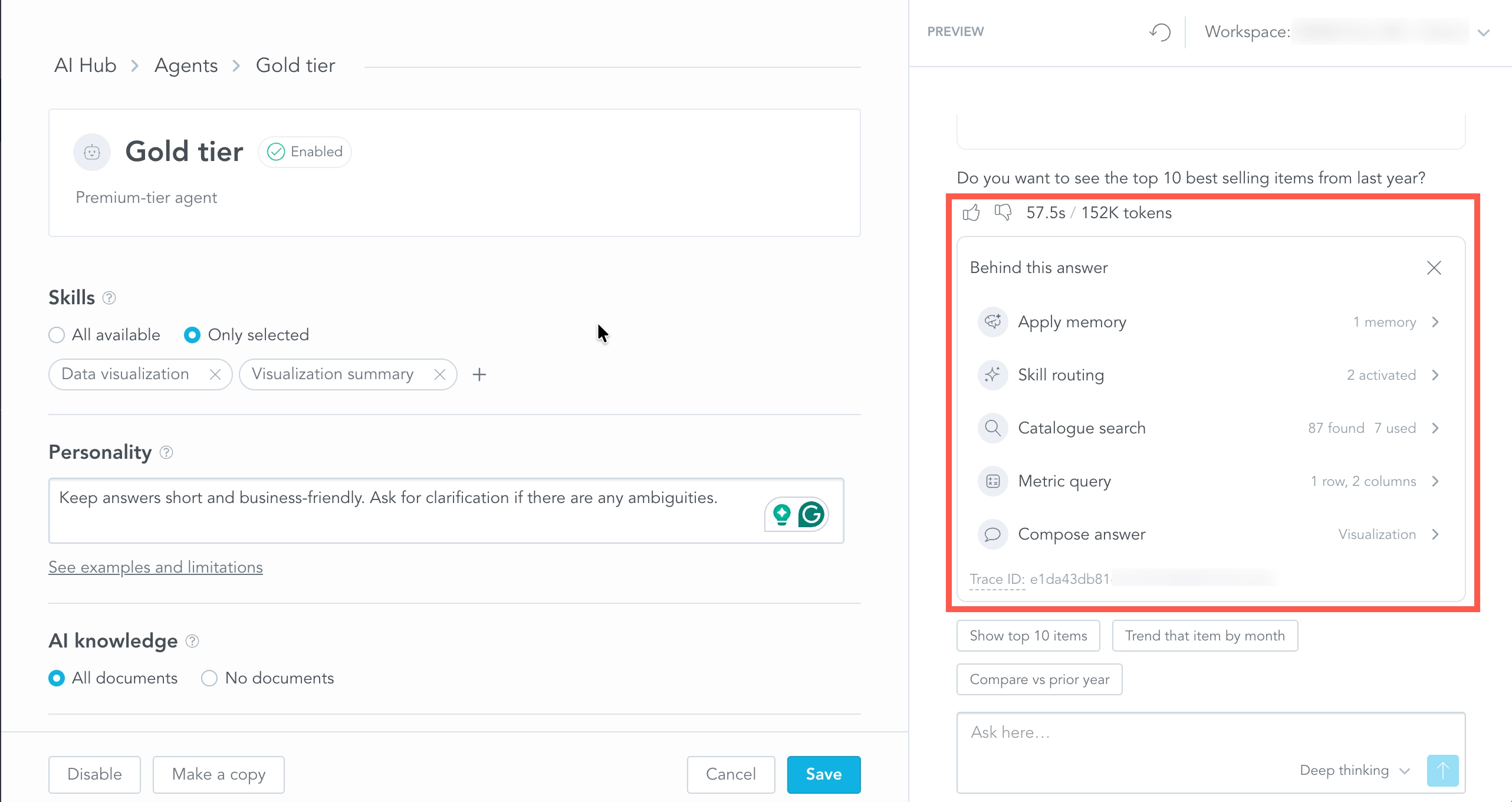
Each response can include a Behind this answer panel that shows how the agent processed the request. Use it to verify whether the agent applied the expected memory instructions, activated the right skills, searched the relevant knowledge and catalog objects, and queried the expected data.
Inspect What Happened Behind an Answer
In Agent Builder, ask a question in the Preview panel. After the agent responds, open Behind this answer below the response.
The panel shows the processing steps for that response. Depending on the request, you may see:
- Apply memory — memory instructions applied before the agent starts processing the request
- Skill routing — skills that were available and activated
- Knowledge search — knowledge files found and used
- Catalogue search — catalog objects found and used while resolving the request
- Metric query — analytical queries used to retrieve data
- Compose answer — generation of the final response
A response does not have to contain every step. Some steps can also happen more than once during a single response.
Each row provides a short summary of the step. For example, the panel can show how many memories were considered, how many skills were activated, how many files were used, or the size of a metric query result.
Click a step to inspect the available details.
Understand Processing Time
The Behind this answer panel also visualizes when individual processing steps ran and how long they took.
Use the timeline to identify which parts of a response contributed most to its overall processing time. For example, a metric query may take significantly longer than memory application or skill routing.
The timing information is intended for debugging and comparison during agent testing. It does not represent only LLM reasoning time; individual tool calls and data queries can also contribute to the total response time.
Use the Details to Improve an Agent
When an answer is unexpected, inspect the processing steps before changing the agent configuration.
For example:
- If the response should use a specific knowledge file, check Knowledge search to verify that the file was found and used.
- If the agent should handle the request with a particular capability, check Skill routing to verify that the expected skill was activated.
- If workspace or organization instructions should influence the answer, check Apply memory.
- If the answer depends on analytical data, inspect Catalogue search and Metric query to understand what data objects and query results contributed to the response.
- If the response is slow, use the timeline to identify the longest-running steps.
After adjusting the agent configuration, ask the question again in Preview and compare the new processing trace.
Trace ID
Each Behind this answer panel includes a Trace ID for the response.
The Trace ID uniquely identifies the processing trace and can be useful when discussing a specific interaction with GoodData Support or when troubleshooting the experimental feature.
Current Experimental Scope
The current experimental version of AI Interaction Intelligence focuses on debugging conversations that happen during live testing from an AI Assistant agent configuration in AI Hub. It does not provide organization-wide or historical observability for production agent conversations.