Reasoning Effort in AI Assistant
Beta Feature
Reasoning effort in AI Assistant is a beta feature. Its behavior and available settings may change in future releases.
Reasoning effort controls how much time and computation AI Assistant uses to work through a request. It helps balance response speed and depth of reasoning.
Default Reasoning Effort for Agents
Analytics engineers can set the default reasoning effort for each agent in Agent Hub.
The default effort is used when a user sends a message without changing the effort level in the chat. This lets each agent use the effort level that best matches its purpose.
Select Reasoning Effort in Chat
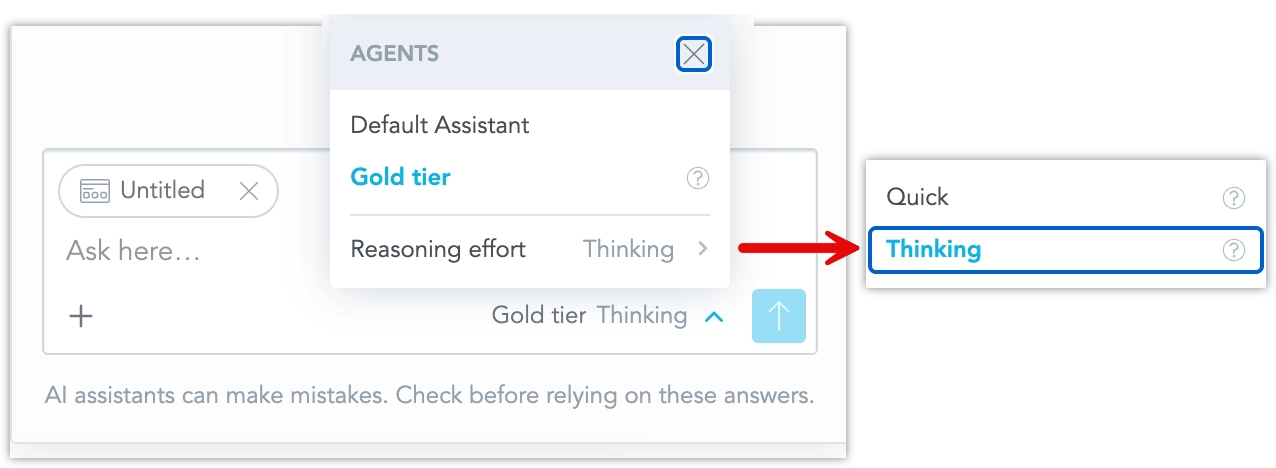
Users can choose the reasoning effort for their next AI Assistant message directly in the chat UI.
The current agent and selected reasoning effort are shown next to the send button, for example Default Agent · Thinking.
The selected effort is sent with the next message. If no effort is selected, AI Assistant uses the default behavior configured for the agent.
How Reasoning Effort Works
AI Assistant does not automatically choose the effort based on the complexity of the question. The effort level is set either by the agent default or by the user’s selection for a specific message.
The exact effect of an effort level can vary depending on the active LLM provider and model. LLM providers support different reasoning settings, so GoodData maps the selected effort to the closest supported provider behavior.
Current Limitations
The following limitations apply while the feature is in beta:
- Reasoning effort is applied per message.
- Reasoning effort is not selected automatically based on question complexity.
- The Assistant does not show a separate confirmation on each response indicating which effort was used.
- Reasoning effort may not be restored when returning to an earlier conversation.
- Organization administrators cannot enforce a maximum effort level for users.
- The effect of the selected effort may vary between LLM providers and models.