Manage IP Allowlist Policies
IP allowlist policies restrict access to your GoodData organization based on the source IP address of an authenticated request. Use them to limit sensitive user accounts, administrator accounts, or technical accounts with API tokens to trusted networks such as office locations, VPN egress addresses, or backend integration ranges.
An IP allowlist policy contains:
- One or more allowed IP addresses or CIDR ranges.
- Optional assigned users and user groups.
When one or more policies apply to a user, GoodData accepts requests for that user only if the request source IP address matches at least one allowed address or range in any applicable policy. If no policy applies to the user, access works as usual.
Only users with the Organization.MANAGE permission can create, update, or delete IP allowlist policies.
Avoid Locking Out Administrators
If you assign an IP allowlist policy to an administrator or administrator group, make sure the allowed addresses include every location that administrators use to access GoodData. Otherwise, administrators may be denied access from their current network.
How IP Allowlists Work
IP allowlist policies are evaluated after GoodData authenticates the request and resolves the user. Policies apply to:
- OIDC-authenticated sessions.
- JWT-authenticated requests.
- Public API tokens owned by a user.
- Bootstrap tokens owned by a known user.
If several policies apply to the same user, GoodData combines them. Matching any allowed source in any applicable policy is enough to allow access.
If the source IP address does not match any applicable policy, GoodData returns 403 Forbidden. The credentials are valid, but the source location is not allowed.
Policy changes may take about a minute to become active.
Allowed Sources
Each allowed source must be a valid IPv4 or IPv6 address or CIDR range. For example:
203.0.113.10
203.0.113.10/32
198.51.100.0/24
2001:db8:abcd::/48
GoodData validates allowed sources and rejects:
- Invalid IP addresses or CIDR ranges.
- DNS hostnames.
- Match-all ranges such as
0.0.0.0/0and::/0. - Empty allowed-source lists.
Policy Assignments and Limits
An IP allowlist policy can have no assigned users or groups. In that case, the policy is saved but inactive and does not affect access.
If you assign a policy to a user group, the policy also applies to users in its child groups. Before assigning a policy to a parent group, make sure the allowed addresses are valid for all affected users.
Current limits are:
- Maximum 100 IP allowlist policies per organization.
- Maximum 100 direct targets per policy.
A direct target is either one assigned user or one assigned user group. Members of assigned groups do not count toward this limit. Use user groups for large populations.
Manage IP Allowlists
Go to Settings.
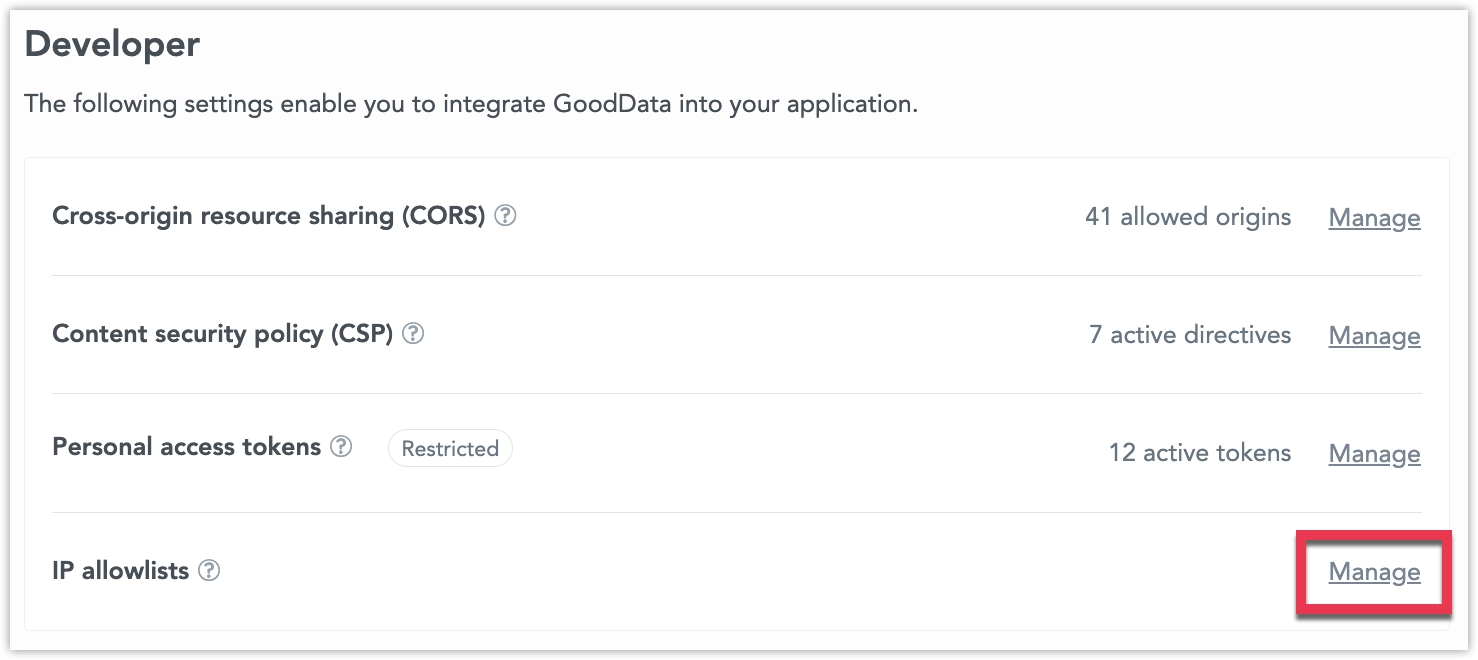
Under Developer > IP allowlists, click Manage.
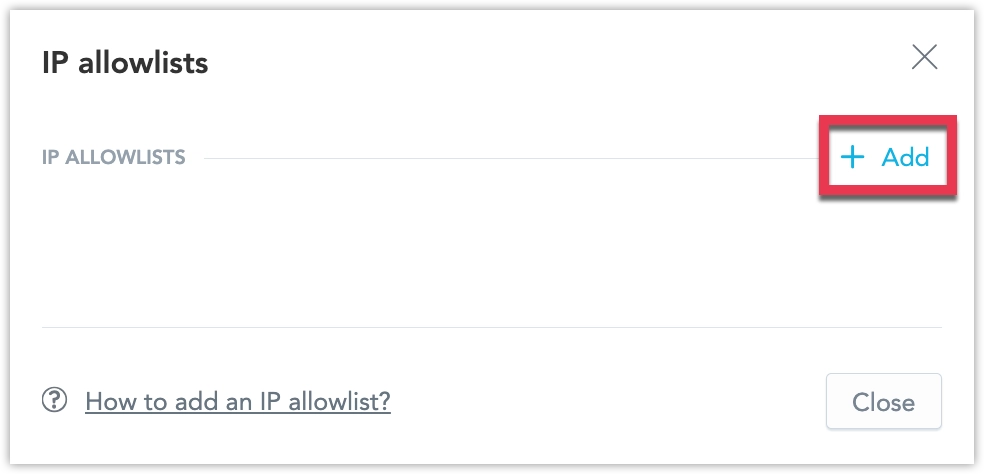
Click + Add.
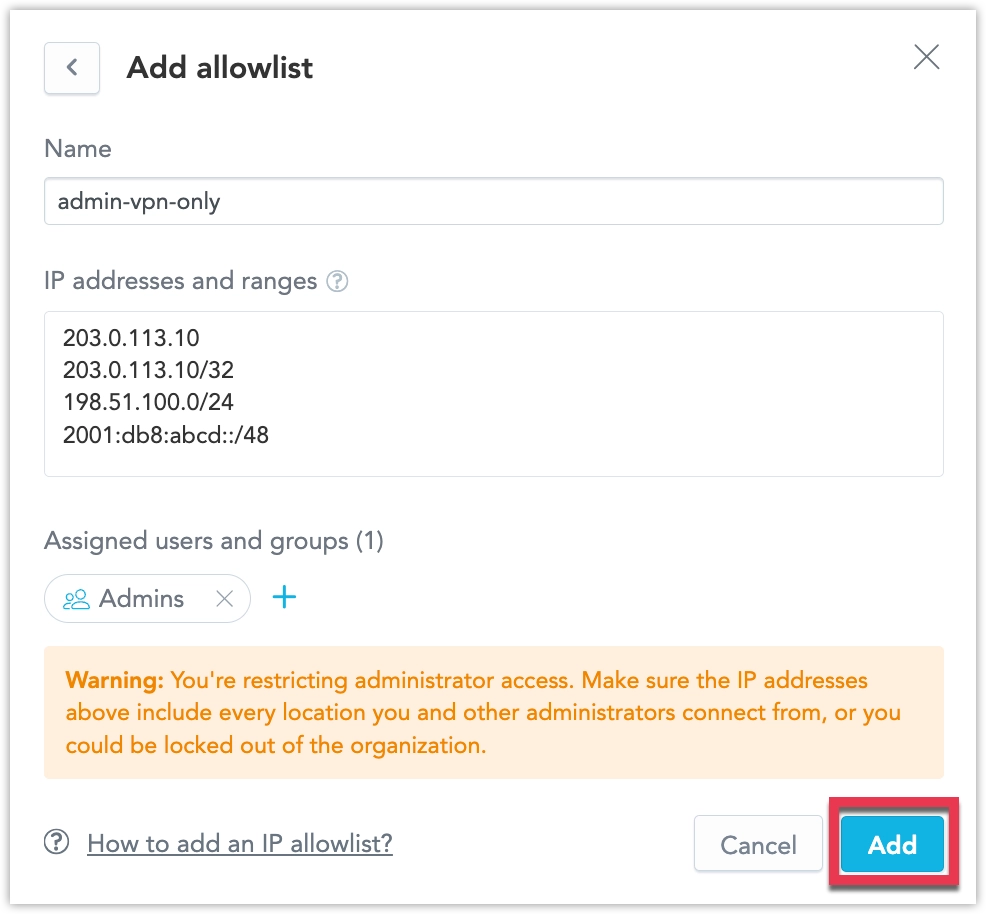
Enter an Allowlist name.
Enter IP addresses or CIDR ranges in IP addresses and ranges. Put each address or range on a separate line.
In Assigned users and groups, click Add user or group and select the users or user groups that the policy should apply to.
Click Add.
You can manage IP allowlist policies using the ipAllowlistPolicy entity.
Replace $HOST_URL, $API_TOKEN, and all user or group IDs with values from your organization.
Create a policy:
curl -X POST "$HOST_URL/api/v1/entities/ipAllowlistPolicies" \
  -H "Authorization: Bearer $API_TOKEN" \
  -H "Content-Type: application/vnd.gooddata.api+json" \
  -d '{
    "data": {
      "id": "admin-vpn-only",
      "type": "ipAllowlistPolicy",
      "attributes": {
        "allowedSources": [
          "203.0.113.10/32",
          "198.51.100.0/24",
          "2001:db8:abcd::/48"
        ]
      },
      "relationships": {
        "users": {
          "data": [
            { "id": "admin_user", "type": "user" }
          ]
        },
        "userGroups": {
          "data": [
            { "id": "adminGroup", "type": "userGroup" }
          ]
        }
      }
    }
  }'
Add targets to a policy without replacing the full list of assigned users and groups:
curl -X POST "$HOST_URL/api/v1/actions/ipAllowlistPolicies/admin-vpn-only/addTargets" \
  -H "Authorization: Bearer $API_TOKEN" \
  -H "Content-Type: application/vnd.gooddata.api+json" \
  -d '{
    "data": {
      "users": [
        { "id": "service_user", "type": "user" }
      ],
      "userGroups": [
        { "id": "restrictedAccessGroup", "type": "userGroup" }
      ]
    }
  }'
Remove targets from a policy:
curl -X POST "$HOST_URL/api/v1/actions/ipAllowlistPolicies/admin-vpn-only/removeTargets" \
  -H "Authorization: Bearer $API_TOKEN" \
  -H "Content-Type: application/vnd.gooddata.api+json" \
  -d '{
    "data": {
      "users": [
        { "id": "service_user", "type": "user" }
      ]
    }
  }'
Adding an already assigned target or removing a missing target has no effect. Removing the last target makes the policy inactive.