Audit Log
Audit logs are records of what happens inside your GoodData environment. These logs help you track who did what, when they did it, how they did it, and what they changed.
The audit log can support you in several critical areas:
- Security and fraud prevention – Monitor unauthorized or suspicious activity.
- Compliance and legal requirements – Meet GDPR, HIPAA, or SOC2 standards.
- Troubleshooting and support – Quickly trace issues and understand changes that impact your setup.
Note
The Audit Log feature is available only as part of the Enterprise tier.
Audit Log Scope and AI-Initiated Actions
The audit log records events that GoodData considers relevant for security investigations, data access, and changes to the solution. It is not intended to contain every individual interaction with the platform.
For example, searching for a dashboard or visualization through the user interface, API, or AI Assistant does not create an audit log entry unless the action also triggers one of the events listed in the Audit Events section.
AI Assistant does not grant users additional permissions. If the AI Assistant performs an action on behalf of a user and the same action is covered by the audit log when performed directly through the UI or API, GoodData records the same audit event. Depending on the action, additional metadata may distinguish whether the action was initiated through the AI Assistant, for example by including an agent identifier.
Diagnostic identifiers such as traceId or X-GDC-TRACE-ID are used for internal troubleshooting. They are not intended as stable end-to-end audit correlation identifiers.
Setting up Audit Logging
To deliver audit logs to you, GoodData uses AWS Cloud services as the supported storage platform. GoodData generates the audit log data and sends it through the Audit Log Event Forwarder component to an Amazon S3 bucket that you provide and control. This setup ensures that you have full ownership of your audit data and can integrate it with your internal systems (such as SIEM tools).
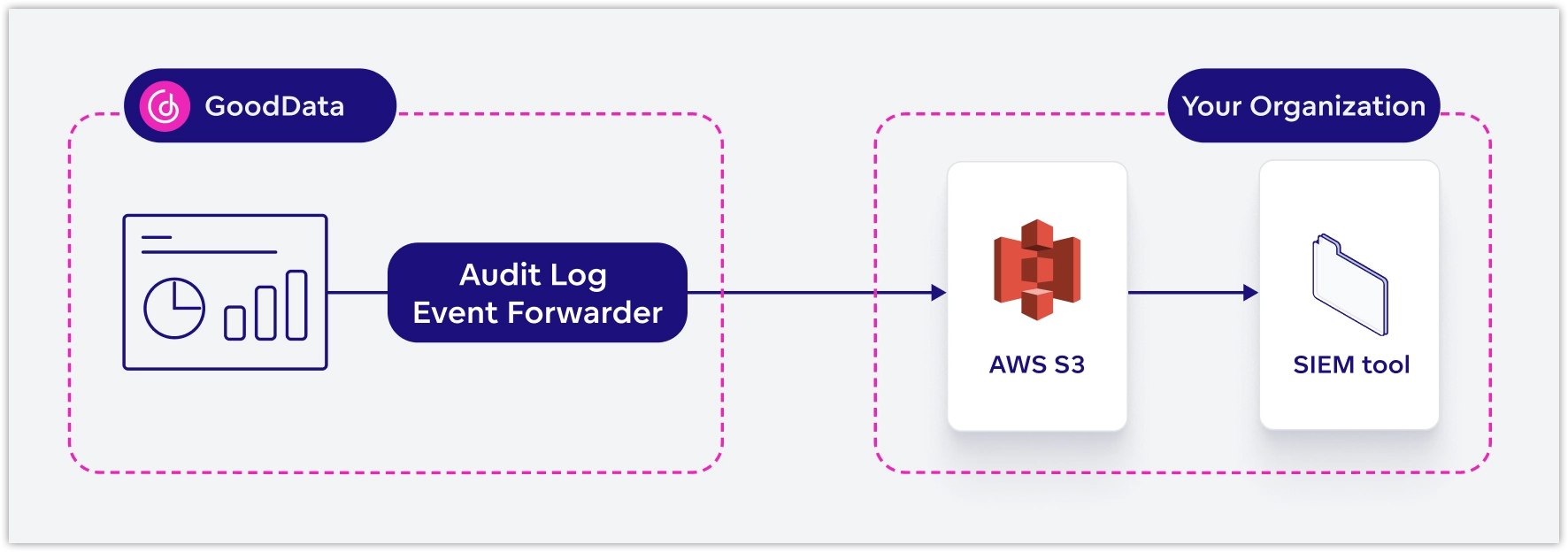
Follow the steps below to get started:
- Using the following definition, create or update your S3 bucket policy to allow GoodData to deliver audit log files.
{
  "Version": "2012-10-17",
  "Statement": [
      {
          "Sid": "GD-Cloud-auditlog-access",
          "Effect": "Allow",
          "Principal": {
              "AWS": "arn:aws:iam::772547432422:root"
          },
          "Action": [
              "s3:PutObject",
              "s3:GetBucketLocation",
              "s3:AbortMultipartUpload",
              "s3:ListBucket"
          ],
          "Resource": [
              "arn:aws:s3:::<bucket-name>",
              "arn:aws:s3:::<bucket-name>/*"
          ]
      }
  ]
}
Once your bucket is ready, provide our Support team with the
bucket-name(as defined in the previous step). We will take care of the remaining setup and configure the system to write audit logs directly to your specified S3 bucket.After the setup, the logs will begin appearing in your S3 bucket under the
auditlog/default/<orgId>path. From there, you can integrate them into your Security Information and Event Management (SIEM) system for ongoing monitoring, alerting, and incident response.
Example:
$ aws s3 ls s3://<your-bucket-name>/auditlog/default/<your-org-id>/ --profile <your-profile>
YYYY-MM-DD HH:MM:SS      24850 12345678901234.json
YYYY-MM-DD HH:MM:SS      24850 12345678901285.json
Audit Log Entries
Each audit log entry is saved in JSON format and includes a set of mandatory fields, which are standardized and present in every log entry, regardless of the event type:
| Field | Description |
|---|---|
eventName | Standard name of the event |
categoryUid | Category based on OCSF (Open Cybersecurity Schema Framework) |
classUid | Class based on OCSF |
description | A short, human-readable summary of the event |
ts | Time the event happened (timestamp), e.g. 2023-01-20T18:55:32.466Z |
orgId | ID of the organization |
workspaceId | ID of the workspace (if applicable) |
userId | Who triggered the event (user ID, service, or token) |
target | What was affected (e.g. dashboard, user, group) |
source | IP address where the event came from (127.0.0.1 is used for events initiated by internal components) |
errorCode | If something went wrong (e.g. Access Denied) |
sessionContextType | Type of session: JWT, API Token, OIDC, or automation |
sessionContextIdentifier | Token or automation identifier |
type | Type of message. The default value is audit. |
Audit entries may include additional JSON fields specific to that event type. These extra fields provide more context for that particular action and are not standardized across all events. These include:
| Field | Description |
|---|---|
agentId | ID of the AI agent. Present only if the action was performed by the AI Assistant on behalf of the user. |
conversationId | ID of the AI Assistant conversation. Present only if the action was performed by the AI Assistant on behalf of the user. |
Example Audit Log Entry:
{
  "eventName": "user_login",
  "categoryUid": "3",
  "classUid": "3002",
  "description": "User XY logged in",
  "ts": "2023-01-20T18:55:32.466Z",
  "orgId": "org_abc123",
  "workspaceId": "workspace_xyz456",
  "userId": "user_XY",
  "target": "organization_setting_XY",
  "source": "1.2.3.4",
  "sessionContextType": "OIDC",
  "sessionContextIdentifier": "token_1234",
  "success": true,
  "type": "audit"
}
Audit Events
Below is a complete list of all audit log events, including their meanings, categories, and classes. The categories and classes follow the Open Cybersecurity Schema Framework (OCSF) where applicable.
| Event | Meaning | Category | Class | Additional Details |
|---|---|---|---|---|
| DATA_ACCESS | User accessed workspace data | 6 | 6005 | target = dashboard/visualization IDs |
| DATA_EXPORT_INITIATE | User started a data export | 6 | 6005 | exportFormat, exportId |
| DATA_EXPORT_RETRIEVE | User downloaded exported data | 6 | 6005 | exportId |
| EXECUTION_INITIATE | An AFM execution was initiated. | 6 | 6005 | — |
| EXECUTION_RETRIEVE | The results of an AFM execution were retrieved. | 6 | 6005 | — |
| CSV_DATA_UPLOAD | Data uploaded via CSV | 6 | 6005 | target = datasourceId |
| USER_LOGIN | User tried to log in | 3 | 3002 | Logs only failed logins for JWT/API; success only for OIDC |
| USER_LOGOUT | User logged out | 3 | 3002 | — |
| USER_CREATE | A user was created | 3 | 3001 | Includes ID, email, userGroups |
| USER_UPDATE | User account updated | 3 | 3001 | List of changed attributes |
| USER_DELETE | User account deleted | 3 | 3001 | — |
| API_TOKEN_CREATE | An API token was created | 3 | 3002 | — |
| API_TOKEN_DELETE | An API token was deleted | 3 | 3002 | — |
| USER_DATA_FILTER_CREATE | A user data filter was created | 3 | 3005 | MAQL expression + user/userGroup |
| USER_DATA_FILTER_UPDATE | A user data filter was updated | 3 | 3005 | — |
| USER_DATA_FILTER_DELETE | A user data filter was deleted | 3 | 3005 | — |
| USERGROUP_CREATE | A user group was created | 3 | 3006 | — |
| USERGROUP_UPDATE | A user group was updated | 3 | 3006 | — |
| USERGROUP_DELETE | A user group was deleted | 3 | 3006 | — |
| USER_USERGROUP_ADD | User added to a group | 3 | 3006 | Includes user and group info |
| USER_USERGROUP_DELETE | User removed from a group | 3 | 3006 | — |
| PERMISSION_USER_ADD | Permission added to user | 3 | 3005 | Includes permissionLevel and object |
| PERMISSION_USER_DELETE | Permission removed from user | 3 | 3005 | — |
| PERMISSION_USERGROUP_ADD | Permission added to group | 3 | 3006 | Includes permissionLevel and object |
| PERMISSION_USERGROUP_DELETE | Permission removed from group | 3 | 3006 | — |
| PERMISSION_RULE_ADD | Permission rule added | 3 | 3005 | Example: ALL_WORKSPACE_USERS |
| PERMISSION_RULE_DELETE | Permission rule removed | 3 | 3005 | — |
| INVITATION_SEND | Invitation to join organization sent | 3 | 3005 | Only used in trial setups of GoodData Cloud. Not applicable to GoodData.CN. |
| SCHEDULED_MAIL_SEND | A scheduled email was sent | 4 | 4009 | from_email, sessionContext info |
| AUTH_PROVIDER_CREATE | Auth provider created | 99 | 99001 | Parameters (secrets masked) |
| AUTH_PROVIDER_DELETE | Auth provider deleted | 99 | 99001 | — |
| AUTH_PROVIDER_UPDATE | Auth provider updated | 99 | 99001 | — |
| AUTH_FIM_ENABLE | Federated identity enabled | 99 | 99001 | — |
| DATASOURCE_CREATE | New data source created | 99 | 99002 | Parameters (credentials masked) |
| DATASOURCE_DELETE | Data source deleted | 99 | 99002 | — |
| DATASOURCE_UPDATE | Data source updated | 99 | 99002 | — |
| CACHE_INVALIDATE | Cache invalidated | 99 | 99002 | target = dataSource ID / workspace ID / set of datasource IDs |
| CACHE_SETTINGS | Data source cache settings changed (strategy, validity period, or invalidation schedule) | 99 | 99002 | target = datasource:<id>; previous and new values of cacheStrategy (ALWAYS, NEVER) and cacheRetention (INDEFINITE, VALIDITY_PERIOD, SCHEDULE). See Cache Settings Audit Events. |
| ORG_SETTINGS_CREATE | Org settings created | 99 | 99003 | Includes settingType |
| ORG_SETTINGS_UPDATE | Org settings updated | 99 | 99003 | — |
| ORG_SETTINGS_DELETE | Org settings deleted | 99 | 99003 | — |
| NOTIFICATION_CHANNEL_CREATE | A new notification channel was created. | 99 | 99003 | - |
| NOTIFICATION_CHANNEL_UPDATE | A notification channel was updated. | 99 | 99003 | - |
| NOTIFICATION_CHANNEL_DELETE | A notification channel was deleted. | 99 | 99003 | — |
| IP_ALLOWLIST_CREATE | An IP allowlist policy was created. | 99 | 99003 | — |
| IP_ALLOWLIST_UPDATE | An IP allowlist policy was updated. | 99 | 99003 | — |
| IP_ALLOWLIST_DELETE | An IP allowlist policy was deleted. | 99 | 99003 | — |
| WORKSPACE_DATA_FILTER_CREATE | Workspace data filter created | 99 | 99006 | Includes column name and title |
| WORKSPACE_DATA_FILTER_UPDATE | Workspace data filter updated | 99 | 99006 | — |
| WORKSPACE_DATA_FILTER_DELETE | Workspace data filter deleted | 99 | 99006 | — |
| WORKSPACE_DATA_FILTER_SETTING_CREATE | Workspace data filter setting created | 99 | 99006 | Includes filterValues |
| WORKSPACE_DATA_FILTER_SETTING_UPDATE | Workspace data filter setting updated | 99 | 99006 | — |
| WORKSPACE_DATA_FILTER_SETTING_DELETE | Workspace data filter setting deleted | 99 | 99006 | — |
| WORKSPACE_CREATE | Workspace created | 99 | 99005 | — |
| WORKSPACE_UPDATE | Workspace updated | 99 | 99005 | — |
| WORKSPACE_DELETE | Workspace deleted | 99 | 99005 | Deletes all resources inside |
| WORKSPACE_SETTINGS_CREATE | Workspace setting created | 99 | 99005 | settingType = name of setting |
| WORKSPACE_SETTINGS_UPDATE | Workspace setting updated | 99 | 99005 | — |
| WORKSPACE_SETTINGS_DELETE | Workspace setting deleted | 99 | 99005 | — |
| ANALYTICS_MODEL_CREATE | Analytics model created | 99 | 99007 | Includes type and sourceColumn |
| ANALYTICS_MODEL_UPDATE | Analytics model updated | 99 | 99007 | — |
| ANALYTICS_MODEL_DELETE | Analytics model deleted | 99 | 99007 | — |
| METRIC_CREATE | Metric created | 99 | 99007 | Includes MAQL and format |
| METRIC_UPDATE | Metric updated | 99 | 99007 | — |
| METRIC_DELETE | Metric deleted | 99 | 99007 | — |
| DATASET_CREATE | Dataset created | 99 | 99007 | Includes ID and source table |
| DATASET_UPDATE | Dataset updated | 99 | 99007 | — |
| DATASET_DELETE | Dataset deleted | 99 | 99007 | — |
| LOCALIZATION_UPDATE | Localizations updated | 99 | 99004 | — |
| LOCALIZATION_DOWNLOAD | Localizations downloaded | 99 | 99004 | — |
| DASHBOARD_UPDATE | Dashboard updated | 99 | 99007 | — |
| DASHBOARD_CREATE | Dashboard created | 99 | 99007 | — |
| DASHBOARD_DELETE | Dashboard deleted | 99 | 99007 | — |
| VISUALISATION_CREATE | Visualization created | 99 | 99007 | — |
| VISUALISATION_UPDATE | Visualization updated | 99 | 99007 | — |
| VISUALISATION_DELETE | Visualization deleted | 99 | 99007 | — |
| AUTOMATION_CREATE | A new automation was created. | 99 | 99007 | — |
| AUTOMATION_UPDATE | An automation was updated. | 99 | 99007 | — |
| AUTOMATION_DELETE | An automation was deleted. | 99 | 99007 | — |
| AGENT_CREATE | An AI agent was created | 99 | 99008 | id, title, description, enabled, personality, skillsMode, customSkills, aiKnowledge, availableToAll, userGroups. The audit entry contains only the fields that were changed by the request. The skillsMode field is an enum value, customSkills is a list of enum values, and userGroups is a list of user group IDs. |
| AGENT_UPDATE | An AI agent was updated | 99 | 99008 | Delta of changed fields only. The id is always included. |
| AGENT_DELETE | An AI agent was deleted | 99 | 99008 | The id is always included. Other fields are included if present at deletion time. |
| MEMORY_ITEM_CREATE | An AI memory item was created | 99 | 99007 | strategy, instruction, keywords, isDisabled, title, description |
| MEMORY_ITEM_UPDATE | An AI memory item was updated | 99 | 99007 | Delta of changed fields only. The id is always included. |
| MEMORY_ITEM_DELETE | An AI memory item was deleted | 99 | 99007 | The id is always included. Other fields are included if present at deletion time. |
| DOCUMENT_CREATE | A knowledge document was uploaded | 99 | 99007 | content_size, num_chunks, title if set, scopes if set. The target field contains the document filename. If present, scopes are comma-joined in the audit entry. |
| DOCUMENT_UPDATE | A knowledge document was updated | 99 | 99007 | the same event covers both full content replacement and metadata-only patches. Full upsert: content_size, num_chunks, title if set, scopes if set. Partial patch: only changed fields among is_disabled, title, scopes. |
| DOCUMENT_DELETE | A knowledge document was deleted | 99 | 99007 | No additional attributes beyond mandatory fields |
AI Memory Audit Events
The same MEMORY_ITEM_* event set covers both workspace-level and organization-level AI memory items. Workspace-level memory items log with workspaceId populated. Organization-level memory items log with workspaceId set to <NONE>. Use the workspaceId field to distinguish the scope.
For MEMORY_ITEM_UPDATE, the audit entry contains only the fields that were changed by the request. The strategy field is an enum value, keywords is a list of strings, isDisabled is a boolean, and instruction contains the system-prompt text.
When a memory item is created or updated by the AI Assistant on behalf of a user, agentId and conversationId are attached automatically.
Reads of memory items, such as GET, list, or search operations, are not audited.
Cache Settings Audit Events
The CACHE_SETTINGS event is recorded when the cache strategy or cache retention of a data source changes. This includes the initial settings applied when a data source is created, changes made when a data source is updated, and changes applied through the data sources layout API. No CACHE_SETTINGS event is recorded if neither setting changes.
The audit entry identifies the affected data source in the target field as datasource:<id> and contains these attributes:
cacheStrategyPreviousValueandcacheStrategyValue: Previous and new cache strategies. Values areALWAYSorNEVER.cacheRetentionPreviousValueandcacheRetentionValue: Previous and new cache retention configurations. The configuration can beINDEFINITE,VALIDITY_PERIOD(with an ISO-8601 duration), orSCHEDULE(with a cron expression and timezone).
For example, a validity period of 24 hours is represented as {"type":"VALIDITY_PERIOD","validityPeriod":"PT24H"}. A previous value of null means no value was previously set. A previous value of READ_FAILED means the earlier setting could not be retrieved, but the change was still applied and logged.
Data source updates continue to generate DATASOURCE_UPDATE events. Cache invalidations, including scheduled invalidations, are recorded separately as CACHE_INVALIDATE events.
Audit Logging for Layout APIs
When using the layout APIs, deletion of old resources is recorded through a single audit log message per action, rather than individual entries for each sub-resource. However, creation events are logged individually for each entity.
Here is how deletion events are logged:
eventName = workspace_delete, target = <org_id>(Triggered by the organization layout API) This also deletes: workspace settings, dashboards, visualizations, and permissions.eventName = workspace_delete, target = <workspace_id>(Triggered by the workspace layout API) This also deletes: workspace settings, dashboards, visualizations, and permissions.eventName = analytics_model_delete, target = <workspace_id>(Triggered by the analytics model layout API) This also deletes related permissions.eventName = datasource_delete, target = <organization_id>Deletes the data source and all related permissions.
Limitations
- The audit log does not provide a complete record of every API request, UI interaction, or AI Assistant conversation.
- Authorization failures, 403 responses, failed AI actions, prompt-injection attempts, and policy-blocked actions are not generally recorded as audit events unless they correspond to one of the events listed in the Audit Events section.
- Diagnostic logs may contain additional troubleshooting information, but diagnostic log fields and formats are not part of the public audit log.
- Data Residency: We do not provide storage for audit log data. The audit logs are stored in an AWS Cloud environment that you create and manage.
- Batch Processing: Logs are processed and delivered in batches approximately every 10 minutes.
- Retention Period: If our Audit Log Event Forwarder component cannot deliver audit logs to the specified destination (S3 bucket), we cache the audit log events and retry delivery for up to 7 days. Once the logs are successfully delivered, we do not manage their deletion. Therefore, it is up to you to decide how long to keep the logs. If you wish to control log retention, we recommend setting up lifecycle policies or similar rules in your S3 configuration.
- S3 encryption: We do not support AWS KMS encryption (SSE-KMS) for S3 buckets that receive audit logs.