Set Up Multiple Tenants
Multitenant analytics lets you deliver analytics to multiple audiences, called tenants. You can maintain shared analytics centrally while controlling which content and data each tenant can access.
Tenants can be:
- Users and user groups outside your company who are related to your business, such as resellers, agents, or franchise units.
- Customers, such as subscribers or client companies.
- Users inside your company, such as departments, global business units, or individual users with specific needs.
Plan Access in GoodData Cloud
A multitenant setup combines workspace structure, permissions, and data filters. Start with Choose What to Protect to identify the controls you need. The guides below describe how to configure them in GoodData Cloud.
| Decision | Guide |
|---|---|
| Where to maintain shared definitions and organize tenant workspaces | Build a Workspace Hierarchy |
| Who can enter each workspace and which tasks they can perform | Workspace Permissions |
| Which columns, metrics, visualizations, and dashboards each audience can use | Object Permissions |
| Which rows are available in each tenant’s child workspace | Workspace Data Filters |
| Which rows individual users or groups can see within a workspace | User Data Filters |
| How workspace, object, and user-group inheritance affect access | Permission Hierarchies |
Workspace permissions determine who can enter a workspace and what they can do there. Object permissions determine which analytics they can use, share, or edit. Data filters limit the rows available through those analytics. Configure these controls together: creating a child workspace does not by itself select the tenant’s rows, and sharing a dashboard does not share all of its dependencies.
For a complete setup covering inherited dashboards, visualizations, metrics, and columns, see Share Analytics Across Tenant Workspaces. For different content by subscription plan, see Offer Different Analytics by Subscription Plan.
Reuse Analytics Across Workspaces
In a workspace-per-tenant setup, each tenant uses a dedicated workspace to analyze its data and view its dashboards. A parent workspace holds shared definitions that child workspaces inherit.
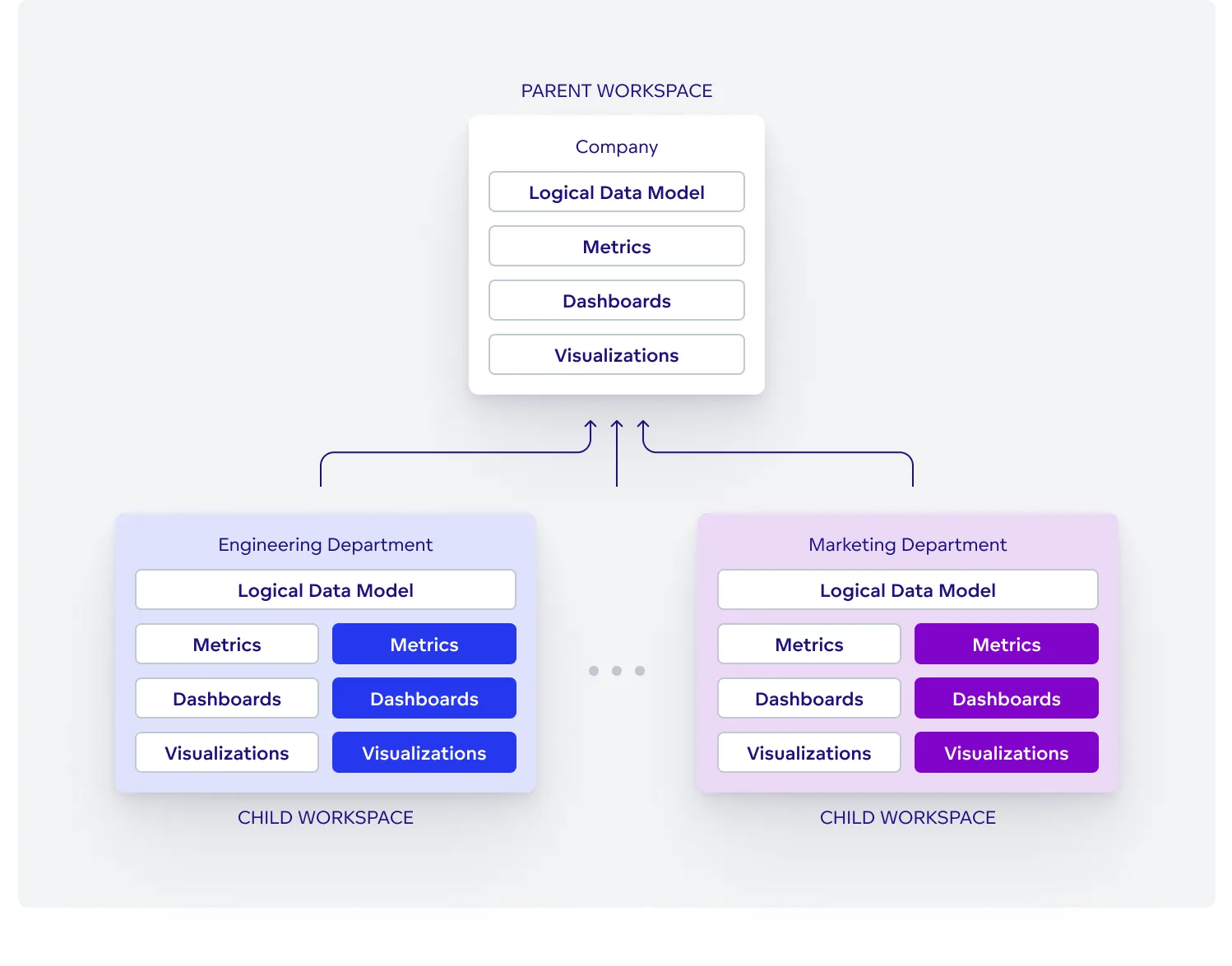
- The parent workspace, also called the master workspace, serves as a template. It contains the logical data model, metrics, visualizations, and dashboards shared with child workspaces. In this setup, reserve parent-workspace access for the people who maintain shared analytics; give tenant users access to their child workspaces.
- A child workspace is where a tenant’s users consume analytics. It inherits model and analytical definitions from its parent. Give users access to the workspace and the objects they need, and configure data filters for the tenant’s rows. With the required creation capabilities and access to inputs, users can create additional metrics, visualizations, and dashboards in the child without changing the parent’s definitions.
Use workspace data filters to limit rows in child workspaces and user data filters when users or groups within a workspace need further restrictions. Verify the filters and object grants with users from each tenant before making analytics available to them.
This structure lets you maintain shared reporting centrally while allowing tenants to create their own analytics. It is commonly used to deliver analytics to customers and business partners, and can also serve departments within your organization.