> Documentation index: https://www.gooddata.ai/docs/gooddata-ui/llms.txt lists every page of these docs as Markdown.
# Add totals to a table
> Add grand totals and subtotals to Pivot Tables with newTotal, covering sum, avg, min, max, median, and rollup aggregations.
API reference: [newTotal()](https://www.gooddata.ai/docs/gooddata-ui/latest/api-reference/sdk-model/sdk-model.newtotal/index.md) (function)
Show rows with aggregated measure data in the [`PivotTable`](https://www.gooddata.ai/docs/gooddata-ui/latest/api-reference/sdk-ui-pivot/sdk-ui-pivot.pivottable/index.md) component with the `totals` prop. Create each total with `newTotal(type, measure, attribute, alias?)`, where `type` is one of the [`TotalType`](https://www.gooddata.ai/docs/gooddata-ui/latest/api-reference/sdk-model/sdk-model.totaltype/index.md) values below.
## [Supported aggregation functions](https://www.gooddata.ai/docs/gooddata-ui/latest/data-layer/execution/table-totals/#supported-aggregation-functions)
| Function | [`TotalType`](https://www.gooddata.ai/docs/gooddata-ui/latest/api-reference/sdk-model/sdk-model.totaltype/index.md) | Description |
| :--- | :--- | :--- |
| Sum | `"sum"` | Sum of values |
| Maximum | `"max"` | Largest value |
| Minimum | `"min"` | Smallest value |
| Average | `"avg"` | Average value |
| Median | `"med"` | Middle value |
| Rollup | `"nat"` | Sum (or another type of aggregation) of pre-aggregated (raw) values |
## [Add a column grand total](https://www.gooddata.ai/docs/gooddata-ui/latest/data-layer/execution/table-totals/#add-a-column-grand-total)
A column grand total aggregates data for all values in a column and displays it in the row pinned to the bottom of the table. Define it with a measure and the first row attribute.
Totals can't be calculated for tables without row attributes or without measures. A pivot table with column attributes shows totals for all columns with the specified measure.
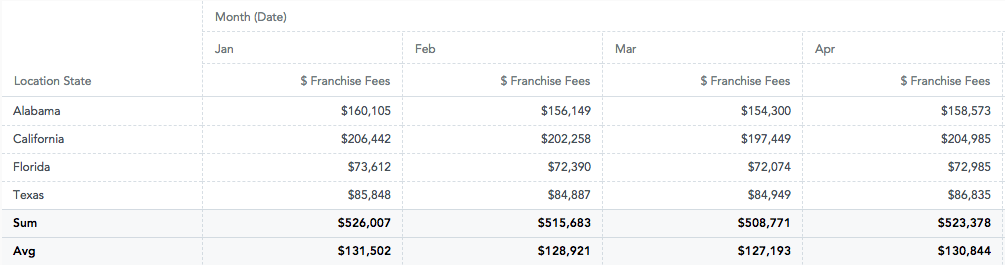
```tsx
import { PivotTable } from "@gooddata/sdk-ui-pivot";
import { newTotal } from "@gooddata/sdk-model";
import * as Md from "./catalog.js";
const measures = [Md.$FranchiseFees];
const columns = [Md.DateMonth.Short];
const rows = [Md.LocationCity];
const totals = [
newTotal("sum", Md.$FranchiseFees, Md.LocationCity),
newTotal("avg", Md.$FranchiseFees, Md.LocationCity),
];
export const TableWithGrandTotals = () => (
);
```
## [Add a subtotal](https://www.gooddata.ai/docs/gooddata-ui/latest/data-layer/execution/table-totals/#add-a-subtotal)
A subtotal aggregates data for all values in an attribute group. It's displayed as a regular table row and isn't pinned to the bottom of the table.
Define a subtotal the same way as a grand total, but pass the attribute that is being grouped.
> **Note:**
> Custom executions ([`Execute`](https://www.gooddata.ai/docs/gooddata-ui/latest/api-reference/sdk-ui/sdk-ui.execute/index.md), [`RawExecute`](https://www.gooddata.ai/docs/gooddata-ui/latest/api-reference/sdk-ui/sdk-ui.rawexecute/index.md), `useExecutionDataView`) accept totals on any dimension. [`PivotTable`](https://www.gooddata.ai/docs/gooddata-ui/latest/api-reference/sdk-ui-pivot/sdk-ui-pivot.pivottable/index.md) renders totals defined on its row attributes as total rows and totals defined on its column attributes as total columns. Subtotals are rendered only when the table is sorted by the first row attribute, which is the default sorting for tables.
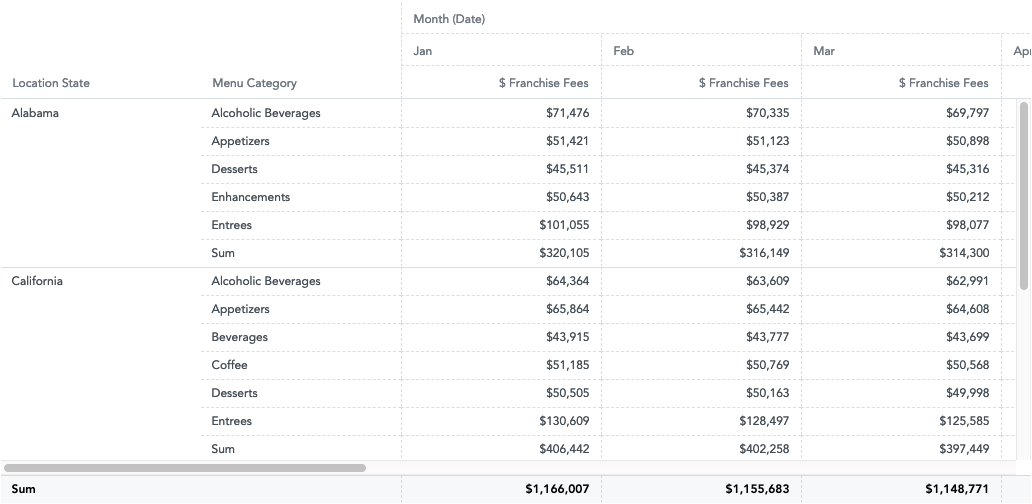
```tsx
import { PivotTable } from "@gooddata/sdk-ui-pivot";
import { newTotal } from "@gooddata/sdk-model";
import * as Md from "./catalog.js";
const measures = [Md.$FranchiseFees];
const columns = [Md.DateMonth.Short];
const rows = [Md.LocationState, Md.MenuCategory];
const totals = [
newTotal("sum", Md.$FranchiseFees, Md.LocationState),
newTotal("sum", Md.$FranchiseFees, Md.MenuCategory),
];
export const TableWithSubtotals = () => (
);
```