Attribute filter
Configure AttributeFilter with a filter definition or placeholder, handle selection changes, choose selection behavior, and replace its UI components.
AttributeFilter is a dropdown that lists the values of an attribute and lets users pick the ones to filter by.
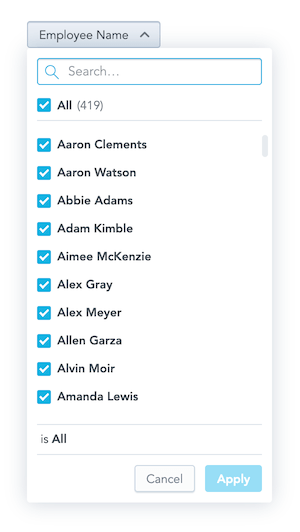
You can connect the component in one of two ways:
- Pass a
filterand anonApplycallback. The callback receives the updated filter when a user clicks Apply. - Pass a visualization definition placeholder in
connectToPlaceholder. The component reads and writes the placeholder value itself, soonApplyis optional.
newPositiveAttributeFilter(Md.Product.Name, ["Product A"]). The { uris: [...] } form is a legacy form: these backends treat its items as primary key values too.Structure
import "@gooddata/sdk-ui-filters/styles/css/main.css";
import { AttributeFilter } from "@gooddata/sdk-ui-filters";

<AttributeFilter
    filter={<attribute-filter>}
    onApply={<on-apply-callback>}
    selectionMode={<"multi" | "single">}
    parentFilters={<parent-filters>}
    parentFilterOverAttribute={<connecting-attribute>}
/>;
Example
The filter starts with nothing excluded. When a user clicks Apply, onApply receives the new filter definition, which you can pass to the filters prop of a chart.
import { useState } from "react";
import { AttributeFilter } from "@gooddata/sdk-ui-filters";
import { newNegativeAttributeFilter } from "@gooddata/sdk-model";

import "@gooddata/sdk-ui-filters/styles/css/main.css";

import * as Md from "./catalog.js";

const defaultFilter = newNegativeAttributeFilter(Md.EmployeeName.Default, []);

export const AttributeFilterExample = () => {
    const [filter, setFilter] = useState(defaultFilter);

    return (
        <AttributeFilter
            filter={filter}
            onApply={(updatedFilter) => {
                console.log("Applying updated filter:", updatedFilter);
                setFilter(updatedFilter);
            }}
        />
    );
};
AttributeFilter vs. AttributeFilterButton
AttributeFilter works the same way as AttributeFilterButton. The two differ only in the look of the dropdown button.
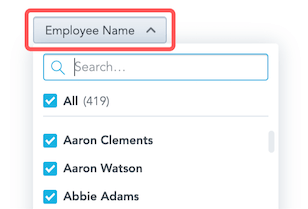
Default selection
To select values by default, include them in the filter prop.
<AttributeFilter
    filter={newPositiveAttributeFilter(Md.EmployeeName.Default, ["Abbie Adams"])}
    onApply={setFilter}
/>
Hidden and static elements
hiddenElementsremoves elements from the list and from the resulting filter. Give the items in the same form as the filter elements: values for a value-based filter. Make sure your input filter is consistent with them: a positive filter must not contain any hidden element, and a negative filter must contain all of them.staticElementsshows a fixed list of elements instead of loading them from the backend.
Parent-child relationships between filters
To make one attribute filter depend on another, pass parentFilters and parentFilterOverAttribute to the child filter.
parentFilterOverAttribute defines how the parent and child filters are connected. Reference an attribute of the parent filter, or an attribute that both filters share.
The parent filter can be an attribute filter definition or a visualization definition placeholder.
<div>
    <AttributeFilter filter={parentFilter} onApply={setParentFilter} />
    <AttributeFilter
        filter={filter}
        parentFilters={parentFilter ? [parentFilter] : []}
        parentFilterOverAttribute={idRef("attr.restaurantlocation.locationid")}
        onApply={setFilter}
    />
</div>
<div>
    <AttributeFilter connectToPlaceholder={parentFilterPlaceholder} />
    <AttributeFilter
        connectToPlaceholder={filterPlaceholder}
        parentFilters={parentFilterPlaceholder ? [parentFilterPlaceholder] : []}
        parentFilterOverAttribute={idRef("attr.restaurantlocation.locationid")}
    />
</div>
Dependent date filters
You can make an attribute filter depend on date filters (beta). The attribute filter then shows only the elements that are relevant for the specified date range. The dependentDateFilters prop takes dashboard date filters (IDashboardDateFilter), not the IDateFilter objects you pass to visualizations.
import { AttributeFilter } from "@gooddata/sdk-ui-filters";
import { idRef, type IDashboardDateFilter } from "@gooddata/sdk-model";

// Last 6 months including the current one
const dateFilter: IDashboardDateFilter = {
    dateFilter: {
        type: "relative",
        granularity: "GDC.time.month",
        from: -5,
        to: 0,
        dataSet: idRef("date.dataset", "dataSet"),
    },
};

<AttributeFilter filter={filter} dependentDateFilters={[dateFilter]} onApply={setFilter} />;
Single value selection
To let users select only one value at a time, set selectionMode to "single".
import { useState } from "react";
import { AttributeFilter } from "@gooddata/sdk-ui-filters";
import { newPositiveAttributeFilter } from "@gooddata/sdk-model";

import "@gooddata/sdk-ui-filters/styles/css/main.css";
import * as Md from "./catalog.js";

// Single selection filter must be a positive filter with at most one element
const singleValueFilter = newPositiveAttributeFilter(Md.Product.Name, ["Product A"]);

export const SingleSelectionAttributeFilterExample = () => {
    const [filter, setFilter] = useState(singleValueFilter);

    return (
        <AttributeFilter
            filter={filter}
            selectionMode="single"
            onApply={(updatedFilter) => {
                console.log("Applying updated single-value filter:", updatedFilter);
                setFilter(updatedFilter);
            }}
        />
    );
};
In single selection mode:
- The filter must be a positive filter with at most one selected element.
- If you use parent filters, the backend must support single-select dependent filters (the
supportsSingleSelectDependentFilterscapability). - The component uses UI parts built for selecting one value.
Automatic first item selection
To select the first available item when the filter is empty, set selectFirst to true. This works only in single selection mode.
<AttributeFilter
    filter={newPositiveAttributeFilter(Md.Product.Name, [])}
    selectionMode="single"
    selectFirst={true}
    onApply={setFilter}
/>
Filter the list by measures, facts, or attributes
To list only the elements that are compatible with specific measures, facts, or attributes, pass their object references (ObjRef) in validateElementsBy.
import { useState } from "react";
import { AttributeFilter } from "@gooddata/sdk-ui-filters";
import { attributeDisplayFormRef, idRef, newNegativeAttributeFilter } from "@gooddata/sdk-model";

import "@gooddata/sdk-ui-filters/styles/css/main.css";
import * as Md from "./catalog.js";

const defaultFilter = newNegativeAttributeFilter(Md.Product.Name, []);

export const ValidatedAttributeFilterExample = () => {
    const [filter, setFilter] = useState(defaultFilter);

    return (
        <AttributeFilter
            filter={filter}
            validateElementsBy={[
                idRef("total_sales", "measure"), // Validate by measure
                idRef("fact.sales.amount", "fact"), // Validate by fact
                attributeDisplayFormRef(Md.Product.Category), // Validate by attribute label
            ]}
            onApply={setFilter}
        />
    );
};
validateElementsBy accepts references to:
- Measures: only elements that have data for these measures are listed.
- Facts: only elements connected to these facts are listed.
- Attributes and labels: only elements related to these attributes are listed.
For example, list only the territories that have sales for a product, or only the product categories that have revenue and orders:
<AttributeFilter
    filter={categoryFilter}
    validateElementsBy={[idRef("revenue", "measure"), idRef("order_count", "measure")]}
    onApply={setCategoryFilter}
/>
supportsAttributeFilterElementsLimiting backend capability. Backends without it ignore validateElementsBy.Customizing AttributeFilter components
AttributeFilter component customizations are in beta.To change the look of AttributeFilter, pass your own components for specific parts of it.
<AttributeFilter
    filter={newNegativeAttributeFilter(Md.EmployeeName.Default, [])}
    onApply={setFilter}
    // Your own component for the "Apply" and "Cancel" buttons
    DropdownActionsComponent={CustomActions}
    // Your own component for each attribute element
    ElementsSelectItemComponent={CustomItem}
/>
If the props passed to a custom component aren’t enough, call the useAttributeFilterContext hook inside it to read the full internal state of the filter.
const { attribute } = useAttributeFilterContext();
Use customizations for small changes to the AttributeFilter UI. For a UI that differs a lot, build your own with the useAttributeFilterController hook.
Customizable parts
Each *Component prop replaces one part of the filter. ErrorComponent renders when the filter fails to initialize, and LoadingComponent renders while it initializes. The other parts:
DropdownButtonComponent: the dropdown button.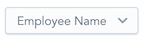
DropdownBodyComponent: the dropdown body.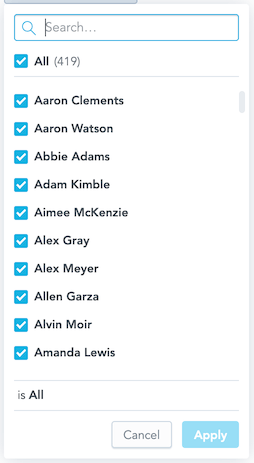
DropdownActionsComponent: the Apply and Cancel buttons.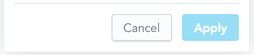
ElementsSearchBarComponent: the search bar.
ElementsSelectComponent: the element list.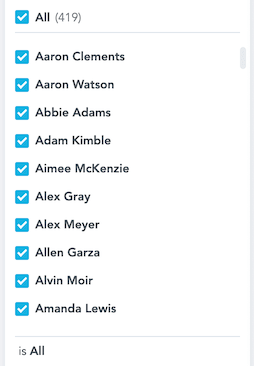
ElementsSelectLoadingComponent: the element list while it loads.
ElementsSelectItemComponent: one element in the list.
ElementsSelectActionsComponent: the select all control above the list.
ElementsSelectErrorComponent: the error shown when elements fail to load.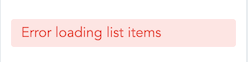
EmptyResultComponent: the message shown when no element matches.
StatusBarComponent: the status bar that summarizes the selection.
Props
| Prop | Type | Required | Description | Inherited from |
|---|---|---|---|---|
titleWithSelection | boolean | No | — | — |
alignPoints | IAlignPoint[] | No | Specifies the align points for the attribute filter dropdown body. In other words where the dropdown body should be placed. | IAttributeFilterCoreProps |
backend | IAnalyticalBackend | No | Specify an instance of analytical backend instance to work with. | IAttributeFilterCoreProps |
connectToPlaceholder | IPlaceholder<IAttributeFilter> | No | Specify @gooddata/sdk-ui#IPlaceholder to use to get and set the value of the attribute filter. | IAttributeFilterCoreProps |
customIcon | IFilterButtonCustomIcon | No | (Alpha) Represents a custom icon along with a tooltip. | IAttributeFilterCoreProps |
dependentDateFilters | IDashboardDateFilter[] | No | (Beta) Specifies a dependent date filter that will be used to reduce options for for current attribute filter. | IAttributeFilterCoreProps |
disabled | boolean | No | (Alpha) Specifies the visibility mode of the filter. | IAttributeFilterCoreProps |
displayAsLabel | ObjRef | No | (Alpha) Provide a attribute filter label used for representing elements in component. Used only for filter with elements selection. For text filters (arbitrary, match) it is not used. | IAttributeFilterCoreProps |
DropdownActionsComponent | ComponentType<IAttributeFilterDropdownActionsProps> | No | (Beta) Customize attribute filter dropdown actions component. | IAttributeFilterCustomComponentProps |
DropdownBodyComponent | ComponentType<IAttributeFilterDropdownBodyProps> | No | (Beta) Customize attribute filter dropdown body component. | IAttributeFilterCustomComponentProps |
DropdownButtonComponent | ComponentType<IAttributeFilterDropdownButtonProps> | No | (Beta) Customize attribute filter dropdown button component. | IAttributeFilterCustomComponentProps |
ElementsSearchBarComponent | ComponentType<IAttributeFilterElementsSearchBarProps> | No | (Beta) Customize attribute filter search bar component. | IAttributeFilterCustomComponentProps |
ElementsSelectActionsComponent | ComponentType<IAttributeFilterElementsActionsProps> | No | (Beta) Customize attribute filter elements select action component (Select all checkbox) | IAttributeFilterCustomComponentProps |
ElementsSelectComponent | ComponentType<IAttributeFilterElementsSelectProps> | No | (Beta) Customize attribute filter elements select component. | IAttributeFilterCustomComponentProps |
ElementsSelectErrorComponent | ComponentType<IAttributeFilterElementsSelectErrorProps> | No | (Beta) Customize attribute filter elements select error component. | IAttributeFilterCustomComponentProps |
ElementsSelectItemComponent | ComponentType<IAttributeFilterElementsSelectItemProps> | No | (Beta) Customize attribute filter elements select item component. | IAttributeFilterCustomComponentProps |
ElementsSelectLoadingComponent | ComponentType<IAttributeFilterElementsSelectLoadingProps> | No | (Beta) Customize attribute filter elements select loading component. | IAttributeFilterCustomComponentProps |
EmptyResultComponent | ComponentType<IAttributeFilterEmptyResultProps> | No | (Beta) Customize attribute filter empty result component. | IAttributeFilterCustomComponentProps |
enableImmediateAttributeFilterDisplayAsLabelMigration | boolean | No | Enables the migration of displayAsLabel to be immediately reported to the parent app. | IAttributeFilterCoreProps |
ErrorComponent | ComponentType<IAttributeFilterErrorProps> | No | (Beta) Customize attribute filter with a component to be rendered if initialization fails. | IAttributeFilterCustomComponentProps |
filter | IAttributeFilter | No | Specify an attribute filter that will be customized using this filter. | IAttributeFilterCoreProps |
FilterMenuComponent | ComponentType<IFilterMenuProps> | No | (Alpha) Customize filter mode menu component. | IAttributeFilterCustomComponentProps |
fullscreenOnMobile | boolean | No | Customize, whether the filter should take the entire screen on mobile devices. | IAttributeFilterCoreProps |
hiddenElements | string[] | No | If specified, these will be excluded from the elements available for selection and will also be removed from the resulting filter. This effectively behaves as if those elements were not part of the underlying display form. | IAttributeFilterCoreProps |
hideTooltips | boolean | No | (Alpha) When true, hides all help/info tooltip icons within the attribute filter. | IAttributeFilterCoreProps |
LoadingComponent | ComponentType<IAttributeFilterLoadingProps> | No | (Beta) Customize attribute filter with a component to be rendered if attribute filter is loading. Note that this will be rendered only during the initialization of the attribute filter. | IAttributeFilterCustomComponentProps |
locale | ILocale | No | Locale to use for localization of appearing texts. | IAttributeFilterCoreProps |
menuConfig | IAttributeFilterMenuConfig | No | (Alpha) Configuration for the attribute filter header menu. | IAttributeFilterCoreProps |
onApply | OnApplyCallbackType | No | Specify function which will be called when user clicks ‘Apply’ button on this filter. Note: this callback is typically not called when using Dashboard apply filters mode ALL_AT_ONCE because there is no apply button dispalyed in attribute filter component. See withoutApply prop. | IAttributeFilterCoreProps |
onChange | OnChangeCallbackType | No | Specify function which will be called when user changes filter working selection. This is the selection that is staged for application. Not applied yet. Covers all filter modes: elements, arbitrary, match. | IAttributeFilterCoreProps |
onError | (error: GoodDataSdkError) => void | No | Callback that will be triggered when error is thrown. | IAttributeFilterCoreProps |
onInitLoadingChanged | (loading: boolean, attribute?: IAttributeMetadataObject) => void | No | Callback that will be triggered when initialization loading state changes. | IAttributeFilterCoreProps |
onSelect | OnSelectCallbackType | No | (Deprecated) Specify function which will be called when user changes filter working selection. | IAttributeFilterCoreProps |
overlayPositionType | OverlayPositionType | No | Specifies the overlay position type for the attribute filter dropdown. | IAttributeFilterCoreProps |
parentFilterOverAttribute | ParentFilterOverAttributeType | No | Specify the over attribute - an attribute the filter and its parent filter are connected through. | IAttributeFilterCoreProps |
parentFilters | AttributeFiltersOrPlaceholders | No | Specifies a parent attribute filter that will be used to reduce options for current attribute filter. | IAttributeFilterCoreProps |
selectFirst | boolean | No | Specify if first available element should be automatically selected for empty selection. | IAttributeFilterCoreProps |
selectionMode | DashboardAttributeFilterSelectionMode | No | Customize, how many elements can be selected by filter. | IAttributeFilterCoreProps |
showHeader | boolean | No | (Alpha) When true, always show the dropdown header with title and filter mode menu, even when there is only one available filter mode. | IAttributeFilterCoreProps |
staticElements | IAttributeElement[] | No | If specified, these elements will replace the elements that would be loaded from the server. Note that if using this, limiting measures and/or filters will not work: it is your responsibility to filter the static elements yourself. | IAttributeFilterCoreProps |
StatusBarComponent | ComponentType<IAttributeFilterStatusBarProps> | No | (Beta) Customize attribute filter status bar component. | IAttributeFilterCustomComponentProps |
TextFilterBodyComponent | ComponentType<ITextFilterBodyProps> | No | (Alpha) Customize text filter body component. | IAttributeFilterCustomComponentProps |
title | string | No | Specify title for the attribute filter. | IAttributeFilterCoreProps |
validateElementsBy | ObjRef[] | No | Specify the items that are used for elements availability validation (metrics or attributes, labels, or facts that the backend will use to build validation metrics from). Only the elements that are compatible with the provided elements will be shown in the filter. | IAttributeFilterCoreProps |
withoutApply | boolean | No | (Alpha) This enables filter mode without apply button. If true, it is responsibility of a client, to apply filters when needed. Typically uses onChange callback to catch filter state. Note, onApply callback is not called when this is true. | IAttributeFilterCoreProps |
workingFilter | IAttributeFilter | No | (Deprecated) (Alpha) Specify a working attribute filter that will be shown. | IAttributeFilterCoreProps |
workspace | string | No | Specify workspace to work with. | IAttributeFilterCoreProps |
Related
Configure AttributeFilterButton with a filter definition or placeholder, handle selected values, choose single or multiple selection, and replace its UI components.
Build fully custom attribute filter UIs with SDK-managed state, elements loading, and apply callbacks.
Access the IMultiSelectAttributeFilterHandler Core API directly for low-level attribute filter control.
Create attribute, date, measure-value, and ranking filters and apply them to charts, InsightView, or individual measures.
Create common and composed visualization definition placeholders, update and resolve their values with React hooks, and use them with TypeScript.