Date filter
Configure DateFilter with filter options, granularities, and a date format, and handle the applied selection.
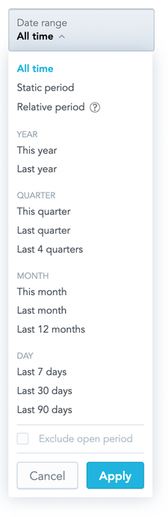
DateFilter is a dropdown that lists date filter options. You pass the options to offer (filterOptions) and an onApply callback. When a user clicks Apply, the callback receives the selected option and the exclude-current-period flag.
Structure
import "@gooddata/sdk-ui-filters/styles/css/main.css";
import { DateFilter } from "@gooddata/sdk-ui-filters";

<DateFilter
    filterOptions={<date-filter-options>}
    selectedFilterOption={<selected-option>}
    excludeCurrentPeriod={<boolean>}
    availableGranularities={<granularities>}
    dateFilterMode={<"active" | "readonly" | "hidden">}
    onApply={<on-apply-callback>}
/>;
Example
The filter starts on All time. When a user clicks Apply, the component stores the selected option and the exclude-current-period flag in state.
import { useState } from "react";
import { DateFilter, defaultDateFilterOptions, type DateFilterOption } from "@gooddata/sdk-ui-filters";
import type { DateFilterGranularity } from "@gooddata/sdk-model";

import "@gooddata/sdk-ui-filters/styles/css/main.css";

const availableGranularities: DateFilterGranularity[] = [
    "GDC.time.month",
    "GDC.time.year",
    "GDC.time.quarter",
    "GDC.time.date",
];

// Provide your own date filter options (IDateFilterOptionsByType), or use the defaults
const dateFilterOptions = defaultDateFilterOptions;

export const DateFilterExample = () => {
    const [selectedFilterOption, setSelectedFilterOption] = useState<DateFilterOption>(
        dateFilterOptions.allTime!,
    );
    const [excludeCurrentPeriod, setExcludeCurrentPeriod] = useState(false);

    return (
        <div style={{ width: 300 }}>
            <DateFilter
                excludeCurrentPeriod={excludeCurrentPeriod}
                selectedFilterOption={selectedFilterOption}
                filterOptions={dateFilterOptions}
                availableGranularities={availableGranularities}
                customFilterName="Date filter name"
                dateFilterMode="active"
                dateFormat="M/d/yy"
                onApply={(option, exclude) => {
                    setSelectedFilterOption(option);
                    setExcludeCurrentPeriod(exclude);
                }}
            />
        </div>
    );
};
To turn the selected option into a filter for a visualization, call DateFilterHelpers.mapOptionToAfm(option, dateDataSetRef, excludeCurrentPeriod). It returns an IDateFilter, or null for All time.
Granularities
availableGranularities sets the granularities users can pick in the relative period form.
availableGranularities option of relativeForm in the filter options was removed. Use the availableGranularities prop of DateFilter instead.Date format
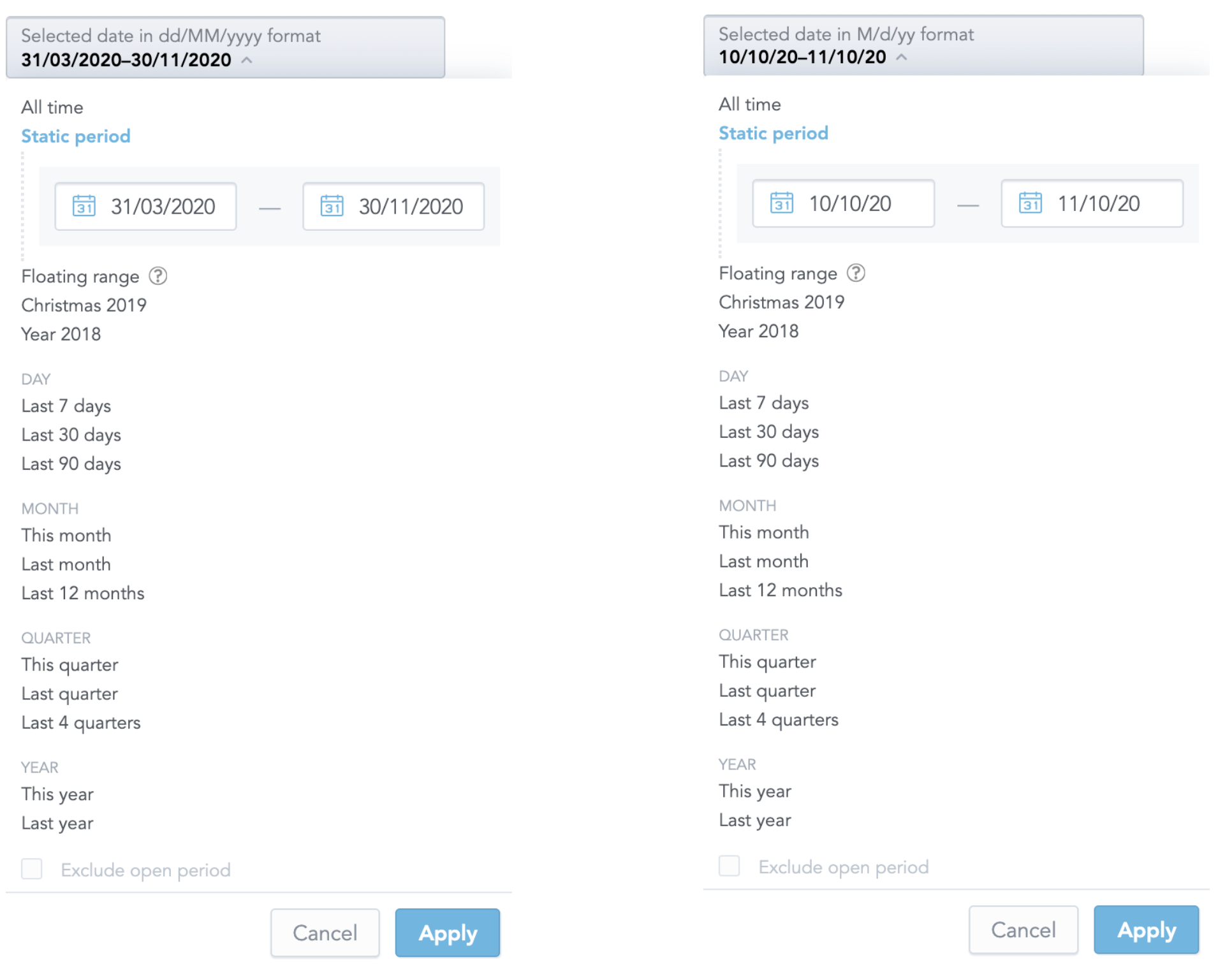
dateFormat sets how dates are displayed. Use any format that the date-fns library supports.
Time filtering
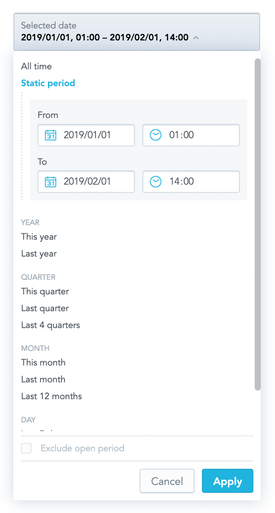
To let users pick a time in addition to a date in the static period form, set isTimeForAbsoluteRangeEnabled to true. Only GoodData Cloud and GoodData.CN support it.
Dashboard date filter presets
The presets that dashboards show in their date filters come from the dateFilterConfig organization or workspace setting, not from DateFilter props. See Customize the date filter presets.
Props
| Prop | Type | Required | Description | Inherited from |
|---|---|---|---|---|
availableGranularities | DateFilterGranularity[] | Yes | — | IDateFilterOwnProps |
dateFilterMode | VisibilityMode | Yes | — | IDateFilterOwnProps |
excludeCurrentPeriod | boolean | Yes | — | IDateFilterStatePropsIntersection |
filterOptions | IDateFilterOptionsByType | Yes | — | IDateFilterOwnProps |
onApply | (dateFilterOption: DateFilterOption, excludeCurrentPeriod: boolean) => void | Yes | — | IDateFilterCallbackProps |
selectedFilterOption | DateFilterOption | Yes | — | IDateFilterStatePropsIntersection |
activeCalendars | IActiveCalendars | No | (Alpha) Active calendars configuration from workspace settings. Controls which calendar types (standard/fiscal) are available in the filter. | IDateFilterOwnProps |
ButtonComponent | ComponentType<IDateFilterButtonProps> | No | (Alpha) Specify custom button component | IDateFilterOwnProps |
customFilterName | string | No | — | IDateFilterOwnProps |
customIcon | IFilterButtonCustomIcon | No | (Alpha) Represents a custom icon with associated tooltip information. | IDateFilterOwnProps |
customRangeHint | ReactNode | No | (Alpha) Custom content rendered at the end of the hint area of the static period (absolute range) form, after the default date/time format hints. | IDateFilterOwnProps |
dateFormat | string | No | — | IDateFilterOwnProps |
enableEmptyDateValues | boolean | No | (Alpha) Enables empty date values UI (e.g. “Other → Empty values” preset, empty-values handling controls). | IDateFilterOwnProps |
FilterConfigurationComponent | ComponentType<IFilterConfigurationProps> | No | (Alpha) Represents a custom component for configuration. | IDateFilterOwnProps |
hideDisabledExclude | boolean | No | (Alpha) When true, the “Exclude current period” toggle is hidden when it is disabled for the currently selected option. | IDateFilterOwnProps |
isAbsoluteDateFilterGranularityEnabled | boolean | No | (Alpha) Enables Day/Week/Month/Quarter/Year granularity switching for the absolute (static) date filter. | IDateFilterOwnProps |
isEditMode | boolean | No | — | IDateFilterOwnProps |
isSecondsForAbsoluteRangeEnabled | boolean | No | If enabled, the absolute date filter form time inputs allow second-level precision (HH:mm:ss) instead of minute precision (HH:mm). Only takes effect together with isTimeForAbsoluteRangeEnabled. | IDateFilterOwnProps |
isTimeForAbsoluteRangeEnabled | boolean | No | — | IDateFilterOwnProps |
locale | string | No | — | IDateFilterOwnProps |
onCancel | () => void | No | — | IDateFilterCallbackProps |
onClose | () => void | No | — | IDateFilterCallbackProps |
onOpen | () => void | No | — | IDateFilterCallbackProps |
onSelect | (dateFilterOption: DateFilterOption, excludeCurrentPeriod: boolean) => void | No | — | IDateFilterCallbackProps |
openOnInit | boolean | No | — | IDateFilterOwnProps |
overlayPositionType | OverlayPositionType | No | Specifies the overlay position type for the date filter dropdown. | IDateFilterOwnProps |
showDropDownHeaderMessage | boolean | No | — | IDateFilterOwnProps |
weekStart | WeekStart | No | The day weeks start on in the calendars and in the list of weeks. Defaults to Sunday. | IDateFilterOwnProps |
withoutApply | boolean | No | (Alpha) This enables filter mode without apply button. If true, it is responsibility of a client, to appy filters when needed. Typically uses onSelect callback to catch filter state. Note, onApply callback is not called when this is true. | IDateFilterOwnProps |
workingExcludeCurrentPeriod | boolean | No | (Deprecated) (Alpha) Working filter exclude current period used for synchronization inner filter state with outer given state. Makes a controlled component state out of this. | IDateFilterOwnProps |
workingSelectedFilterOption | DateFilterOption | No | (Deprecated) (Alpha) Working filter option used for synchronization inner filter state with outer given state. Makes a controlled component state out of this. | IDateFilterOwnProps |
Related
Create attribute, date, measure-value, and ranking filters and apply them to charts, InsightView, or individual measures.
Configure AttributeFilterButton with a filter definition or placeholder, handle selected values, choose single or multiple selection, and replace its UI components.
Create same-period-last-year and previous-period derived measures with newPopMeasure and newPreviousPeriodMeasure.
Split an IFilter array by kind, find the filter for a display form, read or replace the selected elements, and detect an empty selection without reading filter internals.
Change the granularities and presets that dashboard date filters offer by creating the dateFilterConfig organization or workspace setting.