Measure value filter
Let users edit and apply a measure value filter, configure input formatting and null handling, or render the dropdown with a custom toggle button.
MeasureValueFilter is a dropdown that lets users create a measure value filter or edit an existing one. When a user clicks Apply, the onApply callback receives a measure value filter that you can pass to a visualization.
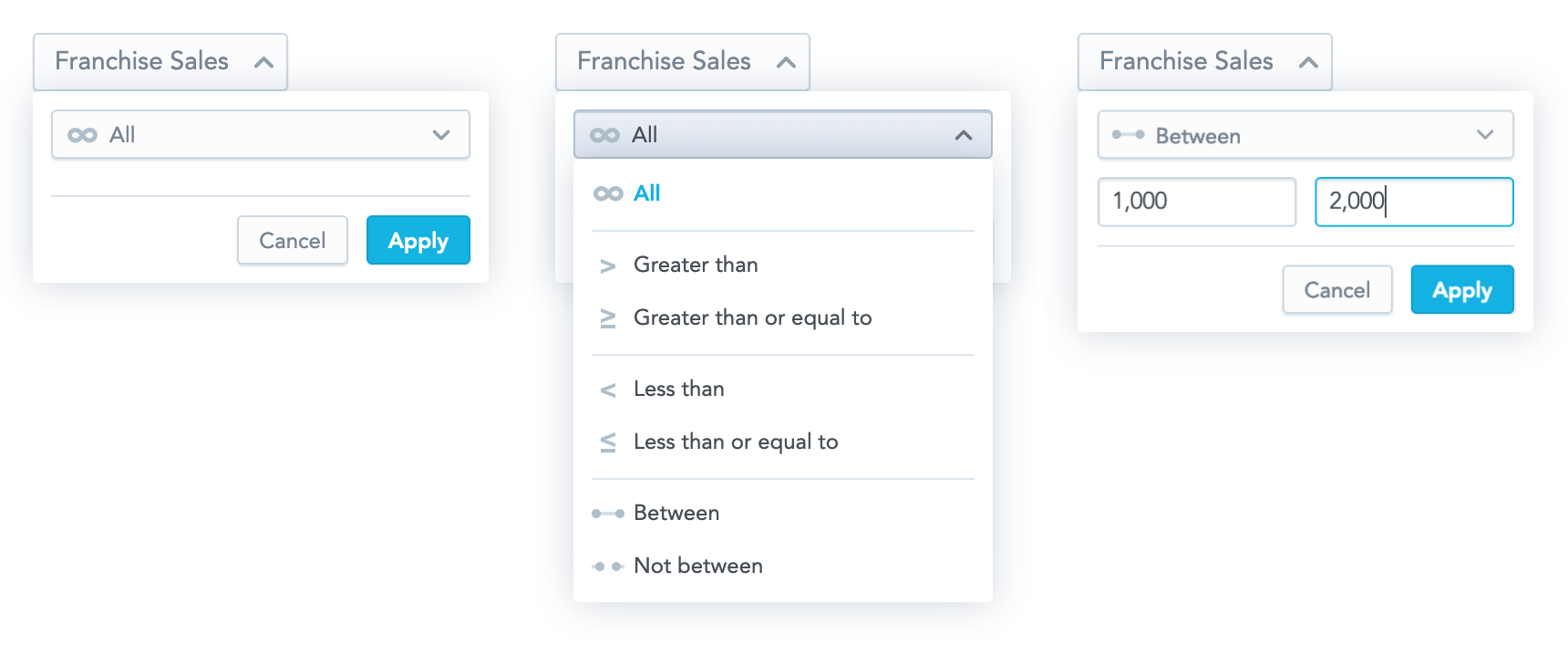
Structure
import "@gooddata/sdk-ui-filters/styles/css/main.css";
import { MeasureValueFilter } from "@gooddata/sdk-ui-filters";

<MeasureValueFilter
  onApply={<on-apply-callback>}
  onCancel={<on-cancel-callback>}
  filter={<filter>}
  measureIdentifier={<measure-local-identifier>}
  buttonTitle={<toggle-button-title>}
  usePercentage={<percentage-measure-boolean>}
  warningMessage={<warning-message>}
/>
Example
The following example shows a bar chart displaying one measure sliced by one attribute. Users can filter the displayed bars with MeasureValueFilter.
import { useState } from "react";
import "@gooddata/sdk-ui-filters/styles/css/main.css";
import "@gooddata/sdk-ui-charts/styles/css/main.css";
import { MeasureValueFilter } from "@gooddata/sdk-ui-filters";
import { BarChart } from "@gooddata/sdk-ui-charts";
import { type IMeasureValueFilter, measureLocalId, newMeasureValueFilter } from "@gooddata/sdk-model";
import * as Md from "./catalog.js";

const measureTitle = "$ Total Sales";

export const SalesByResort = () => {
    const [filter, setFilter] = useState<IMeasureValueFilter | null>(
        newMeasureValueFilter(Md.$TotalSales, "GREATER_THAN", 0),
    );

    return (
        <div>
            <MeasureValueFilter
                onApply={setFilter}
                filter={filter ?? undefined}
                measureIdentifier={measureLocalId(Md.$TotalSales)}
                buttonTitle={measureTitle}
            />
            <BarChart
                measures={[Md.$TotalSales]}
                viewBy={[Md.LocationResort]}
                filters={filter ? [filter] : []}
            />
        </div>
    );
};
Formatting user input
The separators prop sets the thousands separator (, by default) and the decimal separator (. by default) of the value input.
<MeasureValueFilter
    onApply={setFilter}
    measureIdentifier={measureLocalId(Md.$TotalSales)}
    buttonTitle="$ Total Sales"
    separators={{ thousand: " ", decimal: "," }}
/>
Percentage measures
Set usePercentage to true to format the filtered measure as a percentage, so the dropdown accepts percentage values instead of the measure values. It defaults to false.
Keep usePercentage set to false when the filtered measure has computeRatio enabled: such a measure is filtered by its actual values, not by the percentages. See Filter by a percentage measure.
Warning message
warningMessage shows a message in the dropdown. Pass a string, or an object with text and severity ("low", "medium", or "high"), where severity sets the background color of the message.
Operator selection
Users can pick the comparison operator in the dropdown. To hide the operator picker, set enableOperatorSelection to false. It defaults to true.
Treating null values as 0
By default, an execution containing a measure value filter does not pass null (missing) values to arithmetic operations. However, you can allow users to make the execution treat the null values as 0 and include the null results in the filtering process.
To let users do so, show the “Treat blank values as 0” checkbox in the filter dialog by setting displayTreatNullAsZeroOption to true. To select the checkbox by default, set treatNullAsZeroDefaultValue to true. Both default to false.

<MeasureValueFilter
    onApply={setFilter}
    measureIdentifier={measureLocalId(Md.$TotalSales)}
    buttonTitle="$ Total Sales"
    displayTreatNullAsZeroOption={true}
    treatNullAsZeroDefaultValue={true}
/>
Custom toggle button
To toggle the filter dropdown with your own button, use MeasureValueFilterDropdown (beta). It renders only the dropdown body, outside of the current DOM tree, using portals.

MeasureValueFilterDropdown takes the same props as MeasureValueFilter, with these differences:
- It has no
buttonTitle. onCancelis required, because you use it to hide the dropdown.anchorEl(optional) sets the element the dropdown is aligned to, typically your toggle button. It takes anHTMLElementor a CSS selector string and defaults to"body".
Props
| Prop | Type | Required | Description | Inherited from |
|---|---|---|---|---|
buttonTitle | string | Yes | — | — |
autoOpen | boolean | No | When toggled from falsy to truthy, opens the dropdown once. A re-render with the same truthy value will not re-open it after the user has dismissed it. | — |
buttonDisabled | boolean | No | — | — |
buttonSubtitle | string | No | — | — |
buttonTitleExtension | ReactNode | No | — | — |
onCancel | () => void | No | — | — |
measureIdentifier | string | Yes | — | IMeasureValueFilterCommonProps |
onApply | (filter: IMeasureValueFilter | null) => void | Yes | — | IMeasureValueFilterCommonProps |
alignPoints | IAlignPoint[] | No | Optional alignment points for the dropdown overlay. | IMeasureValueFilterCommonProps |
BodyComponent | ComponentType<IMeasureValueFilterBodyProps> | No | Customize the dropdown body — the area between the header and the actions footer. | IMeasureValueFilterCustomComponentProps |
catalogDimensionality | IDimensionalityItem[] | No | Catalog items available for dimensionality | IMeasureValueFilterCommonProps |
dimensionality | IDimensionalityItem[] | No | — | IMeasureValueFilterCommonProps |
displayTreatNullAsZeroOption | boolean | No | — | IMeasureValueFilterCommonProps |
DropdownActionsComponent | ComponentType<IMeasureValueFilterDropdownActionsProps> | No | Customize the dropdown actions (footer) component. | IMeasureValueFilterCustomComponentProps |
DropdownButtonComponent | ComponentType<IMeasureValueFilterDropdownButtonProps> | No | Customize MeasureValueFilter dropdown button (header) component. | IMeasureValueFilterCustomComponentsProps |
enableMultipleConditions | boolean | No | Enables UI support for defining multiple measure value filter conditions. When set to false (default), only a single condition is shown/edited and, if the provided filter contains multiple conditions, only the first one is used. | IMeasureValueFilterCommonProps |
enableOperatorSelection | boolean | No | — | IMeasureValueFilterCommonProps |
enableRankingWithMvf | boolean | No | Enables using ranking filters together with measure value filters (MVF). | IMeasureValueFilterCommonProps |
filter | IMeasureValueFilter | No | — | IMeasureValueFilterCommonProps |
format | string | No | Number format pattern for the measure (e.g., “#,##0.00”, “$#,##0”, etc.). When provided, values in the preview section will be formatted using this pattern. If not provided, falls back to simple number formatting with separators. | IMeasureValueFilterCommonProps |
fullscreenOnMobile | boolean | No | When true, the dropdown takes the entire screen on mobile devices. | IMeasureValueFilterCommonProps |
insightDimensionality | IDimensionalityItem[] | No | — | IMeasureValueFilterCommonProps |
isDimensionalityEnabled | boolean | No | — | IMeasureValueFilterCommonProps |
isFilterSummaryEnabled | boolean | No | Controls visibility of the textual filter summary shown above the dropdown footer. Defaults to true. | IMeasureValueFilterCommonProps |
isHeaderEnabled | boolean | No | When true, renders a header at the top of the dropdown body with the metric title and a question-mark icon revealing metric details on hover/focus. Defaults to false. | IMeasureValueFilterCommonProps |
isLoadingCatalogDimensionality | boolean | No | Whether catalog dimensionality is currently being loaded. If true, the attribute picker can show a small loading indicator. | IMeasureValueFilterCommonProps |
isViewMode | boolean | No | When true, hides explanatory help tooltips (question marks) inside the dropdown. Intended for read-only / view-mode contexts where the educational UI is not needed. | IMeasureValueFilterCommonProps |
loadCatalogDimensionality | (dimensionality: ObjRefInScope[]) => Promise<IDimensionalityItem[]> | No | Callback for loading catalog dimensionality items lazily. When provided, the dimensionality picker can call this on demand (e.g. when opened) to load compatible attributes/dates for the current dimensionality. | IMeasureValueFilterCommonProps |
loadMetricDetails | () => Promise<IMeasureMetadataObject | undefined> | No | Loader for the metric details shown in the dropdown header tooltip. | IMeasureValueFilterCommonProps |
locale | string | No | — | IMeasureValueFilterCommonProps |
measureTitle | string | No | Human-readable measure title used in UI texts (e.g., preview). If not provided, the preview falls back to showing only operator/value parts. | IMeasureValueFilterCommonProps |
onChange | (filter: IMeasureValueFilter | null) => void | No | Optional change callback used in IMeasureValueFilterCommonProps.withoutApply mode. When withoutApply is true, every meaningful state change (operator switch, value commit, dimensionality update, treat-null-values toggle) is propagated through this callback instead of waiting for the user to click the Apply button. | IMeasureValueFilterCommonProps |
onDimensionalityChange | (dimensionality: ObjRefInScope[]) => void | No | Callback triggered when dimensionality changes. Used to revalidate catalog items after selection changes. | IMeasureValueFilterCommonProps |
separators | ISeparators | No | — | IMeasureValueFilterCommonProps |
showSimplifiedSummary | boolean | No | When true, renders a simplified filter summary: the “Preview:” header and the metric title are omitted, so only the conditions (and dimensionality, if any) are shown. Defaults to false. | IMeasureValueFilterCommonProps |
treatNullAsZeroDefaultValue | boolean | No | — | IMeasureValueFilterCommonProps |
usePercentage | boolean | No | — | IMeasureValueFilterCommonProps |
useShortFormat | boolean | No | When true, uses K/M/B shortening for compact display in the preview (e.g., “1K” instead of “1,000”). When false or undefined, uses full metric format. This provides consistency between the filter button and preview display. | IMeasureValueFilterCommonProps |
warningMessage | WarningMessage | No | — | IMeasureValueFilterCommonProps |
withoutApply | boolean | No | When true, the dropdown hides its default Apply/Cancel footer and propagates intermediate filter state through IMeasureValueFilterCommonProps.onChange instead of accumulating changes until the user clicks Apply. Intended for hosts (such as the Dashboard “Apply together” mode) that collect working filter changes and apply them via a global Apply action. | IMeasureValueFilterCommonProps |
Related
Let users edit and apply a ranking filter to a visualization, or render the filter dropdown with a custom toggle button.
Create attribute, date, measure-value, and ranking filters and apply them to charts, InsightView, or individual measures.
Configure AttributeFilterButton with a filter definition or placeholder, handle selected values, choose single or multiple selection, and replace its UI components.
Configure DateFilter with filter options, granularities, and a date format, and handle the applied selection.