Ranking filter
Let users edit and apply a ranking filter to a visualization, or render the filter dropdown with a custom toggle button.
RankingFilter is a dropdown that lets users create a ranking filter or edit an existing one. When a user clicks Apply, the onApply callback receives a ranking filter that you can pass to a visualization.
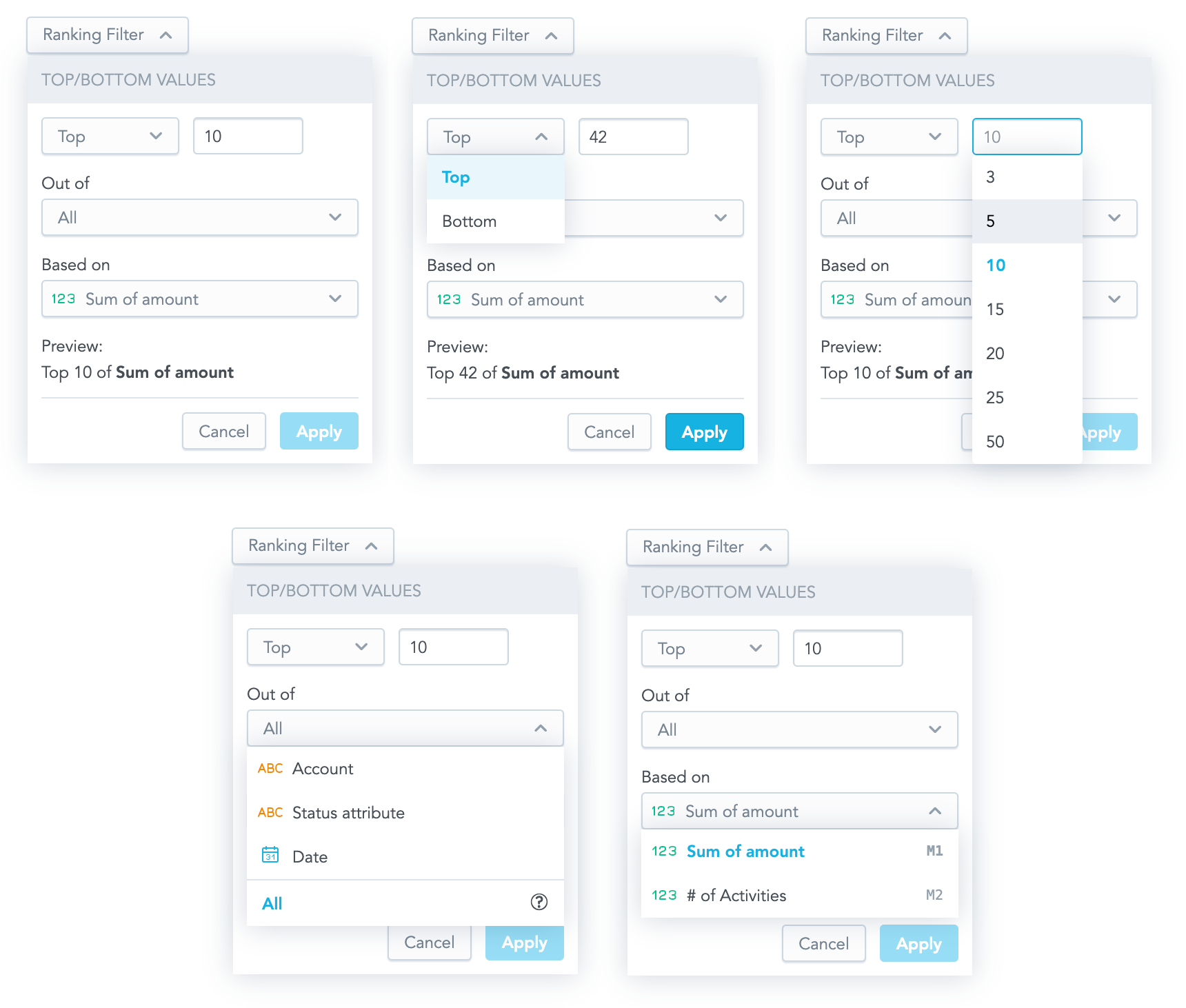
Structure
import "@gooddata/sdk-ui-filters/styles/css/main.css";
import { RankingFilter } from "@gooddata/sdk-ui-filters";

<RankingFilter
  onApply={<on-apply-callback>}
  onCancel={<on-cancel-callback>}
  filter={<filter>}
  buttonTitle={<toggle-button-title>}
  measureItems={<visualization-measures>}
  attributeItems={<visualization-attributes>}
/>
Example
The following example shows a table displaying one measure sliced by one attribute. Users can filter the displayed rows with RankingFilter.
import { FC, Fragment, useState } from "react";
import { PivotTable } from "@gooddata/sdk-ui-pivot";
import {
    attributeLocalId,
    localIdRef,
    measureLocalId,
    modifyAttribute,
    modifyMeasure,
    newRankingFilter,
} from "@gooddata/sdk-model";
import { RankingFilter, type IMeasureDropdownItem, type IAttributeDropdownItem } from "@gooddata/sdk-ui-filters";
import * as Md from "./catalog.js";

const FranchiseFees = modifyMeasure(Md.$FranchiseFees, (m) =>
    m.format("#,##0").localId("franchiseFees").title("Franchise Fees"),
);
const FranchisedSales = modifyMeasure(Md.$FranchisedSales, (m) =>
    m.format("#,##0").title("Franchise Sales").localId("franchiseSales"),
);
const LocationState = modifyAttribute(Md.LocationState, (a) => a.localId("LocationState"));
const LocationName = modifyAttribute(Md.LocationName.Default, (a) => a.localId("locationName"));

const measures = [FranchiseFees, FranchisedSales];
const attributes = [LocationState, LocationName];

const measureDropdownItems: IMeasureDropdownItem[] = [
    {
        title: "Franchise fees",
        ref: localIdRef(measureLocalId(FranchiseFees)),
        sequenceNumber: "M1",
    },
    {
        title: "Franchised sales",
        ref: localIdRef(measureLocalId(FranchisedSales)),
        sequenceNumber: "M2",
    },
];
const attributeDropdownItems: IAttributeDropdownItem[] = [
    {
        title: "Location state",
        ref: localIdRef(attributeLocalId(LocationState)),
        type: "ATTRIBUTE",
    },
    {
        title: "Location",
        ref: localIdRef(attributeLocalId(LocationName)),
        type: "ATTRIBUTE",
    },
];
export const RankingFilterExample: FC = () => {
    const [filter, setFilter] = useState(newRankingFilter(measureLocalId(FranchisedSales), "TOP", 3));
    return (
        <Fragment>
            <RankingFilter
                measureItems={measureDropdownItems}
                attributeItems={attributeDropdownItems}
                filter={filter}
                onApply={(filter) => setFilter(filter)}
                buttonTitle={"Ranking filter"}
            />
            <hr className="separator" />
            <div style={{ height: 300 }} className="s-pivot-table">
                <PivotTable measures={measures} rows={attributes} filters={[filter]} />
            </div>
        </Fragment>
    );
};
Custom toggle button
To toggle the filter dropdown with your own button, use RankingFilterDropdown. It renders only the dropdown body, outside of the current DOM tree, using portals.
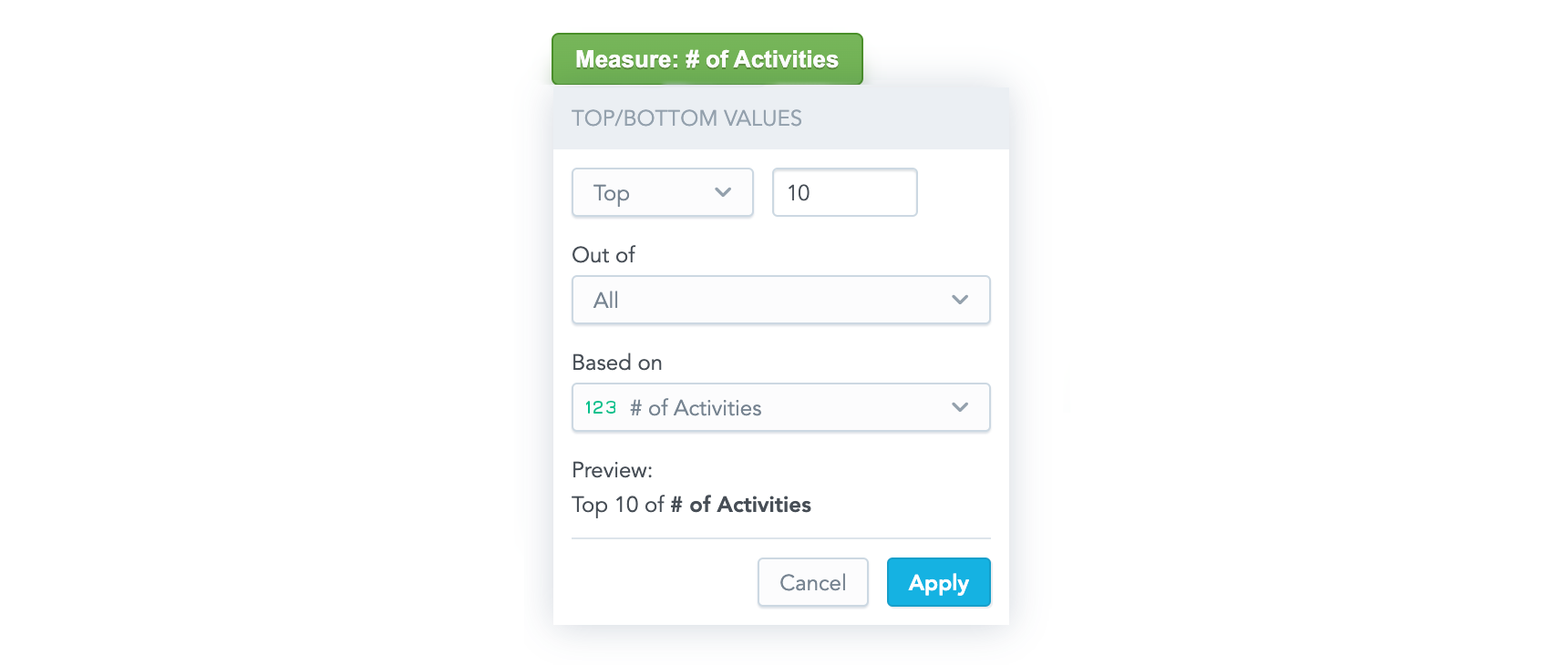
RankingFilterDropdown takes the same props as RankingFilter (see Props), with these differences:
- It has no
buttonTitle. onCancelis required, because you use it to hide the dropdown.anchorEl(optional) sets the element the dropdown is aligned to, typically your toggle button. It takes anHTMLElementor a CSS selector string and defaults to"body".
Props
| Prop | Type | Required | Description | Inherited from |
|---|---|---|---|---|
attributeItems | IAttributeDropdownItem[] | Yes | — | — |
buttonTitle | string | Yes | — | — |
filter | IRankingFilter | Yes | — | — |
measureItems | IMeasureDropdownItem[] | Yes | — | — |
onApply | (filter: IRankingFilter) => void | Yes | — | — |
customGranularitySelection | ICustomGranularitySelection | No | — | — |
locale | string | No | — | — |
onCancel | () => void | No | — | — |
onDropDownItemMouseOut | () => void | No | — | — |
onDropDownItemMouseOver | (ref: ObjRefInScope) => void | No | — | — |
Related
Let users edit and apply a measure value filter, configure input formatting and null handling, or render the dropdown with a custom toggle button.
Create attribute, date, measure-value, and ranking filters and apply them to charts, InsightView, or individual measures.
Configure AttributeFilterButton with a filter definition or placeholder, handle selected values, choose single or multiple selection, and replace its UI components.
Configure DateFilter with filter options, granularities, and a date format, and handle the applied selection.