Waterfall chart
Show cumulative contributions to a total with the WaterfallChart component.
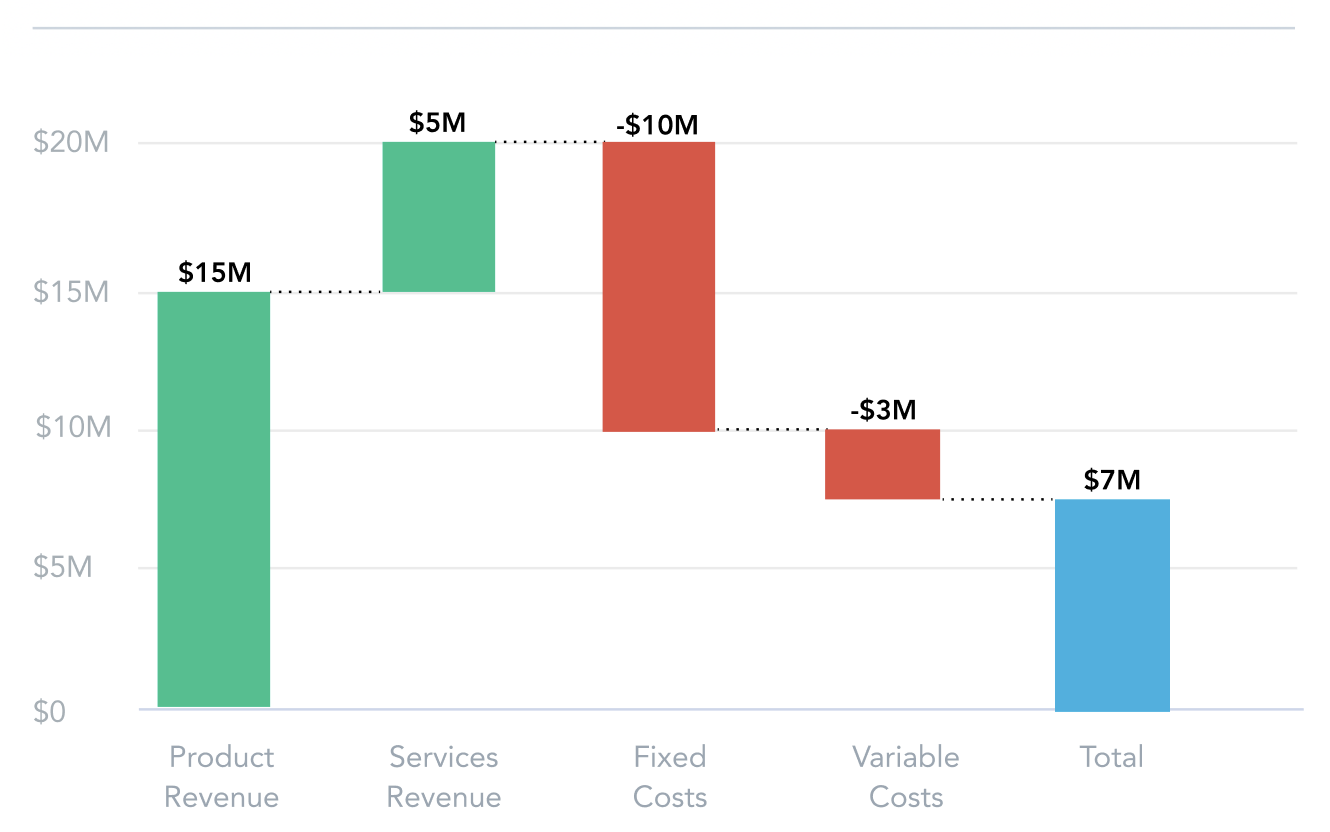
A waterfall chart shows the cumulative impact of sequentially introduced positive or negative values. Use it for financial data such as profit and loss statements or budget analysis, or wherever you want to show how a starting value changes step by step.
Buckets
| Prop | Required | Takes | What it does |
|---|---|---|---|
measures | Yes | One or more measures | With one measure, each viewBy value is a column. With more measures, each measure is a column. |
viewBy | No | One attribute | Splits a single measure into one column per attribute value. Not used with multiple measures. |
filters | No | Filters | Limits the data the chart shows. |
Sorting
To sort the data, pass sort items in the sortBy prop. See Sort items.
Configuration
Pass these options in the config prop. See Chart configuration for the shared options. The following example shows the config structure with sample values for waterfall charts:
import type { IChartConfig } from "@gooddata/sdk-ui-charts";

const config: IChartConfig = {
    colors: ["rgb(195, 49, 73)", "rgb(168, 194, 86)"],
    colorPalette: [{
        guid: "01",
        fill: {
            r: 195,
            g: 49,
            b: 73
        }
    }, {
        guid: "02",
        fill: {
            r: 168,
            g: 194,
            b: 86
        }
    }],
    colorMapping: [{
        // waterfall colors are assigned to the "total", "positive", and "negative" bars,
        // not to measures; the available ids are "properties.color.total",
        // "properties.color.positive", and "properties.color.negative"
        predicate: (headerItem) => {
            return headerItem.colorHeaderItem && (headerItem.colorHeaderItem.id === "properties.color.negative")
        },
        color: {
            type: "guid",
            value: "02"
        }
    }],
    legend: {
        enabled: true,
        position: "top",
    },
    dataLabels: {
        visible: "auto"
    },
    total: {
        enabled: true, // default; set to false to hide the computed total column
        name: "Total", // custom title of the computed total column
        measures: ["measure_localIdentifier"] // render these measures as total columns instead
    },
    separators: {
        thousand: ",",
        decimal: "."
    }
};
Total columns
The total option controls the total columns:
const config: IChartConfig = {
    total: {
        enabled: true,
        name: "Total",
        measures: ["revenue_total", "profit_total"]
    }
};
total.enabled(defaulttrue) appends a computed total column that sums all the other columns. Set it tofalseto hide it.total.namesets the title of the computed total column. The default is the localized “Total”.total.measureslists the local identifiers of measures that should be rendered as total columns (bars that start from zero) rather than as increments. This only makes sense with multiple measures. Whentotal.measuresis not empty, the computed total column is not added.
Usage patterns
A waterfall chart reads best with a small number of columns (typically 3 to 15) that represent sequential changes from a starting value to a final value.
Single measure with a viewBy attribute
When using a single measure with a viewBy attribute, each attribute value creates a column showing the incremental change. The chart appends a computed total column; use total.enabled and total.name to hide or rename it:
<WaterfallChart
    measures={[Md.$MonthlyRevenue]}
    viewBy={Md.Month}
    config={{
        total: {
            name: "Yearly total"
        }
    }}
/>
Multiple measures
When using multiple measures, each measure creates a column in the waterfall. The viewBy attribute cannot be used in this case. total.measures takes the measures’ local identifiers, so read them with measureLocalId:
import { measureLocalId } from "@gooddata/sdk-model";

<WaterfallChart
    measures={[Md.$StartingBalance, Md.$Income, Md.$Expenses, Md.$EndingBalance]}
    config={{
        total: {
            measures: [measureLocalId(Md.$EndingBalance)]
        }
    }}
/>
With total columns
You can mark specific measures as totals so that they render as total columns instead of increments:
import { newMeasure } from "@gooddata/sdk-model";

// Define a total measure with an explicit local identifier
const totalRevenue = newMeasure("total_revenue", (m) => m.title("Total Revenue").localId("total_revenue"));

<WaterfallChart
    measures={[Md.$Q1Revenue, Md.$Q2Revenue, Md.$Q3Revenue, Md.$Q4Revenue, totalRevenue]}
    config={{
        total: {
            measures: ["total_revenue"]
        }
    }}
/>
Structure
import "@gooddata/sdk-ui-charts/styles/css/main.css";
import { WaterfallChart } from "@gooddata/sdk-ui-charts";

<WaterfallChart
    measures={<measures>}
    config={<chart-config>}
    …
/>
Example
import "@gooddata/sdk-ui-charts/styles/css/main.css";
import { WaterfallChart } from "@gooddata/sdk-ui-charts";
import * as Md from "./catalog.js";

const style = { height: 300 };

<div style={style}>
    <WaterfallChart
        measures={[Md.$Revenue]}
        viewBy={Md.Quarter}
    />
</div>
Props
| Prop | Type | Required | Description | Inherited from |
|---|---|---|---|---|
measures | AttributesMeasuresOrPlaceholders | Yes | Specify one or more measures to segment the waterfall chart. | IWaterfallChartBucketProps |
backend | IAnalyticalBackend | No | Analytical backend, from which the chart will obtain data to visualize If you do not specify instance of analytical backend using this prop, then you MUST have BackendProvider up in the component tree. | IBucketChartProps |
config | IChartConfig | No | Configure chart’s behavior and appearance. | ICommonChartProps |
drillableItems | ExplicitDrill[] | No | Configure drillability; e.g. which parts of the visualization can be interacted with. | IVisualizationProps |
ErrorComponent | ComponentType<IErrorProps> | No | React component to display in the event when there is an error with either obtaining the data from backend or with the data itself. | IVisualizationProps |
execConfig | IExecutionConfig | No | Execution configuration, will provide the execution with necessary config before initiating execution. | ICommonChartProps |
exportTitle | string | No | Set title to use for exported files. | IVisualizationProps |
filters | NullableFiltersOrPlaceholders | No | Specify filters to apply on the data to chart. | IWaterfallChartBucketProps |
height | number | No | Set height of the chart (in pixels). | ICommonChartProps |
LoadingComponent | ComponentType<ILoadingProps> | No | React component to display while loading data from the backend. | IVisualizationProps |
locale | string | No | Set Locale for visualization localization. | IVisualizationProps |
onDataView | OnDataView | No | (Alpha) Called when the visualization loads a DataView, i.e. it receives data from the backend. | IVisualizationCallbacks |
onDrill | OnFiredDrillEvent | No | Called when user triggers a drill on a visualization. | IVisualizationCallbacks |
onError | OnError | No | Called when an error occurs while loading data for the visualization. | IVisualizationCallbacks |
onExportReady | OnExportReady | No | Called when the visualization is ready to be exported. | IVisualizationCallbacks |
onLegendReady | OnLegendReady | No | Called when legend is rendered. | IChartCallbacks |
onLoadingChanged | OnLoadingChanged | No | Called when loading status of the visualization changes - vis starts or stops loading | IVisualizationCallbacks |
placeholdersResolutionContext | any | No | Resolution context for composed placeholders. | IWaterfallChartBucketProps |
sortBy | SortsOrPlaceholders | No | Specify how to sort the data to chart. | IWaterfallChartBucketProps |
viewBy | AttributeOrPlaceholder | No | Specify viewBy attribute that will be used to create the column There will be a column for each value of the attribute. | IWaterfallChartBucketProps |
width | number | No | Set width of the chart (in pixels). | ICommonChartProps |
workspace | string | No | Identifier of analytical workspace, from which the chart will obtain data to visualize. If you do not specify workspace identifier, then you MUST have WorkspaceProvider up in the component tree. | IBucketChartProps |
Related
Display vertical bar comparisons with the ColumnChart component.
Display sequential stages of a process with the FunnelChart component.
Configure chart appearance, axes, legends, colors, and data labels.
Shared behavior of GoodData.UI visual components — responsive sizing, the style and data props model, and the visualization lifecycle callbacks.