Bubble chart
Show three-dimensional data relationships using the BubbleChart component.
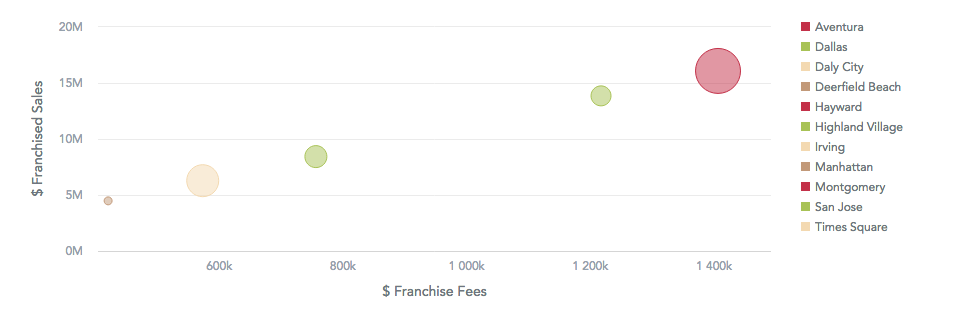
A bubble chart shows data as bubbles using Cartesian coordinates. Bubble charts typically have three measures, one for the X axis, one for the Y axis, and one that determines the size of each bubble. The data is sliced by an attribute, with each bubble (an attribute item) noted with a different color. Use a bubble chart to show relationships and patterns among data points, for example, cities positioned by their coordinates, with the bubble size showing each city’s GDP.
Buckets
| Prop | Required | Takes | What it does |
|---|---|---|---|
xAxisMeasure | No | One measure | Positions the bubbles on the X axis. |
yAxisMeasure | No | One measure | Positions the bubbles on the Y axis. |
size | No | One measure | Sets the size of the bubbles. Without it, the bubbles have a default size. |
viewBy | No | One attribute | Creates one bubble per attribute value, each in its own color. |
filters | No | Filters | Limits the data the bubble chart shows. |
Sorting
BubbleChart applies no default sorting. You can pass sortBy to sort the data.
Configuration
Pass these options in the config prop. See Chart configuration for details.
| Option | What it changes |
|---|---|
colors, colorPalette, colorMapping | Colors of the bubbles. With viewBy, each bubble gets its own color. |
legend | Whether the legend shows and where. The legend lists the viewBy values. |
dataLabels | visible shows or hides the labels, which show the size value of each bubble. style: "backplate" adds a background behind them. |
xaxis, yaxis | The X axis (xAxisMeasure) and the Y axis (yAxisMeasure). visible, labelsEnabled, rotation, and name set how the axis, its labels, and its name show. min and max set the axis range. format: "inherit" formats the axis labels with the measure format. |
grid | enabled shows or hides the grid lines on both axes. |
zoomInsight | true lets you zoom in along the X axis and pan while holding Shift. |
separators | Thousands and decimal separators in the number format. |
Limits
- A bubble chart renders up to 10,000 bubbles. With more, the chart shows an error and
onErrorreceives aDataTooLargeToDisplaySdkError. Filter the data to fit. - A bubble with an empty value in any of its measures isn’t drawn.
Structure
import "@gooddata/sdk-ui-charts/styles/css/main.css";
import { BubbleChart } from "@gooddata/sdk-ui-charts";

<BubbleChart
    xAxisMeasure={<measure>}
    yAxisMeasure={<measure>}
    size={<measure>}
    viewBy={<attribute>}
    config={<chart-config>}
    …
/>
Example
import "@gooddata/sdk-ui-charts/styles/css/main.css";
import { BubbleChart } from "@gooddata/sdk-ui-charts";

import * as Md from "./catalog.js";

const style = { height: 300 };

<div style={style}>
    <BubbleChart
        xAxisMeasure={Md.$FranchiseFees}
        yAxisMeasure={Md.$FranchisedSales}
        size={Md.$AvgDailyTotalSalesByServer}
        viewBy={Md.LocationResort}
    />
</div>
Props
| Prop | Type | Required | Description | Inherited from |
|---|---|---|---|---|
backend | IAnalyticalBackend | No | Analytical backend, from which the chart will obtain data to visualize If you do not specify instance of analytical backend using this prop, then you MUST have BackendProvider up in the component tree. | IBucketChartProps |
config | IChartConfig | No | Configure chart’s behavior and appearance. | ICommonChartProps |
drillableItems | ExplicitDrill[] | No | Configure drillability; e.g. which parts of the visualization can be interacted with. | IVisualizationProps |
ErrorComponent | ComponentType<IErrorProps> | No | React component to display in the event when there is an error with either obtaining the data from backend or with the data itself. | IVisualizationProps |
execConfig | IExecutionConfig | No | Execution configuration, will provide the execution with necessary config before initiating execution. | ICommonChartProps |
exportTitle | string | No | Set title to use for exported files. | IVisualizationProps |
filters | NullableFiltersOrPlaceholders | No | Specify filters to apply on the data to chart. | IBubbleChartBucketProps |
height | number | No | Set height of the chart (in pixels). | ICommonChartProps |
LoadingComponent | ComponentType<ILoadingProps> | No | React component to display while loading data from the backend. | IVisualizationProps |
locale | string | No | Set Locale for visualization localization. | IVisualizationProps |
onDataView | OnDataView | No | (Alpha) Called when the visualization loads a DataView, i.e. it receives data from the backend. | IVisualizationCallbacks |
onDrill | OnFiredDrillEvent | No | Called when user triggers a drill on a visualization. | IVisualizationCallbacks |
onError | OnError | No | Called when an error occurs while loading data for the visualization. | IVisualizationCallbacks |
onExportReady | OnExportReady | No | Called when the visualization is ready to be exported. | IVisualizationCallbacks |
onLegendReady | OnLegendReady | No | Called when legend is rendered. | IChartCallbacks |
onLoadingChanged | OnLoadingChanged | No | Called when loading status of the visualization changes - vis starts or stops loading | IVisualizationCallbacks |
placeholdersResolutionContext | any | No | Resolution context for composed placeholders. | IBubbleChartBucketProps |
size | MeasureOrPlaceholder | No | Specify measure which will be used to determine the size of each bubble. | IBubbleChartBucketProps |
sortBy | SortsOrPlaceholders | No | Specify how to sort the data to chart. | IBubbleChartBucketProps |
viewBy | AttributeOrPlaceholder | No | Specify attribute whose values will be used to create the bubbles. | IBubbleChartBucketProps |
width | number | No | Set width of the chart (in pixels). | ICommonChartProps |
workspace | string | No | Identifier of analytical workspace, from which the chart will obtain data to visualize. If you do not specify workspace identifier, then you MUST have WorkspaceProvider up in the component tree. | IBucketChartProps |
xAxisMeasure | MeasureOrPlaceholder | No | Specify measure which will be used to position bubbles on the X axis. | IBubbleChartBucketProps |
yAxisMeasure | MeasureOrPlaceholder | No | Specify measure which will be used to position bubbles on the Y axis | IBubbleChartBucketProps |
Related
Show correlation between two measures with the ScatterPlot component.
Visualize data density across two dimensions with the Heatmap component.
Configure chart appearance, axes, legends, colors, and data labels.
Shared behavior of GoodData.UI visual components — responsive sizing, the style and data props model, and the visualization lifecycle callbacks.