Dependency wheel chart
Visualize flows and relationships between categories with the DependencyWheel component.
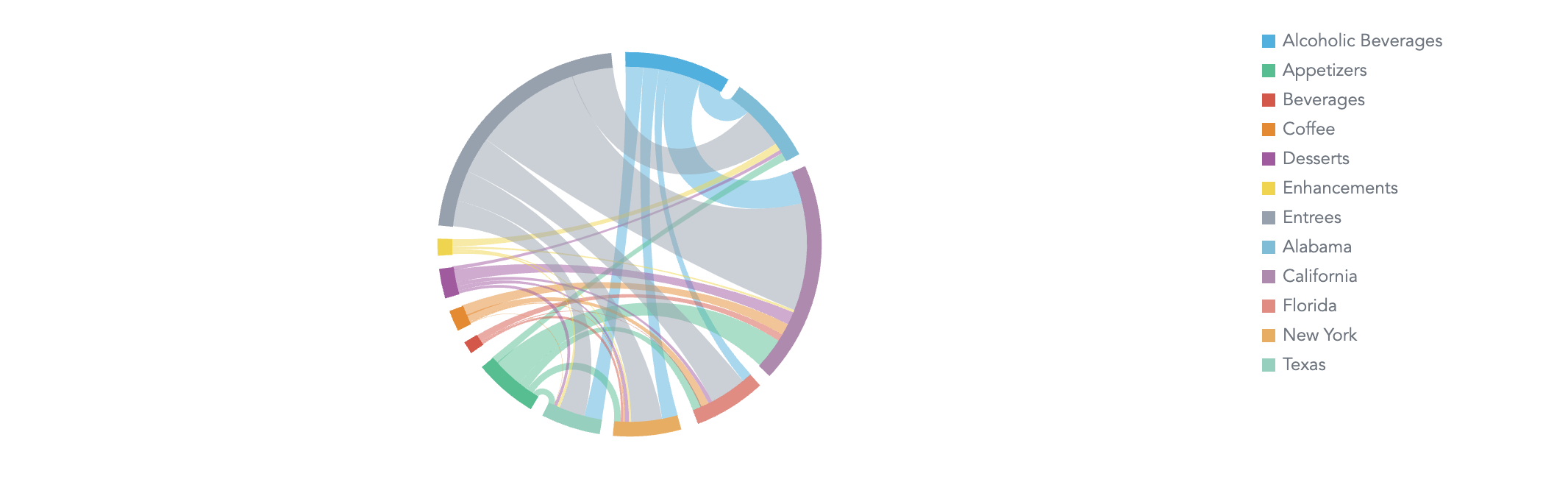
A dependency wheel chart is a type of flow diagram, where nodes are laid out in a circle, and links are drawn between them. The width of the link and size of the nodes are proportional to the flow quantity or weight of each link. Use it to show the relationships among entities, for example, the dependencies between tasks in a project.
Buckets
| Prop | Required | Takes | What it does |
|---|---|---|---|
measure | Yes | One measure | Sets the width of the links. |
attributeFrom | No | One attribute | Sets the source nodes of the links, one node per value. |
attributeTo | No | One attribute | Sets the target nodes of the links. A value that also appears in attributeFrom shares its node. |
filters | No | Filters | Limits the data the dependency wheel shows. |
Sorting
The dependency wheel applies no default sorting. DependencyWheelChart accepts a sortBy prop but doesn’t add it to the execution, so the prop has no effect.
Configuration
Pass these options in the config prop. See Chart configuration for details.
| Option | What it changes |
|---|---|
colors, colorPalette, colorMapping | Colors of the nodes, one per value of attributeFrom and attributeTo. |
legend | Whether the legend shows and where. The legend is hidden unless you set enabled: true, and it lists the nodes. position defaults to "right". |
dataLabels | visible shows or hides the node labels. |
separators | Thousands and decimal separators in the tooltip values. |
Limits
- A dependency wheel can’t show negative values. If the data contains any, the chart shows an error and
onErrorreceives aNegativeValuesSdkError. - A dependency wheel renders up to 10,000 nodes and 10,000 links. With more, the chart shows an error and
onErrorreceives aDataTooLargeToDisplaySdkError. Filter the data to fit.
Structure
import "@gooddata/sdk-ui-charts/styles/css/main.css";
import { DependencyWheelChart } from "@gooddata/sdk-ui-charts";

<DependencyWheelChart
    measure={<measure>}
    attributeFrom={<attribute>}
    attributeTo={<attribute>}
    config={<chart-config>}
    …
/>
Example
import "@gooddata/sdk-ui-charts/styles/css/main.css";
import { DependencyWheelChart } from "@gooddata/sdk-ui-charts";
import * as Md from "./catalog.js";

const style = { height: 300 };
const config = {
    separators: { decimal: ".", thousand: "," },
    legend: { position: "auto", enabled: true },
    dataLabels: { visible: false },
};

<div style={style}>
    <DependencyWheelChart
        measure={Md.TotalSales}
        attributeFrom={Md.MenuCategory}
        attributeTo={Md.LocationState}
        config={config}
    />
</div>
Props
| Prop | Type | Required | Description | Inherited from |
|---|---|---|---|---|
measure | IAttributeOrMeasure | Yes | Specify a measure whose values will be displayed as the width of the links | IDependencyWheelChartBucketProps |
attributeFrom | AttributeOrPlaceholder | No | Specify attribute, whose values will be used to create from element. | IDependencyWheelChartBucketProps |
attributeTo | AttributeOrPlaceholder | No | Specify attribute, whose values will be used to create to element. | IDependencyWheelChartBucketProps |
backend | IAnalyticalBackend | No | Analytical backend, from which the chart will obtain data to visualize If you do not specify instance of analytical backend using this prop, then you MUST have BackendProvider up in the component tree. | IBucketChartProps |
config | IChartConfig | No | Configure chart’s behavior and appearance. | ICommonChartProps |
drillableItems | ExplicitDrill[] | No | Configure drillability; e.g. which parts of the visualization can be interacted with. | IVisualizationProps |
ErrorComponent | ComponentType<IErrorProps> | No | React component to display in the event when there is an error with either obtaining the data from backend or with the data itself. | IVisualizationProps |
execConfig | IExecutionConfig | No | Execution configuration, will provide the execution with necessary config before initiating execution. | ICommonChartProps |
exportTitle | string | No | Set title to use for exported files. | IVisualizationProps |
filters | NullableFiltersOrPlaceholders | No | Specify filters to apply on the data to chart. | IDependencyWheelChartBucketProps |
height | number | No | Set height of the chart (in pixels). | ICommonChartProps |
LoadingComponent | ComponentType<ILoadingProps> | No | React component to display while loading data from the backend. | IVisualizationProps |
locale | string | No | Set Locale for visualization localization. | IVisualizationProps |
onDataView | OnDataView | No | (Alpha) Called when the visualization loads a DataView, i.e. it receives data from the backend. | IVisualizationCallbacks |
onDrill | OnFiredDrillEvent | No | Called when user triggers a drill on a visualization. | IVisualizationCallbacks |
onError | OnError | No | Called when an error occurs while loading data for the visualization. | IVisualizationCallbacks |
onExportReady | OnExportReady | No | Called when the visualization is ready to be exported. | IVisualizationCallbacks |
onLegendReady | OnLegendReady | No | Called when legend is rendered. | IChartCallbacks |
onLoadingChanged | OnLoadingChanged | No | Called when loading status of the visualization changes - vis starts or stops loading | IVisualizationCallbacks |
placeholdersResolutionContext | any | No | Resolution context for composed placeholders. | IDependencyWheelChartBucketProps |
sortBy | SortsOrPlaceholders | No | Specify how to sort the data to chart. | IDependencyWheelChartBucketProps |
width | number | No | Set width of the chart (in pixels). | ICommonChartProps |
workspace | string | No | Identifier of analytical workspace, from which the chart will obtain data to visualize. If you do not specify workspace identifier, then you MUST have WorkspaceProvider up in the component tree. | IBucketChartProps |
Related
Visualize flow quantities between nodes with the SankeyChart component.
Configure chart appearance, axes, legends, colors, and data labels.
Shared behavior of GoodData.UI visual components — responsive sizing, the style and data props model, and the visualization lifecycle callbacks.