Geo pushpin chart
Plot data points on a map with pushpin markers using the GeoPushpinChart component.
A geo pushpin chart plots data points on a map as pushpins placed at the latitude and longitude of each location.
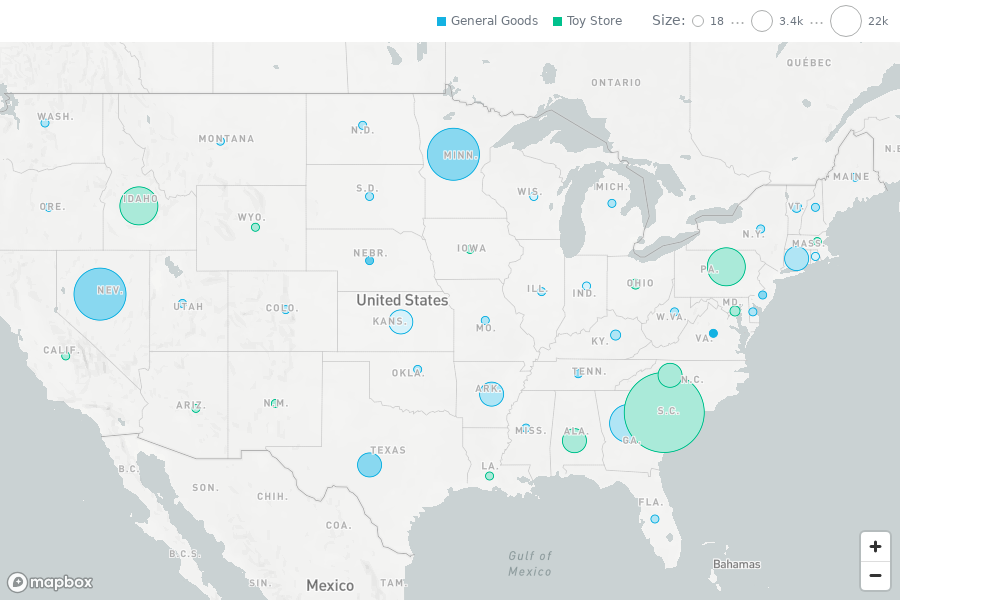
Buckets
| Prop | Required | Takes | What it does |
|---|---|---|---|
latitude | Yes | One attribute | Sets the latitude of each pin. |
longitude | Yes | One attribute | Sets the longitude of each pin. |
size | No | One measure or attribute | Sets the size of the pins. |
color | No | One measure or attribute | Sets the color of the pins. |
segmentBy | No | One attribute | Categorizes the pins, one color per value. |
filters | No | Filters | Limits the data the chart shows. |
location prop (values in "lat;lng" format) is not supported on GoodData Cloud. Passing it makes GeoPushpinChart throw an UnexpectedSdkError. Use separate latitude and longitude attributes.Sorting
Pass sortBy to sort the data of the pushpin layer. The order can affect the tooltip order and which pins render on top.
Configuration
Pass these options in the config prop (IGeoPushpinChartConfig). It accepts the same fields as the GeoChart config, without areas and with tooltipText. See Configuration on the Geo chart page for viewport presets, clustering, and map style options, and Chart configuration for colors, separators, and the legend.
| Option | What it changes |
|---|---|
points | minSize and maxSize scale the pins when size is set. groupNearbyPoints (default true) clusters nearby pins when size, color, and segmentBy are not set. |
viewport | area sets the initial view: "auto" fits the data; "world" or a continent such as "continent_eu" shows that region. |
tooltipText | An attribute whose values label the pins in tooltips instead of the latitude and longitude. |
colors, colorPalette, colorMapping | Colors of the pins. |
legend | enabled shows or hides the legend. position places it in a corner: "top-left", "top-right", "bottom-left", or "bottom-right". |
separators | Thousands and decimal separators in the tooltip values. |
mapboxToken | Deprecated and ignored by the MapLibre-based chart. Kept only for backward-compatible typing. |
import type { IGeoPushpinChartConfig } from "@gooddata/sdk-ui-geo";
import * as Md from "./catalog.js";

const config: IGeoPushpinChartConfig = {
    points: {
        minSize: "0.5x", // "0.5x" | "0.75x" | "normal" | "1.25x" | "1.5x"
        maxSize: "1.5x", // "0.5x" | "0.75x" | "normal" | "1.25x" | "1.5x"
        groupNearbyPoints: true, // clustering applies only when size, color, and segmentBy are not set
    },
    viewport: {
        // "auto" | "custom" | "world" | "continent_af" | "continent_as" | "continent_au"
        // | "continent_eu" | "continent_na" | "continent_sa"
        area: "world",
    },
    tooltipText: Md.StateName,
    colors: ["rgb(195, 49, 73)", "rgb(168, 194, 86)"],
    colorMapping: [
        {
            predicate: (headerItem) => headerItem.attributeHeaderItem?.name === "adult",
            color: { type: "guid", value: "02" },
        },
    ],
    legend: {
        enabled: true,
        position: "top-right", // "top" is a deprecated legacy value, normalized to "top-right"
    },
    separators: {
        thousand: ",",
        decimal: ".",
    },
};
Map rendering
GeoPushpinChart is MapLibre-based and doesn’t need a Mapbox access token. Geo charts start a MapLibre web worker. You don’t need to configure your bundler; for Content Security Policy requirements and self-hosting the worker, see Map worker, bundlers, and CSP.
- The legacy Mapbox-based implementation is still available as
LegacyGeoPushpinChart.MapboxTokenProvideris relevant only for it. - The
mapboxTokenconfig option is deprecated and ignored by the MapLibre-basedGeoPushpinChart. InsightViewrenders a saved pushpin visualization with the legacy implementation when the workspace settingenableNewGeoPushpinisfalse. That chart needs a Mapbox token. On GoodData Cloud and GoodData.CN, the setting istrueby default.
Limits
- A geo pushpin chart renders up to 50,000 data points, or the number you set in
config.limit. With more, the chart shows an error andonErrorreceives aDataTooLargeToDisplaySdkError. Filter the data to fit.
Structure
import "@gooddata/sdk-ui-geo/styles/css/main.css";
import { GeoPushpinChart } from "@gooddata/sdk-ui-geo";

<GeoPushpinChart
    latitude={<attribute>} // latitude and longitude must be two separate attributes
    longitude={<attribute>}
    size={<measure>}
    color={<measure>}
    segmentBy={<attribute>}
    config={<geo-config>}
    …
/>
Example
import "@gooddata/sdk-ui-geo/styles/css/main.css";
import { GeoPushpinChart } from "@gooddata/sdk-ui-geo";
import * as Md from "./catalog.js";

const config = {
    tooltipText: Md.City.Name,
};

<div style={{ height: 600, width: 900 }}>
    <GeoPushpinChart
        latitude={Md.City.Latitude}
        longitude={Md.City.Longitude}
        size={Md.Population.Sum}
        color={Md.Density.Sum}
        segmentBy={Md.StateName}
        config={config}
    />
</div>;
Props
| Prop | Type | Required | Description | Inherited from |
|---|---|---|---|---|
location | AttributeOrPlaceholder | Yes | (Deprecated) The attribute definition or placeholder that determines the longitude and latitude of the pins. Values expected in format lat;long. | — |
additionalLayers | IGeoLayer[] | No | Layers rendered after the primary layer (e.g., overlays). | IGeoSingleLayerWrapperProps |
backend | IAnalyticalBackend | No | Backend used for data execution. Falls back to BackendProvider when omitted. | IGeoCommonExecutionProps |
color | AttributeMeasureOrPlaceholder | No | Measure or attribute used for color encoding. | IGeoPushpinChartBaseProps |
config | IGeoPushpinChartConfig | No | Configuration specific to pushpin layers. | IGeoPushpinChartBaseProps |
drillableItems | ExplicitDrill[] | No | Configure drillability; e.g. which parts of the visualization can be interacted with. | IVisualizationProps |
ErrorComponent | ComponentType<IErrorProps> | No | React component to display in the event when there is an error with either obtaining the data from backend or with the data itself. | IVisualizationProps |
execConfig | IExecutionConfig | No | Additional execution configuration forwarded to backend. | IGeoCommonExecutionProps |
exportTitle | string | No | Set title to use for exported files. | IVisualizationProps |
filters | NullableFiltersOrPlaceholders | No | Filters applied to every layer execution. | IGeoCommonExecutionProps |
LoadingComponent | ComponentType<ILoadingProps> | No | React component to display while loading data from the backend. | IVisualizationProps |
locale | string | No | Set Locale for visualization localization. | IVisualizationProps |
onBoundsChanged | BoundsChangedCallback | No | Callback fired when the map visible bounds change. | IGeoCommonExecutionProps |
onCenterPositionChanged | CenterPositionChangedCallback | No | Callback fired when the map center changes. | IGeoCommonExecutionProps |
onDataView | OnDataView | No | (Alpha) Called when the visualization loads a DataView, i.e. it receives data from the backend. | IVisualizationCallbacks |
onDrill | OnFiredDrillEvent | No | Called when user triggers a drill on a visualization. | IVisualizationCallbacks |
onError | OnError | No | Called when an error occurs while loading data for the visualization. | IVisualizationCallbacks |
onExportReady | OnExportReady | No | Called when the visualization is ready to be exported. | IVisualizationCallbacks |
onLoadingChanged | OnLoadingChanged | No | Called when loading status of the visualization changes - vis starts or stops loading | IVisualizationCallbacks |
onViewportInteractionEnd | ViewportInteractionEndCallback | No | Callback fired when a user-triggered viewport interaction finishes. | IGeoCommonExecutionProps |
onZoomChanged | ZoomChangedCallback | No | Callback fired when map zoom changes. | IGeoCommonExecutionProps |
placeholdersResolutionContext | object | No | Resolution context for composed placeholders. | IGeoCommonExecutionProps |
segmentBy | AttributeOrPlaceholder | No | Optional segment attribute that drives category legend items. | IGeoPushpinChartBaseProps |
size | AttributeMeasureOrPlaceholder | No | Measure or attribute used for size encoding. | IGeoPushpinChartBaseProps |
sortBy | SortsOrPlaceholders | No | Sorting applied to the primary layer execution definition. | IGeoSingleLayerWrapperProps |
theme | ITheme | No | Theme override. Defaults to the nearest ThemeProvider. | IGeoCommonExecutionProps |
workspace | string | No | Workspace identifier. Falls back to WorkspaceProvider when omitted. | IGeoCommonExecutionProps |
Related
Display geographic data on an interactive map with the GeoChart component.
Show geographic data as colored regions on a map with the GeoAreaChart component.
Shared behavior of GoodData.UI visual components — responsive sizing, the style and data props model, and the visualization lifecycle callbacks.