Headline
Display a single KPI value or comparison with the Headline component.
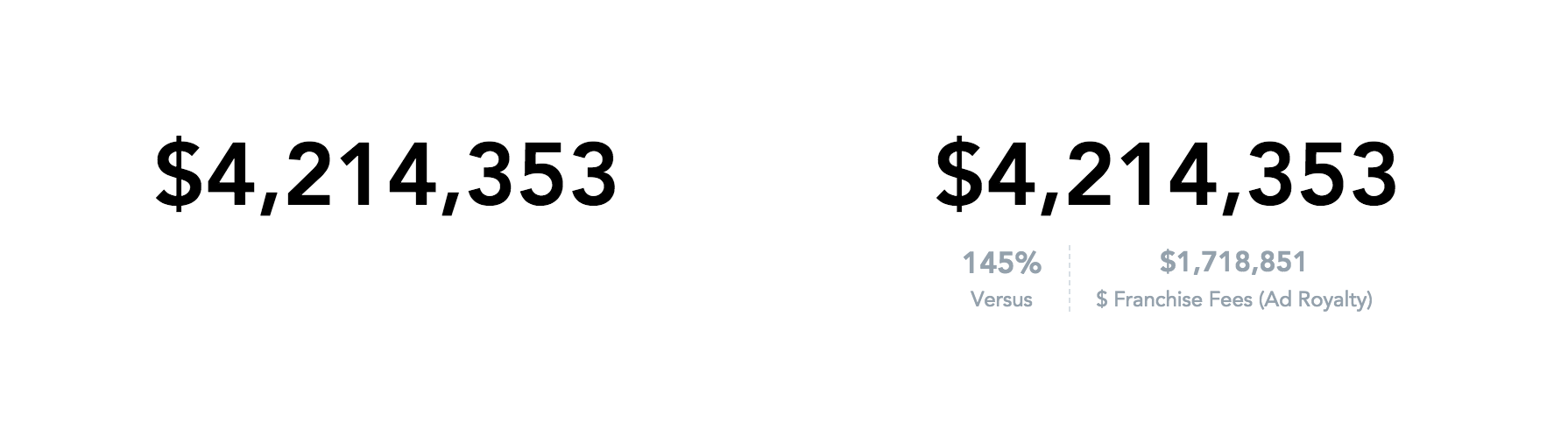
A headline shows a single number or compares two numbers. It can show a primary value with up to two secondary values, or a primary value, a secondary value, and a comparison. Use it to highlight key values, for example, this year’s revenue compared with the same period last year.
Buckets
| Prop | Required | Takes | What it does |
|---|---|---|---|
primaryMeasure | Yes | One measure | Sets the main value of the headline. |
secondaryMeasures | No | Up to two measures | Adds values to compare with the primary value. With one measure, the headline also shows how the two values compare. |
secondaryMeasure | No | One measure | Deprecated. Use secondaryMeasures. |
filters | No | Filters | Limits the data the headline shows. |
Configuration
Pass these options in the config prop. See Chart configuration for details. The comparison options (IComparison) apply only when the headline has exactly one secondary measure.
| Option | What it changes |
|---|---|
comparison.enabled | false turns the comparison off, so the headline shows only the values. The comparison is on by default. |
comparison.calculationType | How the comparison value is calculated: "change" ((primary - secondary) / secondary), "ratio" (primary / secondary), "difference" (primary - secondary), or "change_difference" (both change and difference). Defaults to "change" when the secondary measure is a period-over-period or previous-period measure, and to "ratio" otherwise. |
comparison.format | Number format of the comparison value. Defaults to a rounded percentage (#,##0%), or to the primary measure’s format for "difference". null uses the primary measure’s format. |
comparison.subFormat | Number format of the difference with "change_difference". Defaults to the primary measure’s format. |
comparison.position | Where the comparison value shows: "left" or "auto" (default) left of the secondary value, "right" right of it, and "top" in place of the primary value, which moves to the left of the secondary value. |
comparison.isArrowEnabled | true adds an arrow that points up when the primary value is greater than the secondary value and down when it’s smaller. |
comparison.colorConfig | Colors of the comparison value: positive when the primary value is greater, negative when it’s smaller, and equals. They default to green, red, and gray. With colorPalette, they default to its colors with the guids positive, negative, and equals, or else its first three colors. disabled: true turns the colors off. |
comparison.labelConfig | Label of the comparison value. unconditionalValue sets the text, which defaults to a label based on calculationType, such as Change or of. isConditional: true with positive, negative, and equals sets a label for each case, except with "ratio". |
enableCompactSize | true adapts the headline to small containers. |
disableDrillUnderline | true removes the underline from drillable values. |
separators | Thousands and decimal separators in the number format. |
Limits
- With two secondary measures, the headline shows the three values without a comparison.
- A headline shows up to two secondary measures. If you pass more, it shows only the first one.
Structure
import "@gooddata/sdk-ui-charts/styles/css/main.css";
import { Headline } from "@gooddata/sdk-ui-charts";

<Headline
    primaryMeasure={<measure>}
/>
Example
Headline with a single measure (primary measure)
import "@gooddata/sdk-ui-charts/styles/css/main.css";
import { Headline } from "@gooddata/sdk-ui-charts";
import * as Md from "./catalog.js";

<Headline
    primaryMeasure={Md.$FranchiseFees}
/>
Headline with two measures (primary and secondary measures)
import "@gooddata/sdk-ui-charts/styles/css/main.css";
import { Headline } from "@gooddata/sdk-ui-charts";
import * as Md from "./catalog.js";

<Headline
    primaryMeasure={Md.$FranchiseFees}
    secondaryMeasures={[Md.$FranchiseFeesAdRoyalty]}
/>
Props
| Prop | Type | Required | Description | Inherited from |
|---|---|---|---|---|
primaryMeasure | MeasureOrPlaceholder | Yes | Specify the measure whose value will be shown as the headline. | IHeadlineBucketProps |
backend | IAnalyticalBackend | No | Analytical backend, from which the chart will obtain data to visualize If you do not specify instance of analytical backend using this prop, then you MUST have BackendProvider up in the component tree. | IBucketChartProps |
config | IChartConfig | No | Configure chart’s behavior and appearance. | ICommonChartProps |
drillableItems | ExplicitDrill[] | No | Configure drillability; e.g. which parts of the visualization can be interacted with. | IVisualizationProps |
ErrorComponent | ComponentType<IErrorProps> | No | React component to display in the event when there is an error with either obtaining the data from backend or with the data itself. | IVisualizationProps |
execConfig | IExecutionConfig | No | Execution configuration, will provide the execution with necessary config before initiating execution. | ICommonChartProps |
exportTitle | string | No | Set title to use for exported files. | IVisualizationProps |
filters | NullableFiltersOrPlaceholders | No | Specify filters to apply on the data to chart. | IHeadlineBucketProps |
height | number | No | Set height of the chart (in pixels). | ICommonChartProps |
LoadingComponent | ComponentType<ILoadingProps> | No | React component to display while loading data from the backend. | IVisualizationProps |
locale | string | No | Set Locale for visualization localization. | IVisualizationProps |
onDataView | OnDataView | No | (Alpha) Called when the visualization loads a DataView, i.e. it receives data from the backend. | IVisualizationCallbacks |
onDrill | OnFiredDrillEvent | No | Called when user triggers a drill on a visualization. | IVisualizationCallbacks |
onError | OnError | No | Called when an error occurs while loading data for the visualization. | IVisualizationCallbacks |
onExportReady | OnExportReady | No | Called when the visualization is ready to be exported. | IVisualizationCallbacks |
onLegendReady | OnLegendReady | No | Called when legend is rendered. | IChartCallbacks |
onLoadingChanged | OnLoadingChanged | No | Called when loading status of the visualization changes - vis starts or stops loading | IVisualizationCallbacks |
placeholdersResolutionContext | any | No | Resolution context for composed placeholders. | IHeadlineBucketProps |
secondaryMeasure | MeasureOrPlaceholder | No | (Deprecated) Specify secondary measure whose value will be shown for comparison with the primary measure. The change in percent between the two values will also be calculated and displayed. | IHeadlineBucketProps |
secondaryMeasures | MeasureOrPlaceholder[] | No | Specify secondary measures whose values will be shown as the compare values. | IHeadlineBucketProps |
width | number | No | Set width of the chart (in pixels). | ICommonChartProps |
workspace | string | No | Identifier of analytical workspace, from which the chart will obtain data to visualize. If you do not specify workspace identifier, then you MUST have WorkspaceProvider up in the component tree. | IBucketChartProps |
Related
Compare measures against targets using the BulletChart component.
Create same-period-last-year and previous-period derived measures with newPopMeasure and newPreviousPeriodMeasure.
Configure chart appearance, axes, legends, colors, and data labels.
Shared behavior of GoodData.UI visual components — responsive sizing, the style and data props model, and the visualization lifecycle callbacks.