Repeater
Render repeated inline visualizations for each data row with the Repeater component.
The Repeater component in GoodData.UI, similar to sparklines, displays one visualization in each of several rows, with each row varying by a key attribute. Use it to compare trends across many items in one grid, for example, one line chart of monthly franchise fees per state.
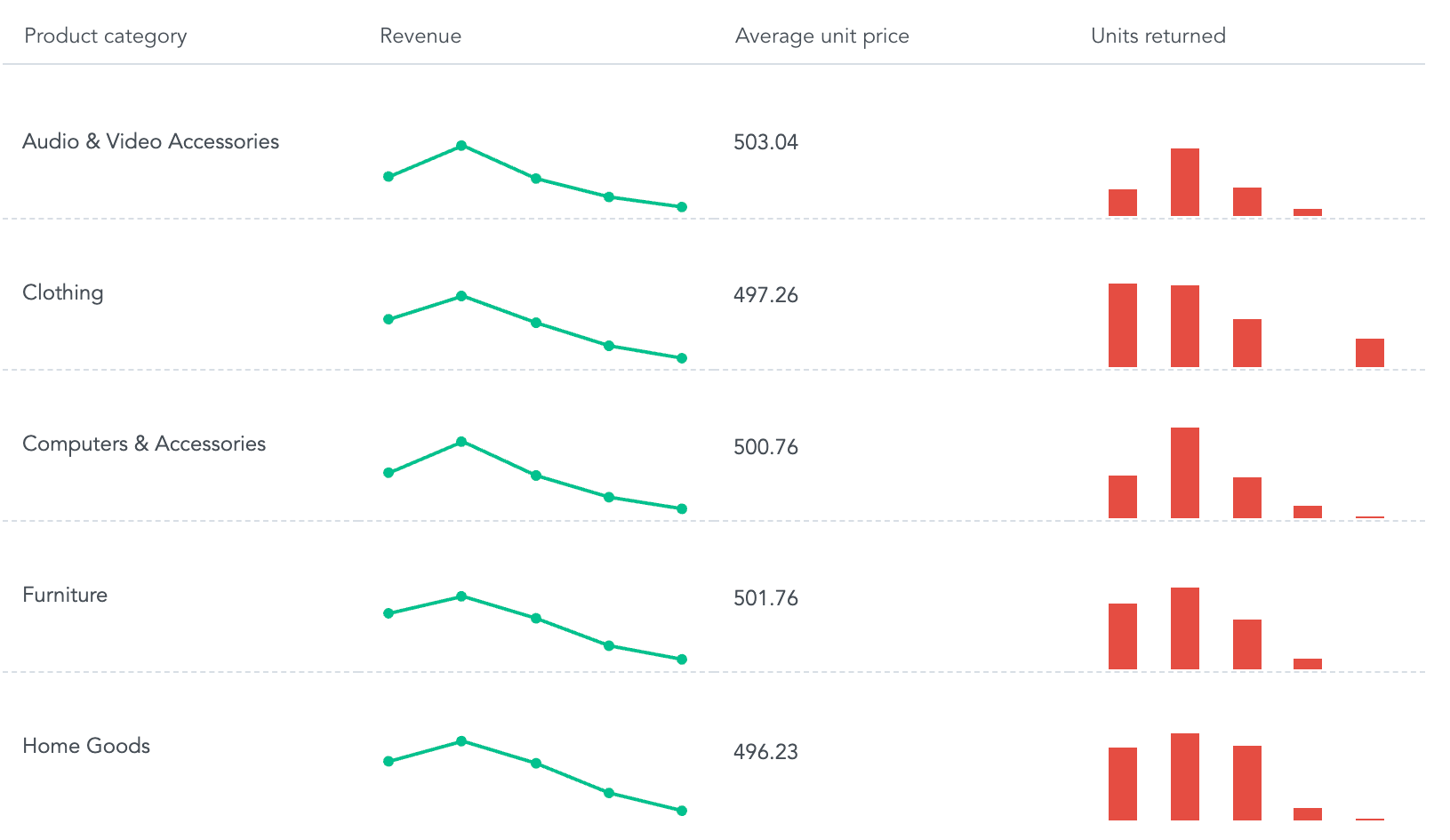
Buckets
| Prop | Required | Takes | What it does |
|---|---|---|---|
attribute | Yes | One attribute | Sets the rows, one row per attribute value. |
columns | No | Attributes and measures | Sets the columns. Attributes show as text, or as images and links when their label type is Image or Hyperlink. Measures show as numbers or inline charts (see Example). Without at least one column, the repeater shows an error. |
viewBy | No | One attribute | Slices the measures in inline charts, one data point per value. |
filters | No | Filters | Limits the data the repeater shows. |
Sorting
Repeater applies no sorting and has no sortBy prop.
Configuration
Pass these options in the config prop. See Chart configuration for details.
| Option | What it changes |
|---|---|
colors, colorPalette, colorMapping | Colors of the inline charts, one per measure. |
separators | Thousands and decimal separators in the number format. |
Limits
- Only attributes in
columnscan be drilled into. - With
viewBy, the repeater loads at most 1,000 values per row, counted asviewByvalues times measures. It doesn’t show the rest.
Structure
import "@gooddata/sdk-ui-charts/styles/css/main.css";
import { Repeater } from "@gooddata/sdk-ui-charts";

<Repeater
    attribute={<primaryAttribute>}
    columns={<attributesOrMeasures>}
    viewBy={<viewByAttribute>}
    config={<chart-config>}
    …
/>
Example
The following code sample shows an arrangement for a typical repeater:
import "@gooddata/sdk-ui-charts/styles/css/main.css";
import { Repeater } from "@gooddata/sdk-ui-charts";
import { measureLocalId } from "@gooddata/sdk-model";
import * as Md from "./catalog.js";

const style = { height: 300 };

<div style={style}>
    <Repeater
        attribute={Md.LocationState}
        columns={[Md.LocationState, Md.$FranchiseFees]}
        viewBy={Md.DateDatasets.OrderDate.OrderDateMonthYear.Default}
        config={{
            inlineVisualizations: {
                [measureLocalId(Md.$FranchiseFees)]: {
                    type: "line",
                },
            },
        }}
    />
</div>;
The following code sample shows an arrangement for a repeater with advanced configuration
import "@gooddata/sdk-ui-charts/styles/css/main.css";
import { Repeater } from "@gooddata/sdk-ui-charts";
import { attributeLocalId, measureLocalId } from "@gooddata/sdk-model";
import * as Md from "./catalog.js";

const style = { height: 300 };

<div style={style}>
    <Repeater
        attribute={Md.LocationState}
        columns={[Md.LocationHyperlink, Md.$FranchiseFees]}
        viewBy={Md.DateDatasets.OrderDate.OrderDateMonthYear.Default}
        config={{
            hyperLinks: {
                [attributeLocalId(Md.LocationHyperlink)]: {
                    // Configure custom text to show for the hyperlink label
                    staticElementsText: "See location details",
                },
            },
            inlineVisualizations: {
                [measureLocalId(Md.$FranchiseFees)]: {
                    // Configure inline visualization type
                    type: "line",
                },
            },
            // Configure image sizing
            cellImageSizing: "fill",
            // Configure text wrapping
            cellTextWrapping: "wrap",
            // Configure vertical alignment of the repeater cells
            cellVerticalAlign: "middle",
        }}
    />
</div>;
Props
| Prop | Type | Required | Description | Inherited from |
|---|---|---|---|---|
drillableItems | ExplicitDrill[] | No | Configure drillability; e.g. which parts of the visualization can be interacted with. LIMITATION: For now only attributes in columns can be drilled into. | — |
onDrill | OnFiredDrillEvent | No | Called when user triggers a drill on a visualization. | — |
attribute | AttributeOrPlaceholder | Yes | Main attribute that sets repeating frequency used for the computation. | IRepeaterBucketProps |
backend | IAnalyticalBackend | No | Analytical backend, from which the chart will obtain data to visualize If you do not specify instance of analytical backend using this prop, then you MUST have BackendProvider up in the component tree. | IBucketChartProps |
columns | AttributesMeasuresOrPlaceholders | No | Definition of columns which are sliced by the main attribute. | IRepeaterBucketProps |
config | IChartConfig | No | Configure chart’s behavior and appearance. | ICommonChartProps |
ErrorComponent | ComponentType<IErrorProps> | No | React component to display in the event when there is an error with either obtaining the data from backend or with the data itself. | IVisualizationProps |
execConfig | IExecutionConfig | No | Execution configuration, will provide the execution with necessary config before initiating execution. | ICommonChartProps |
exportTitle | string | No | Set title to use for exported files. | IVisualizationProps |
filters | NullableFiltersOrPlaceholders | No | Specify filters to apply on the data to compute with. | IRepeaterBucketProps |
height | number | No | Set height of the chart (in pixels). | ICommonChartProps |
LoadingComponent | ComponentType<ILoadingProps> | No | React component to display while loading data from the backend. | IVisualizationProps |
locale | string | No | Set Locale for visualization localization. | IVisualizationProps |
onDataView | OnDataView | No | (Alpha) Called when the visualization loads a DataView, i.e. it receives data from the backend. | IVisualizationCallbacks |
onError | OnError | No | Called when an error occurs while loading data for the visualization. | IVisualizationCallbacks |
onExportReady | OnExportReady | No | Called when the visualization is ready to be exported. | IVisualizationCallbacks |
onLegendReady | OnLegendReady | No | Called when legend is rendered. | IChartCallbacks |
onLoadingChanged | OnLoadingChanged | No | Called when loading status of the visualization changes - vis starts or stops loading | IVisualizationCallbacks |
placeholdersResolutionContext | any | No | Resolution context for composed placeholders. | IRepeaterBucketProps |
viewBy | AttributeOrPlaceholder | No | View by attribute to be used for inline visualizations. | IRepeaterBucketProps |
width | number | No | Set width of the chart (in pixels). | ICommonChartProps |
workspace | string | No | Identifier of analytical workspace, from which the chart will obtain data to visualize. If you do not specify workspace identifier, then you MUST have WorkspaceProvider up in the component tree. | IBucketChartProps |
Related
Display data in a flexible, multi-dimensional table with the PivotTableNext component.
Display a single KPI value or comparison with the Headline component.
Display data trends as connected points with the LineChart component.
Shared behavior of GoodData.UI visual components — responsive sizing, the style and data props model, and the visualization lifecycle callbacks.