AI on Duty: How We Automated Our Most Boring Job with a Kotlin AI Agent
11 min read | Published

Do you often read or hear about people developing AI agents in Python? I do. And it often feels like if you want to automate workflows with AI you have to forgo the benefits of other languages and be driven by the “community flow.” Luckily for us, a team of Kotlin developers at GoodData, JetBrains released their own framework for building AI agents in Kotlin called Koog.
In this article I’ll share our successful experience of optimizing an incredible amount of monotonous work by building our own AI agent, what tricks we used to make it as accurate as possible and the advantages of doing it in Kotlin.
The problem
One of our team’s responsibilities is monitoring production health and reacting to PagerDuty alerts. Every day, an Engineer on Duty (EoD) must verify every notification and ensure system stability. The flow usually looks like this:
- An engineer is working on their tasks and receives an alert.
- They go to check the basic information from PagerDuty: alert type, cluster, namespace, pod, and the metric that triggered the condition to fire.
- And then the most boring part starts: digging through Grafana in the hope of finding something that will allow you to make a decision on the next steps.
And let’s be honest, our alerting system is not perfect — none are. We still get false positives or just short-term spikes. Even though we are continuously improving it, it sometimes forces our developers to switch context for no real value.
When the power of LLMs became obvious to us, the idea of an “AI on Duty” came to mind. The goal was simple: optimize the time our developers spend on low-urgency investigations and delegate it to AI. We wanted to skip the Grafana-digging part, and instead of relying on limited information from PD, get a comprehensive report that allows us to make a decision in seconds, not minutes.
Why Koog?
This started as a PoC during an internal hackathon, so naturally, we chose the language we knew best. But when the agent showed its potential and we wanted to take it to the next level, we had to make a wise choice: follow the mainstream or trust this “fancy new framework”.
After comparing our options, we realized it wasn’t just about who has more features, but how well they are packed together. Although the Python ecosystem is undeniably massive, Koog gives you a cohesive, production-ready toolkit right out of the box. Of course, you can more or less replicate the same functionality by gluing together multiple different libraries in Python. But the more libs you have, the higher the chance you’ll need to replace one because the author got bored and archived the repo, for instance.
Koog is developed by a mature company that has proven it knows how to build frameworks. Even before its first major release, it has everything you might need for your AI agent. Beyond the core features, it has specific production-ready tools. For example:
- Full Langfuse integration in a few lines
- Structured output with flexible Kotlin types
- Multiple approaches to history compression out of the box
- Basic strategies, like Agent Loop
- Utilities for fine-grained context management
- Switching LLM models between nodes
- Parallel tool calls
Add the advantages of Kotlin and Coroutines to the mix, and you get an ideal blend of efficiency, functionality, and developer experience.
The Agent Core: A Three-Phase Strategy
We started simple — just implemented our own classical agent loop. It wasn’t very different from Koog’s standard implementation, but it had a few tweaks. We quickly faced multiple issues that made the agent inaccurate, slow, and costly:
Context rot:
Because we worked with logs and metrics via Grafana MCP, each tool call dumped a lot of raw data into the context. Basically, the result of a call was only needed during the very next LLM thinking iteration, but we were dragging it along to future iterations. In just 3 iterations, we already needed to compress the history. The context was almost full, but its usage wasn’t effective and just slowed down the investigation.
Too many system prompts:
We needed to cover many aspects: working with Grafana MCP, understanding input data, and formatting the final Slack report. Because of this, prompts at each step interfered with one another. The agent knew what to do next, but it had to analyze excess data for every single call and sometimes just ignored important instructions.
Ineffective investigation path:
Often, the agent didn’t have the domain knowledge it needed to make the investigation path effective. Wrong filters, wrong assumptions — every time, it felt very random.
Calling for static data:
If a developer goes to Grafana, they can check available container names in seconds. For the agent, it requires an LLM call to decide to check, a tool call to get the data, and another LLM call to analyze the result. This definitely played against our goal to optimize reaction time.
A single large agent loop was ineffective here. The prompts kept interfering with each other, and the context rotted quickly. So, we broke it up. First, gather the static stuff. Then, do the log analysis on its own. Finally, don’t think about Slack formatting until everything else is done.
By iteratively improving the strategy, we ended up with three phases: Prepare, Investigate, and Report. Here is what our strategy graph definition in Koog looks like:
val contextSubgraph by subgraphCollectContext(agentKnowledgeRegistry)
val planAndExecuteSubgraph by investigationSubgraph(agentKnowledgeRegistry)
val reportSubgraph by subgraphInvestigationReport()

edge(nodeStart forwardTo contextSubgraph)
edge(contextSubgraph forwardTo planAndExecuteSubgraph)
edge(planAndExecuteSubgraph forwardTo reportSubgraph)
edge(reportSubgraph forwardTo nodeFinish)
Lets break it down and dive deeper to each subgraph.
Preparation sub-strategy
The most important thing when working with LLMs is correctly defining your task and explaining it to the model. This is exactly what the “Prepare” step focuses on. Making the right decision is only possible if the context contains correct and comprehensive information, so we added multiple data sources for this stage.
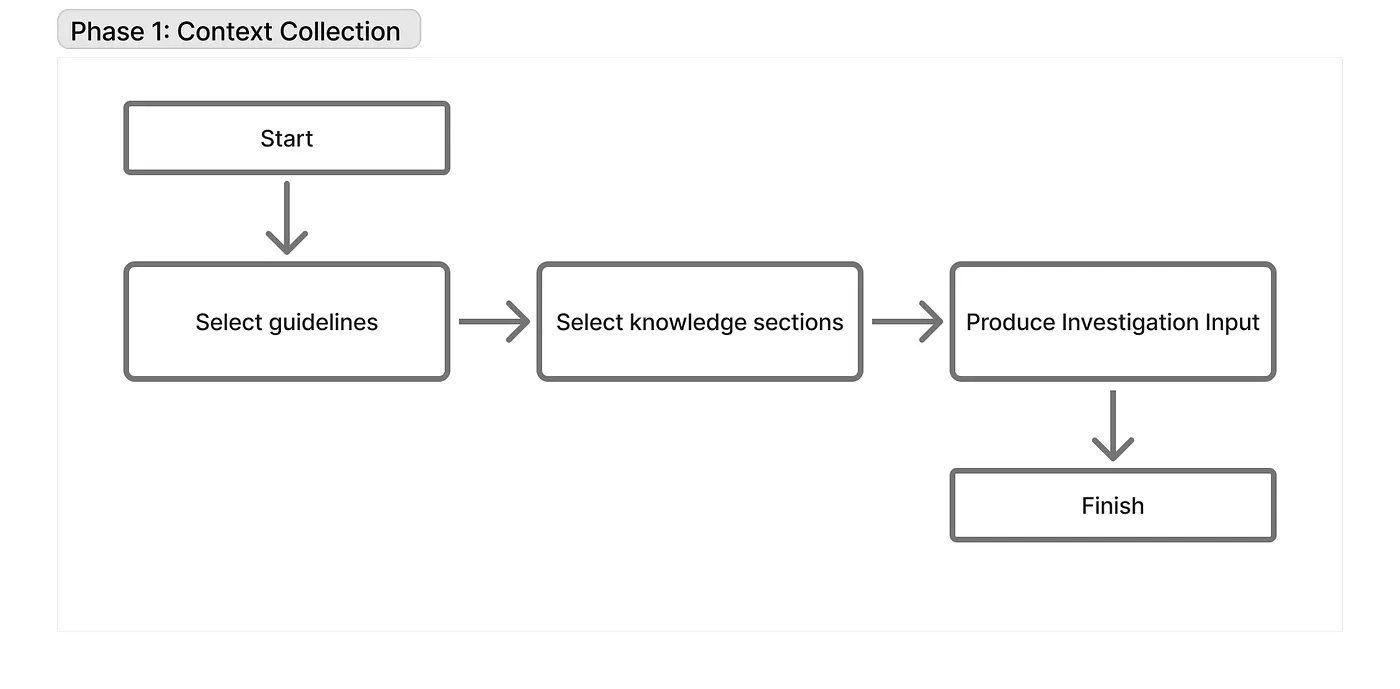
For each alert, we have a Runbook in Confluence containing the experience our EoDs gathered over years of the project being in production. We definitely needed to include this for the LLM, so we put it into the user prompt alongside the current alert info. This, plus a few more static calls, eliminates the need for several agent loop iterations. This is how we solved the “Calling for static data” issue.
We also added a local knowledge base split into two parts:
Knowledge
— an overview of our application, architecture, main flows, and other important details.
Guidelines
— shortcuts, directions, or useful queries that transfer our experience to the agent and fine-tune its behavior when it loses its way.
They are grouped by focused topics, like Kubernetes, gateway, Postgres, etc. Each entry has a frontmatter with three fields: keyword, description, and tags, which the agent uses to decide what relates to the current incident.
It’s important to load guidelines as the very first step, so if the agent faces unknown component names there, it can fetch the relevant “Knowledge” for them afterwards.
Thanks to Kotlin types and Koog’s structured output, it was easy to integrate LLM graphs with knowledge data calls.
For an example, take a look at the code snippet below. This node is responsible for selecting guidelines, and as a result, the LLM returns valid JSON that is parsed directly into a Kotlin object. This allows us to treat requests to external sources as if no LLM were involved at all. The fixingParser automatically asks another LLM (Claude Haiku in our case) to repair the JSON structure if it breaks, all without affecting the main context.
val nodeSelectGuidelines by node<InvestigationContext, GuidelineSelectionContext> { context ->
   val incidentInfo = context.buildIncidentInfo(grafanaDiscovery)
   val guidelineCatalog = agentKnowledgeRegistry.buildCatalog(context.appType)

   llm.writeSession {
       model = AnthropicModels.Haiku_4_5
       rewritePrompt {
           prompt("guideline-selection") {
               system(ContextCollectionPrompts.systemPrompt())
               user(incidentInfo)
               user(ContextCollectionPrompts.guidelineCatalog(guidelineCatalog))
               user(ContextCollectionPrompts.selectGuidelines())
           }
       }

       requestLLMStructured<GuidelineKeywords>(
           fixingParser = StructureFixingParser(
               model = AnthropicModels.Haiku_4_5,
               retries = 3
           )
       )
           .getOrElse { structuredParseError(it) }
           .let { GuidelineSelectionContext(it.data.keywords, context) }
   }
}
This subgraph finishes by compiling all available info into a meaningful structured output: defining the goal, system information, and any relevant details from the guidelines or runbooks. This acts as a request for investigation and clearly defines the task for the next step.
This step mostly emerged because of the sheer amount of data we were passing to give the LLM enough context (guidelines, knowledge, and even Confluence runbooks). A lot of this information isn’t actually needed for the investigation itself, but it allows the LLM to make proper decisions on how to plan it. A huge amount of text is transformed into just 10% of its original size in the form of facts, leaving only what’s strictly related to the current investigation.
This is what the investigation core receives:
data class StructuredContext(
   @property:LLMDescription("A clear, actionable statement of what needs to be investigated")
   val investigationGoal: String,

   @property:LLMDescription("What exactly triggered the alert, including specific metrics and thresholds")
   val alertSummary: String,

   @property:LLMDescription("Any relevant information from the guidelines or runbooks (if available)")
   val relevantGuidelines: List<String>,

   @property:LLMDescription("Specific metric names, queries, or log fields mentioned in runbook or guidelines with short description")
   val runbookUsefulQueries: List<String>,

   @property:LLMDescription("Any facts already established (leave empty for initial investigation)")
   val previousFindings: List<String>,
)
The investigation sub-strategy
This is the main part of the agent; its correctness directly affects the efficiency of the whole system. At the same time, this part suffers from context rot the most because it interacts with Grafana MCP and receives tons of raw logs and metrics. Basically, it’s an implementation of an agent loop with multiple enhancements that solve the first 3 issues from our list.
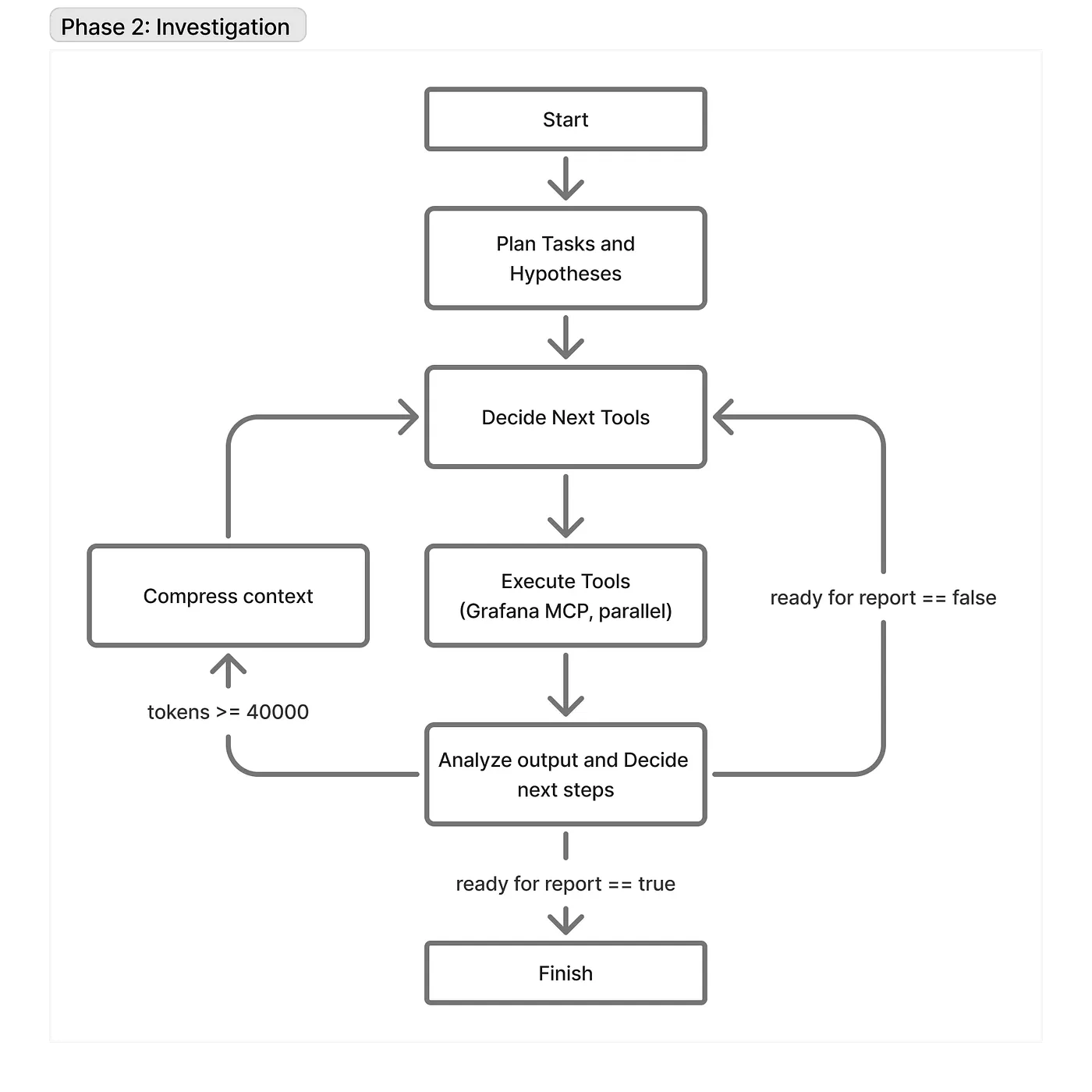
First of all, it doesn’t share context with the “Prepare” sub-strategy. Once we enter this stage, the prompt is fully cleared and built from scratch. The input for this stage is purely the output from the previous stage, and they share nothing else.
To make it easier to explain, I’ll split prompts into two categories: “static” and “dynamic”. Static prompts are the ones that describe how the agent should work: core logic, rules, etc. Dynamic prompts are the actual answers the AI generates, containing the main investigation info: findings, assumptions, and tasks. Because the AI’s output becomes part of its input in the next iteration of the agent loop, we can legitimately call these outputs “prompts”.
The core is built based on multiple principles:
Each node contains only system prompts that are needed to execute the current action in the most accurate way.
For example, we don’t need the static prompt with the tool calling rules when we analyze the tool’s outputs. The current prompt size and message positioning depend on the number of tools that are used and the steps that have been taken so far. It’s easier to mark node-specific static prompts with tags and save them in the custom metadata fields. Then delete them by tag:
/**
* Adds a user message tagged with [tag] in its metadata,
* so it can be filtered out later via [dropTaggedMessages].
*/
internal fun PromptBuilder.user(content: String, tag: String) {
  message(Message.User(content, RequestMetaInfo.Empty.copy(metadata = buildJsonObject { put("tag", tag) })))
}

/**
 * Returns a copy of this prompt with all messages tagged [tag] removed.
 * */
internal fun Prompt.dropTaggedMessages(tag: String): Prompt = withMessages { msgs ->
  msgs.filter { msg -> (msg.metaInfo.metadata?.get("tag") as? JsonPrimitive)?.content != tag }
}

private const val DECIDE_CONTEXT_TAG = "decide-context"

val nodeDecideNextTool by node<Unit, List<Message.Response>> {
  // DecideNextTool node adds own static prompts
  llm.writeSession {
      appendPrompt {
          user(InvestigationExecutionPrompts.currentTaskStatus(currentTasks))
          user(InvestigationExecutionPrompts.toolsUsageRules(), DECIDE_CONTEXT_TAG)
          user(InvestigationExecutionPrompts.decideNextTool(), DECIDE_CONTEXT_TAG)
      }
      requestLLMMultiple()
  }
}

val nodeExecuteTools by nodeExecuteMultipleTools(parallelTools = true)

val nodeAnalyzeAndDecide by node<List<ReceivedToolResult>, InvestigationDecision> { results ->
  llm.writeSession {
      ...
      // Remove decide-context messages (toolUsageRules + decideNextTool) — noise for analysis
      rewritePrompt { it.dropTaggedMessages(DECIDE_CONTEXT_TAG) }

      val combined = requestLLMStructured<ToolAnalysisAndDecision>(fixingParser = FIXING_PARSER)
          .getOrElse { structuredParseError(it) }.data
      ...
  }
}

...
edge(nodeDecideNextTool forwardTo nodeExecuteTools onMultipleToolCalls { true })
edge(nodeExecuteTools forwardTo nodeAnalyzeAndDecide)
...
The benefits are valuable: cost optimization and fewer distractions for the model.
Nodes do not share the full history — only the dynamic prompts containing valuable information for acting further.
Usually, agents see the full chat history and decide the next actions based on it. In our case, each core node’s history is carefully rebuilt using only valuable facts about the investigation. It’s a compressed, clear history defined by the AI using structured output.
val nodePlan by node<StructuredContext, Unit> { structuredContext ->
  ...
  llm.writeSession {
      // Rewrite the prompt to include only the result of the previous sub-strategy
      // and only the relevant system prompt
      rewritePrompt {
          prompt("plan-investigation") {
              system(SystemPrompts.systemGlobal(appType))
              user(incidentInfoPrompt)
              user(InvestigationPlanningPrompts.planningRequest(structuredContext))
          }
      }
      val plan = requestLLMStructured<InvestigationPlan>(fixingParser = FIXING_PARSER)
          .getOrElse { structuredParseError(it) }.data

      // Drop JSON response (InvestigationPlan) and planning messages (planningRequest)
      dropLastNMessages(2)

      // Save only a well-formatted plan without any noise
      llm.writeSession {
          appendPrompt {
              user(InvestigationExecutionPrompts.investigationPlan(plan))
          }
      }
      ...
  }
}
Raw data is analyzed and compressed as soon as possible.
The next step after getting raw data is always extracting conclusions from it. If the AI calls a tool with some parameters, it wants to verify a hypothesis, so it must analyze if that hypothesis was proven or disproven. The raw data is replaced by the facts and observations. The benefits are the same: cost and distractions, but it also solves the problem of context rot. 99% of our investigations do not reach the point when we need to compress the context, because every iteration increases the token count by just a few paragraphs.
val nodeAnalyzeAndDecide by node<List<ReceivedToolResult>, InvestigationDecision> { results ->
  llm.writeSession {
      ...
      // The tool calls analysis
      val combined = requestLLMStructured<ToolAnalysisAndDecision>(fixingParser = FIXING_PARSER)
          .getOrElse { structuredParseError(it) }.data
      ...

      // Drop everything added since before nodeDecideNextTool:
      // - currentTaskStatus
      // - LLM tool calls
      // - tool results
      // - analyze request
      // - JSON response
      dropLastNMessages(prompt.messages.size - sizeBeforeDecide)

      // Format the tool calls analysis, conclusions and decisions
      val toolCalls = results.map { result -> result.tool to result.toolArgs.toString() }
      val formattedAnalysis = toolAnalysisAndDecisionResult(
          combined = combined,
          toolCalls = toolCalls,
          assignedDiscoveredTasks = newTasks,
      )
      // Add the formatted analysis to the prompt
      appendPrompt {
          assistant(formattedAnalysis)
      }

      ...
  }
}
These are the secrets to the agent’s accuracy, and together they make the agent choose the most efficient investigation path. Add the ability to call up to 5 parallel tools per iteration, and you’ll see a really high probability of it digging up the problematic logs in just 2–3 iterations.
It’s worth shortly mentioning a few more tweaks that really improve the core:
Koog has data storage
that lives in the Agent context and passes between nodes, but doesn’t go into the LLM context. We use it to store things like the task list. This is how the agent tracks its process and never repeats actions. It also relieves the AI from the responsibility of keeping the task list correct. It’s always managed in code, so there’s no chance the LLM loses or hallucinates the data after a few calls.
The first stage is a planning node
. It is competent at building an initial detailed task list, definitions of done for each task, priorities, etc. Much better when AI has a good starting point, especially when it takes into account human-written guidelines.
Raw data truncation
. Grafana MCP has a limit of 100 values per request, but sometimes that’s still too much. So, we truncate the raw data coming from all tool calls at 70k characters per iteration. Yes, it might miss some data — but next time it will just make the parameters better, right? And of course, the agent knows the data was truncated because we append a warning sign to the payload.
Anyway, imagine the LLM decides the answer is found. It moves forward by flipping the readyForReport flag in the structured output and bundles all its findings to pass to the final, smallest stage.
The report sub-strategy
Ultimately, our agent prepares a detailed report that allows an Engineer on Duty to evaluate the findings. This subgraph is built following the same principles as the other strategies. The only difference worth mentioning is that it uses Claude Haiku at each step. Because all the heavy reasoning is already done, it just needs to rephrase the thoughts and format them into Slack markdown.
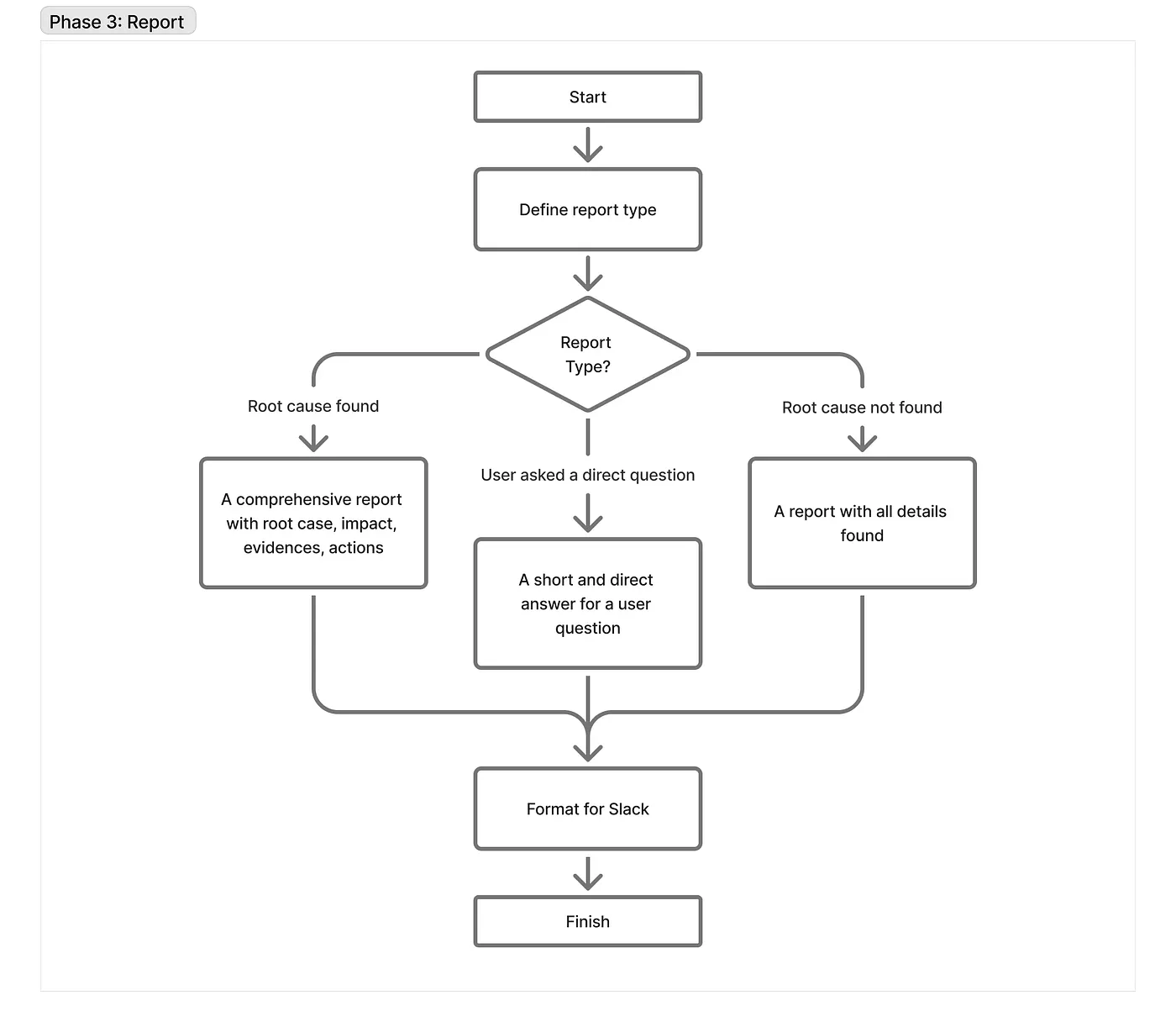
In short, it decides what type of report we need to generate: full, short, or inconclusive. This always depends on the incident itself and any specific user requests. Sometimes it answers with a single sentence; sometimes with a fully structured report describing the impact, evidence, and recommendations.
How it changed our lives
I can tell you for sure: the life of an EoD is completely different now. Our developers do their planned work, which provides much more value to the company than digging through Grafana. And just 2–3 minutes after an alert fires, they can make a decision on how to mitigate it in Slack. At the same time, the agent works as a “second track” for critical alerts, allowing you to always compare your own findings with the AI’s report.
In the long term, the value is undeniable. We now save 90% of the time previously spent on investigations. On average, we receive 10 alerts daily from different parts of the system, and an investigation used to take an average of 20 minutes. Now, it takes two minutes to evaluate the report and make a decision. Also consider the countless context switches and dives into new topics, each of which has a large cognitive and time “tax.”
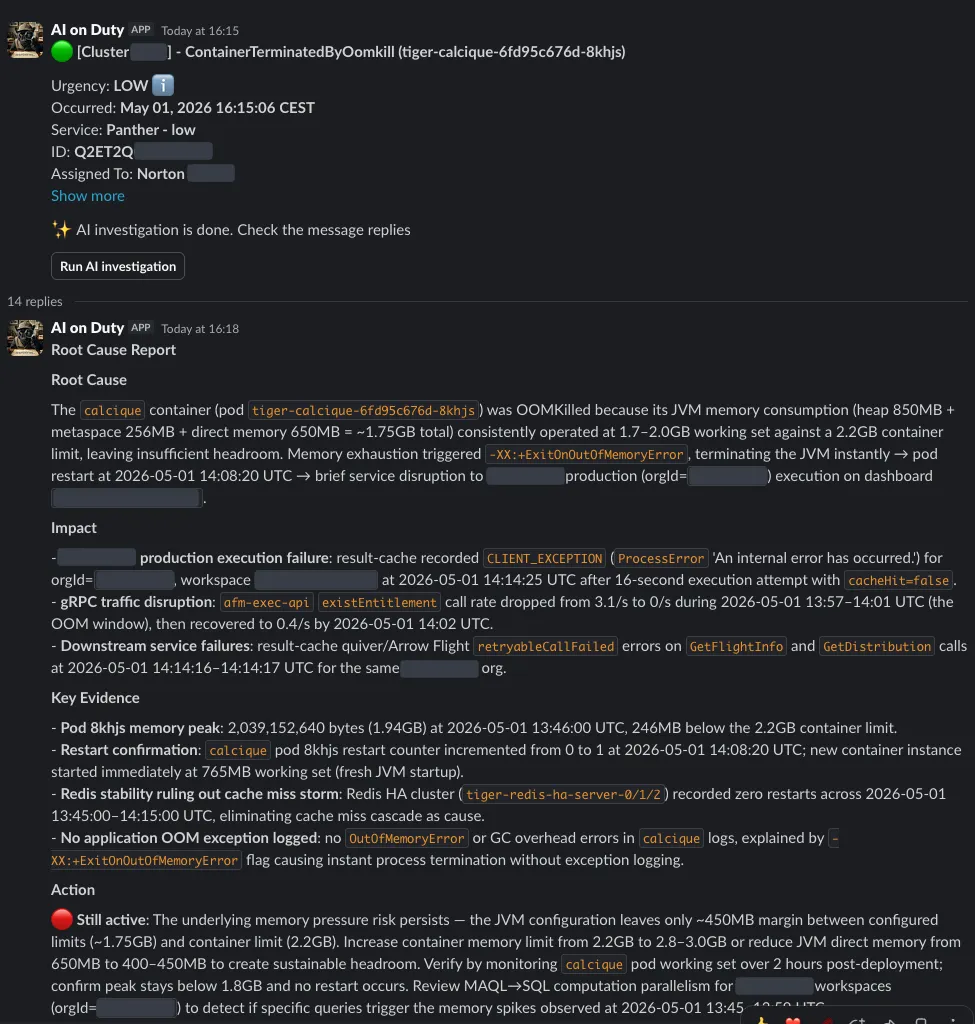
Sometimes the agent is much more scrupulous than humans, which leads to interesting cases. Once, we got an alert about high usage in an R2DBC pool, and the AI warned us about the bad consequences of this. We checked the metrics and dashboards — everything looked normal. Just 5–6 acquired connections on average. We were quite skeptical about the Agent accuracy at the time and blamed it all on hallucinations.
An hour later, 25% of our cluster traffic dropped, and it took a while to understand what happened. It turned out that R2DBC had a bug with unreleased connections during coroutine cancellations in transactions. The pool metric exporter was misconfigured, so we were seeing an incorrect value. Instructive.
Since then, we have made many enhancements to make the system even more useful:
Slack Integration:
We integrated the agent with Slack and started streaming PagerDuty alerts directly there.
Conversation Router Agent:
We implemented an agent that can answer follow-up questions about incidents based on the Slack thread, look for information in the knowledge base, run new investigations with different goals, and so on.
Coding Agent:
We built a simple agent that helps us mitigate problems — for instance, by scaling pods in our GitOps repo. Of course, everything is done via PRs, automating 99% of those routine operational actions.
Implementing these additional agents (which don’t require the extreme acting accuracy of the main investigator) took around 5 minutes. This is heavily thanks to the singleRun strategy that Koog provides out of the box. It eliminates the need to write your own agent loop and already implements mandatory features like history compression and different tool-calling modes.
Conclusions
What started out as just a hackathon project turned into one of the best productivity boosters and boring-job optimizers. LLMs not only steal our beloved engineering process but also bring valuable benefits to developers as much as they do to companies.
And luckily, in the end, this story is not just about choosing our favorite programming language and implementing something useful, but also about discovering a powerful framework which solves most of the problems AI Agent developers can face.
At GoodData, even Platform Engineers can make effective AI Agents. Imagine what our feature teams are capable of doing for your business!