Migrate from Tableau to GoodData Cloud
5 min read | Published



Tableau migrations don't fail because teams can't rebuild dashboards. They fail because the logic inside those dashboards — calculated fields, LOD expressions, scope-specific KPIs — was never designed to live anywhere else. When that logic moves, it breaks in ways that are hard to predict and slow to diagnose.
This guide introduces an open-source migration toolkit on GitHub: templates, scripts, and a structured workbook-by-workbook workflow for migrating Tableau content to GoodData Cloud, with an audit trail at every step. It's built for teams that want a repeatable process and evidence per workbook — not a bulk converter that promises to handle everything automatically.
Key Takeaways
- Tableau to GoodData Cloud migration is a workbook-by-workbook rebuild, not a bulk conversion. Calculated fields become MAQL metrics, workbook actions become native filters and drills, and parity must be proven on agreed data scenarios.
- The most common migration failures are scope KPI miscalculations, silent filter discrepancies, and dashboard actions that don't transfer — all addressable with the right workflow.
- The toolkit provides scripts for extraction, deployment, and validation, plus templates for discovery, semantic contracts, and parity scenarios. Evidence is produced per workbook for sign-off.
- A wave model (inventory → pilot → scale → parallel run → cutover) keeps the migration manageable at any estate size.
- AI/MCP acceleration is available for drafting JSON and documentation, but business involvement in parity validation is non-negotiable.
If You Run Tableau Today
You already know where the pain is.
Important logic lives inside workbooks — calculated fields, LOD expressions, parameters — not in a shared metric catalog you can version in Git. Every workbook is its own island: reuse means copy-paste, not "define once, use everywhere." A dashboard can look correct while a benchmark KPI silently ignores a filter or uses the wrong aggregation. And at scale, migrating Tableau means hundreds or thousands of workbooks, not one hero dashboard.
GoodData Cloud addresses this directly: metrics and dashboards as code, API-driven deployment, and a semantic layer that outlives any single workbook. But moving there is still a rebuild. Tableau formulas become MAQL, workbook actions become native filters and drills, and someone has to prove the numbers still match. This toolkit is built around that reality.
What You Get and What You Don't
You get:
- A repeatable workbook workflow with required artifacts at every step
- Scripts to extract, deploy, and validate
- Templates for discovery, semantic contracts, and parity scenarios
- Optional AI/MCP acceleration for drafting JSON and documentation
- Per-workbook evidence (mappings folder) for formal sign-off
You don't get:
- One command that migrates every workbook on your Tableau server
- Automatic Tableau formula → MAQL translation
- A replacement for warehouse modeling or ETL
- Pixel-perfect recreation of every Tableau visual
- Hands-off migration with zero business involvement
Status: Community-shareable starter repository maintained with GoodData migration practice. It complements Professional Services on large programs; it does not replace data engineering or UAT owners.
Target Architecture
Migrating from Tableau to GoodData Cloud means landing content in a specific layered architecture:
Warehouse / lake → GoodData Cloud LDM (datasets, attributes, facts, dates) → MAQL metrics (reusable KPI definitions) → Visualization objects (saved chart/table definitions) → Analytical dashboards (layout, tabs, filter contexts) → Embed, automations, and alerts (typically after metrics are stable)
The default mapping is one Tableau workbook → one GoodData Cloud dashboard, with Tableau dashboard pages becoming GoodData Cloud tabs. Migrating analytics does not migrate your data pipeline: Tableau extracts and Hyper jobs still need a target — live warehouse tables, scheduled loads, or upstream transforms via dbt, SQL, or ETL.
What Goes Wrong in Most Tableau Migrations
Understanding where migrations break is more useful than a checklist of steps. Three failure modes appear consistently.
Scope KPIs and LOD Expressions
A Tableau benchmark strip — KPI cards at different hierarchy levels such as company total, division, and department — often uses FIXED scope calculations. In GoodData Cloud, this is not one metric with different titles. You typically need one MAQL metric per scope level, with careful filter behavior so coarse-scope cards don't collapse when a user filters to a finer grain.
Wrong signal: every scope card shows the same value after migration.
Same Database, Different Number
Tableau and GoodData Cloud can query the same warehouse and still disagree. Common causes: MEDIAN vs AVG aggregation, hidden worksheet filters, separate Year/Month fields vs a shared date dimension, or extract snapshot time vs live warehouse refresh.
Proof requires agreed scenarios and expected values — not "we connected the same database." This is why the parity scenario templates exist: they enforce the conversation before migration, not after. For a broader view of why this kind of logic comparison is critical during any BI platform migration, see the refactor-first approach to BI migration.
Dashboard Actions That Don't Transfer
| Tableau behavior | GoodData Cloud equivalent |
|---|---|
| Click filters other sheets | Native cross-filtering (verify in live UI) |
| Drill to detail | Drill into visualization or another dashboard tab |
| Email subscriptions | GoodData Cloud Automations (after metrics are stable) |
Extracts vs ETL
| How Tableau uses Hyper / extracts | What to plan in GoodData Cloud |
|---|---|
| Cache / pre-aggregate for speed | Warehouse table + GoodData Cloud query layer |
| Transforms only in Hyper pipeline | Move logic upstream - dbt, ETL, SQL |
The Workbook Migration Workflow
The migration follows a fixed sequence per workbook:
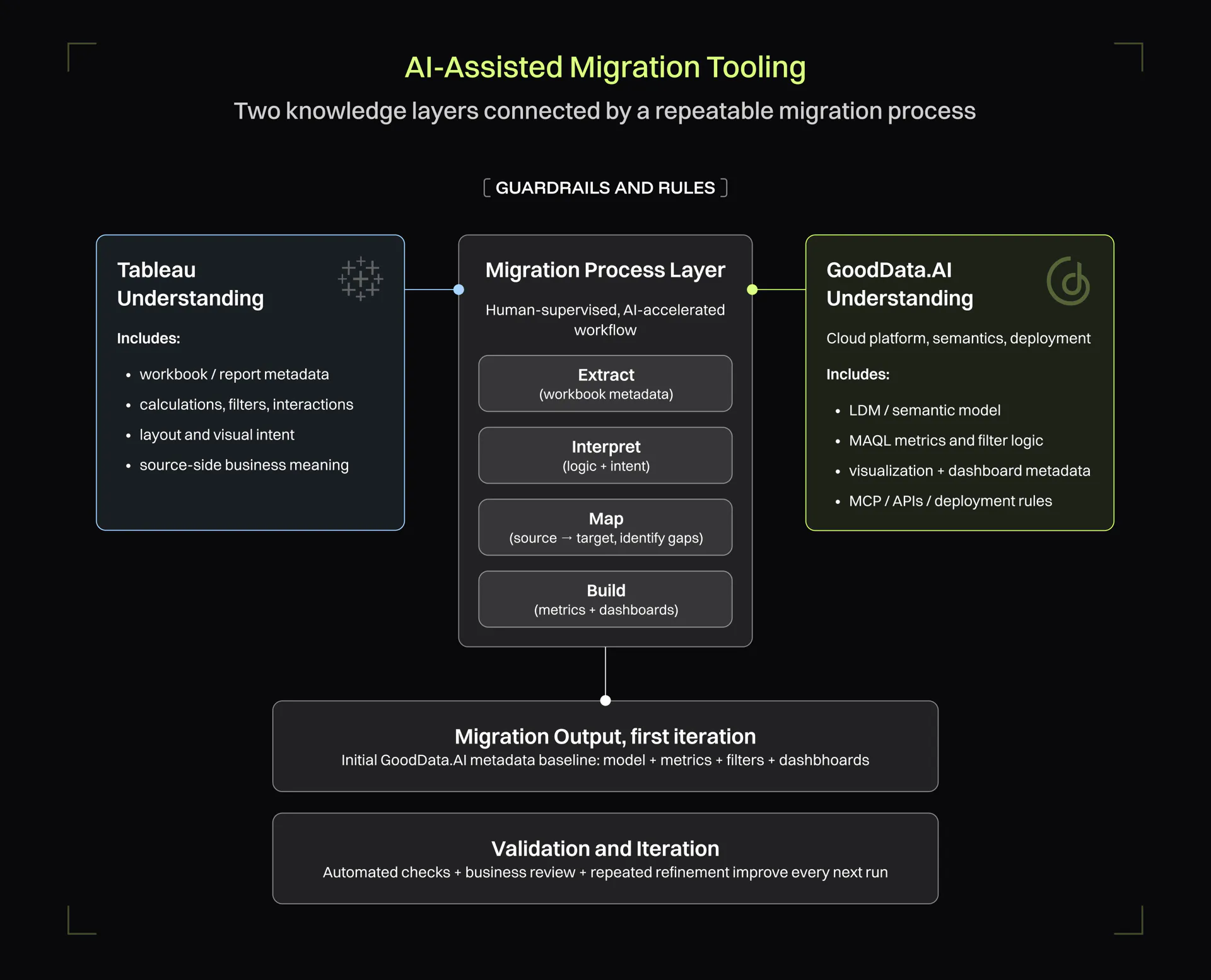
.twb / .twbx → extract script → discovery + mapping matrix + semantic contracts → LDM aligned to Tableau structure → MAQL metrics per contract → visualization JSON per worksheet → dashboard JSON (tabs, layout, filter context) → validate → deploy → parity + completeness audit
Per-workbook evidence produced at each step: source discovery, dashboard-worksheet-measure mapping, mapping matrix, semantic contracts, parity scenarios, and discrepancy reconciliation.
How to Run a Pilot
Set environment variables first:
bash
export GOODDATA_HOST=...
export GOODDATA_WORKSPACE_ID=...
export GOODDATA_API_TOKEN=...
Then run the migration sequence:
bash
python3 scripts/bootstrap_migration_scope.py "my-workbook" \
  --source-workbook "samples/tableau/my-workbook.twbx"

python3 scripts/extract_tableau_workbook.py \
  "samples/tableau/my-workbook.twbx" --scope "my-workbook"

python3 scripts/generate_parity_scenarios.py "my-workbook"

python3 scripts/validate_analytics_artifact.py \
  mappings/my-workbook/artifacts/analytics-models/

python3 scripts/deploy_analytics_model.py \
  mappings/my-workbook/artifacts/analytics-models/dashboard.json \
  --confirm-deploy

python3 scripts/validate_tableau_gooddata_parity.py \
  mappings/my-workbook/validation/parity-scenarios.json \
  --report mappings/my-workbook/validation/parity-report.md

python3 scripts/audit_migration_completeness.py my-workbook \
  --dashboard-id dashboard_id \
  --report mappings/my-workbook/validation/completeness-audit.md
The repository includes a reference sample: a demo workbook with 5 pages and 36 worksheets migrated into one GoodData Cloud dashboard with five tabs and a full artifact tree.
Scaling: The Wave Model
For larger Tableau estates, the wave model keeps migration manageable:
| Phase | Activity |
|---|---|
| Phase 0: Inventory | Audit usage, identify owners, flag retirement candidates |
| Phase 1. Pilot | Migrate 1–2 complex workbooks; measure time and parity rework |
| Phase 2. Scale | Run priority waves of 10–20 workbooks per wave |
| Phase 3. Parallel run | Tableau + GoodData Cloud live simultaneously until sign-off per wave |
| Phase 4: Cutover | Decommission with explicit rules per wave |
This connects directly to the broader BI modernization approach: inventory and rationalization before migration, not after. For context on why this sequencing matters at the platform level, see why most BI migrations fail before they start.
Definition of Done
A migrated workbook is not done when the dashboard opens. It's done when:
- Every in-scope data worksheet has a widget (or a documented placeholder with an owner).
- Agreed filter states match Tableau on the same data snapshot.
- Gaps are in a discrepancy log with an owner and explicit acceptance.
This definition enforces parity as a formal handoff criterion, not an informal judgment call.
AI/MCP Acceleration
For teams that want to move faster, GoodData.AI's MCP Server supports the Tableau migration workflow: it can assist with drafting JSON artifacts, generating documentation, and interpreting validation output. This reduces the manual effort involved in creating semantic contracts and mapping matrices without removing the human judgment required for parity validation. For a broader view of how AI agents are changing BI migration work, see how GenAI is transforming BI platform migration.
Who Should Use This
Good fit:
- Phased Tableau exit with GoodData Cloud as the target
- Teams connected to a cloud warehouse (Snowflake, BigQuery, Redshift, Databricks)
- Teams that need audit trails and formal sign-off per workbook
Poor fit:
- Big-bang migration without dedicated parity validation owners
- Environments using Hyper/extracts as the primary ETL with no upstream data pipeline plan
- IT-only go-live with no business stakeholder involvement in UAT
Frequently Asked Questions
No, and this toolkit doesn't claim to be. Tableau formula → MAQL translation requires human review. Parity validation requires agreed scenarios and business sign-off. The toolkit automates extraction, artifact generation, deployment, and completeness auditing, but it does not replace the judgment calls that determine whether a migrated workbook is actually correct.
They don't migrate. Tableau extracts are a caching and transformation layer specific to Tableau's engine. In GoodData Cloud, the equivalent is a live connection to your cloud warehouse, with caching and query optimization handled at the GoodData Cloud layer. If your Hyper pipeline contains business logic or transforms that don't exist upstream, those need to be moved to dbt, SQL, or ETL before migration.
LOD expressions — particularly FIXED scope calculations — typically require one MAQL metric per scope level in GoodData Cloud, not a single metric with a display parameter. The semantic contracts template in the toolkit is designed to capture this mapping explicitly before any MAQL is written, so scope mismatches are caught at the design stage rather than in validation.
The pilot phase is the best calibration point: the toolkit is designed so that migrating 1–2 complex workbooks gives you a realistic time and rework estimate for the rest of the estate. Based on that pilot, wave sizing (10–20 workbooks per wave) and overall timeline can be planned with real data rather than estimates.
Yes, the wave model is built for parallel operation. Tableau remains the system of record for each wave until parity is formally signed off. Only then is that wave decommissioned. This removes the pressure of a hard cutover and gives business stakeholders a controlled window to validate results.