AI Agent Authorization: Why RBAC Is Necessary but Not Enough for AI Agents
7 min read | Published


Role-based access control (RBAC) tells a system who may log in and which objects a role can see. AI agent authorization decides what an agent may do, for which task, right now, and on whose behalf—a harder question than RBAC was built to answer. RBAC remains the foundation, but it was designed for people who ask occasional questions, not for agents that issue hundreds of requests and act on the results.
The gap shows up quickly in production. Agents often run under shared service accounts or inherit a user's full role, so they hold more access than any single task needs. The OWASP Top 10 for LLM Applications 2026 calls this risk Excessive Agency (LLM03:2026), moves it from sixth to third place, and names excessive functionality, excessive permissions, and excessive autonomy as its root causes.
Closing the gap in AI agent authorization does not mean replacing RBAC. It means adding task-scoped, time-bound, revocable grants on top of it, enforcing them in the layer that serves data rather than in the prompt, and recording every step an agent takes.
Key takeaways
- RBAC answers "who can access this system"; AI agent authorization answers "what can this agent do for this task, now."
- Keep RBAC as the ceiling: an agent acting for a user should never see more than that user can.
- Scope each grant to one task, give it an expiry, and make it revocable without redeploying the agent.
- Enforce AI agent authorization in the governed data layer, not in prompts or agent code.
- Log every data request, tool call, and action so you can reconstruct what an agent did and why.
- Pass the end user's identity through to the data layer; a shared service account gives every user of the agent the same access.
What is AI agent authorization?
AI agent authorization is the set of rules that decides which data, metrics, tools, and actions an AI agent may use while it performs a specific task. Authentication proves which agent is calling. Authorization decides what that call may touch. For agents, the decision depends on three inputs that RBAC does not carry: the principal the agent acts for, the task it performs, and the moment it performs it.
Suppose someone asks a sales assistant, "Why did EMEA revenue drop last quarter?" The user's role may allow access to all regional revenue, customer lists, and discount approvals. The task needs only aggregated EMEA revenue by product and month. Agent authorization narrows the grant to what the question requires, even though the role would permit far more.
Why does RBAC break down for AI agents?
RBAC for AI agents breaks down because agents multiply the access a role grants and remove the human judgment that used to limit it. Four patterns cause most of the problems.
- Over-permissioned service accounts. Teams often connect an agent through one technical account with broad read access, so every user of that agent effectively receives the same wide permissions.
- Delegation chains. An agent calls a tool, the tool calls another agent, and that agent queries a database. Without a clear record of the original principal, permissions widen at every hop.
- Machine-scale requests. One business question can trigger dozens of small queries. A broad role that is tolerable at human volume exposes far more data at agent volume.
- Prompt injection. When an agent's permissions exceed its task, a malicious instruction hidden in a document or ticket can steer it toward data or actions the user never intended. Narrow permissions limit the damage.
None of these patterns makes RBAC wrong. RBAC sets the outer boundary, and something inside that boundary has to decide what each task receives.
What does agent authority add to RBAC?
Agent authority adds task scope, an expiry, and immediate revocation to the access RBAC grants. RBAC grants durable access to a role. Agent authority grants bounded access to a task. The differences show up in almost every dimension of access control.
| Dimension | RBAC (built for people) | Agent authority (built for agents) |
|---|---|---|
| Subject | A known user or application | An agent acting for a user, application, team, or process |
| Scope | Everything the role permits | Only the data, metrics, tools, and actions the task needs |
| Duration | Until an admin changes the role | Until the task ends or the grant expires |
| Revocation | Manual, through role changes | Immediate, per agent or per task |
| Traffic | Occasional human queries | Continuous, high-concurrency machine requests |
| Failure | A person notices an odd result | The system rejects the request explicitly and says why |
| Audit | Login and access logs | Every step: data accessed, tools called, policy decisions made, and actions taken |
Scope and failure matter most. A person who sees a confusing number stops and asks. An agent that receives a partial or wrong answer keeps reasoning on top of it, so the platform must refuse out-of-scope requests clearly instead of returning whatever the role happens to allow.
Where should agent authorization be enforced?
Agent authorization should be enforced in the governed layer that serves data to agents, not in prompts, system instructions, or agent code. A prompt can tell a model not to read salary data, but a prompt is not a control: models can ignore it, and injected text can override it. A permission check in the data layer applies no matter what the model generates. It also has to sit in one place: if every dashboard, app, and agent checks access its own way, each new AI tool adds another policy to maintain and another gap to miss.
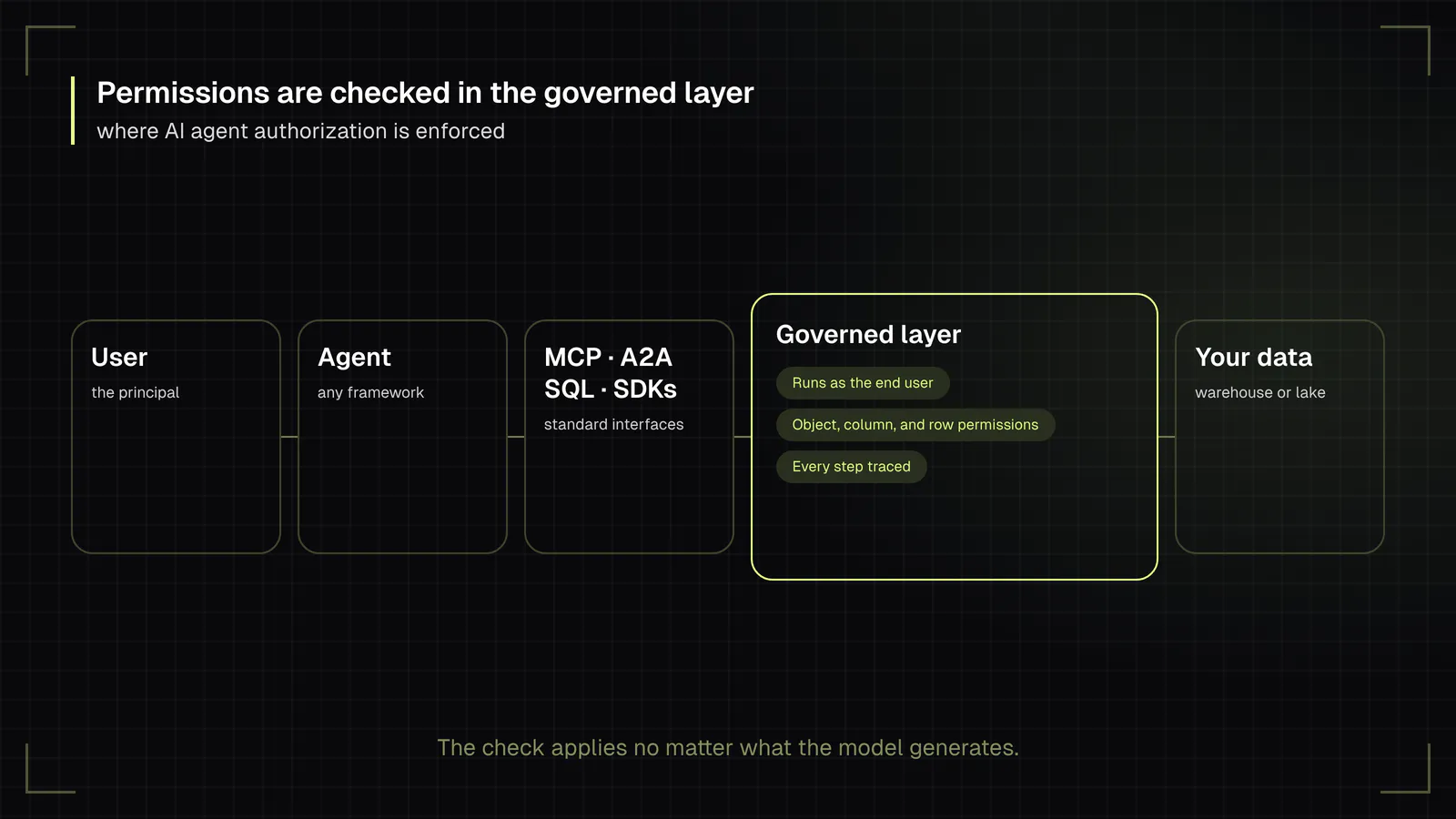
AI agent authorization enforced in the governed data layer
How GoodData.AI enforces AI agent authorization
GoodData.AI puts authorization for agents in the governed layer underneath BI, apps, agents, and MCP clients. Metrics, business definitions, and access rules are defined once, and the same permissions apply to every query, so an agent cannot get a different answer, or a wider view of the data, than a dashboard user with the same rights. That is the idea behind the Agentic Serving Plane: a governed execution layer between enterprise data platforms and the dashboards, applications, assistants, and agents that consume them.
Identity starts with how an agent connects. When an agent uses the GoodData.AI MCP Server through company single sign-on (SSO), a signed JSON Web Token (JWT), or a per-user API token, every call runs as that user and can reach only the workspaces, datasets, and objects that user may access. A shared token runs every request under one identity, which is why GoodData.AI's documentation reserves it for prototypes and demos. Agent-to-agent (A2A) requests authenticate with OAuth 2.0 or OpenID Connect and run with the calling user's permissions.
Within those boundaries, object-level permissions control who can view, share, and edit individual columns, metrics, and saved visualizations; content built on a restricted column is blocked for anyone without access. The same permission model applies to dashboards, the AI Assistant, Smart Search, and the MCP Server.
Agents themselves are scoped too. In Agent Builder, administrators choose each agent's skills and which user groups can use it, and an agent answers only with data the user is allowed to access. Its personality instruction cannot grant data access or override permissions and data filters, because those controls are configured separately. Through the MCP Server, agents can also build and run analytics assets such as metrics, dashboards, and alerts, under the same permissions as the user they act for.
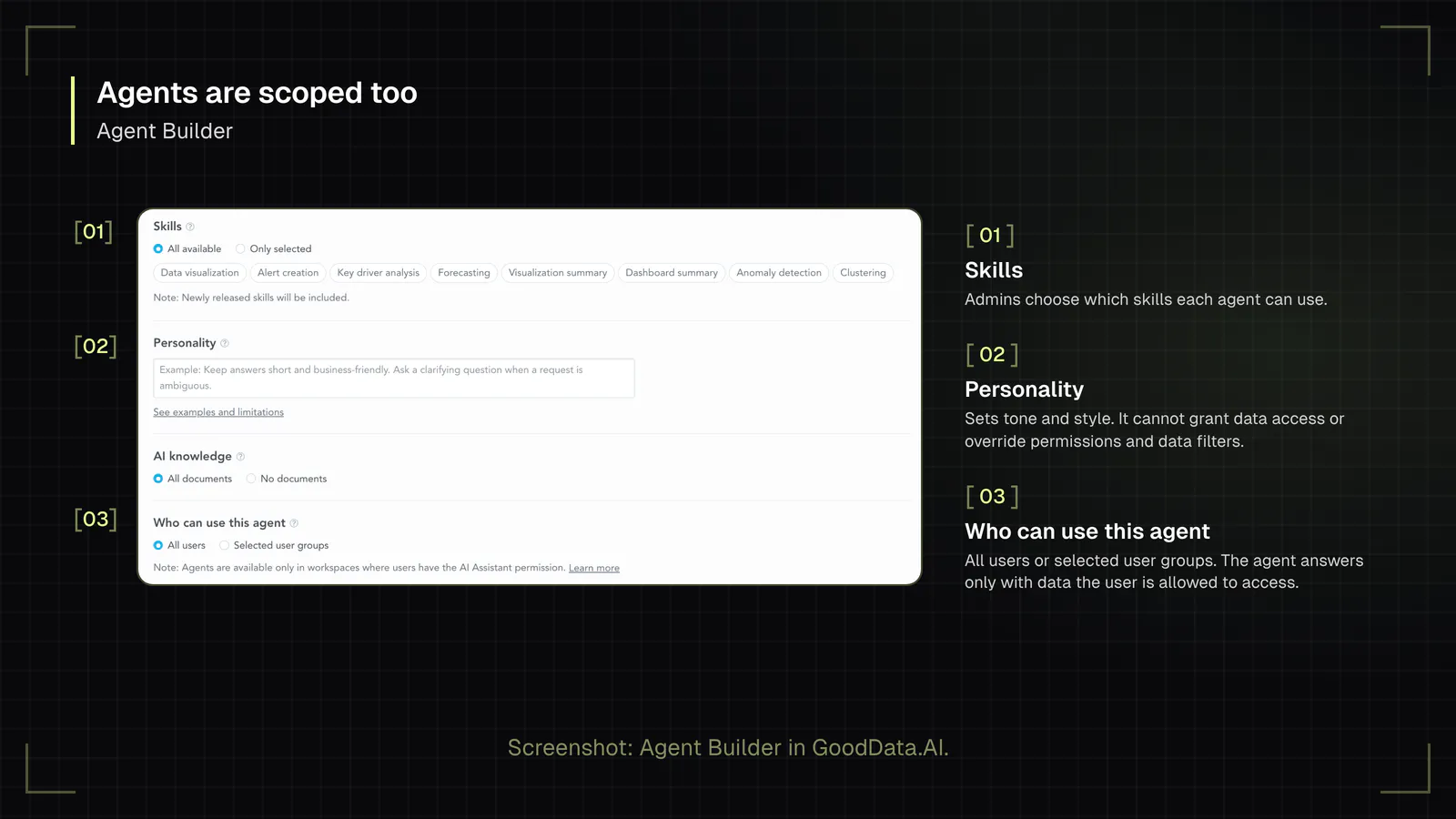
Three principles for data-layer enforcement
The same approach works on any platform. Three architectural principles make AI agent authorization hold in the data layer:
The user's permissions are the ceiling.
When an agent acts for a person, it inherits that person's object-, column-, and row-level permissions and never exceeds them. A task grant, a form of delegated authority, can narrow the agent's access further but cannot widen it.
The model proposes, the engine decides.
The language model produces a structured query definition against governed metrics. A deterministic query engine checks permissions and runs it. In this design, the model does not need to read raw tables at all.
One interface, many clients.
Agents built on any framework connect through standard interfaces such as SQL, MCP, A2A, or SDKs. Every path passes through the same checks, so the security model does not depend on which agent framework a team picks.
How to implement task-scoped access control for AI agents
Task-scoped AI agent access control starts from the permissions you already have and narrows them per agent and per task. The sequence below works whether you run one assistant or dozens of autonomous agents.
Inventory your agents and their principals.
List every agent, who or what it acts for, and which data and tools it can reach today, so you have a baseline of AI agent permissions. Agents connected through personal API keys belong on the list too.
Replace shared service accounts with delegated identity.
Each request should carry the identity of the user, application, or process the agent represents, so existing RBAC and object-level security rules apply automatically.
Define task scopes.
For each recurring task, specify the datasets, metrics, tools, and actions it needs. A forecasting task needs read access to historical revenue; it does not need write access to CRM records.
Set expiry and revocation.
A grant should end when its task ends, and administrators need a way to revoke an agent's authority immediately, without redeploying it. This applies the zero trust principle of NIST SP 800-207: no access is trusted implicitly, and each grant is evaluated dynamically against policy.
Require approval for actions.
Reading data and changing data carry different risks. Route write operations, outbound messages, and anything irreversible through explicit human approval until an agent has a proven track record.
Fail explicitly.
When a request exceeds the grant, return a clear refusal the agent can report, not an empty or partial result it might misread.
What should an AI agent audit trail record?
An AI agent audit trail should record enough to reconstruct every decision an agent makes: the principal it acted for, the task, each data request with the policy decision applied to it, each tool call, the model used, and every action taken or blocked. Logging only the final answer is not enough, because the risk sits in the intermediate steps. The NIST AI Risk Management Framework treats this kind of traceability as part of governing AI systems.
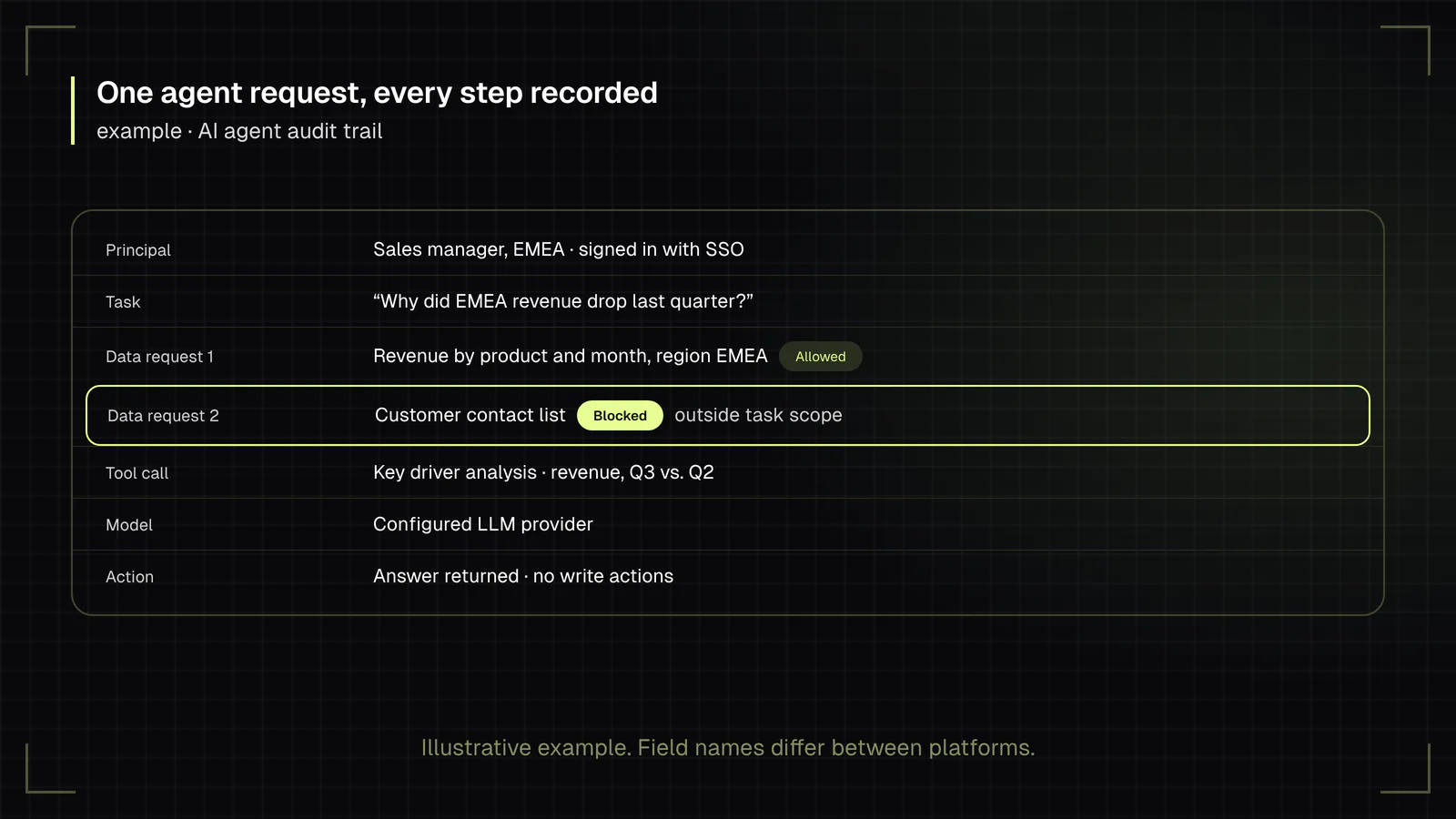
In GoodData.AI, AI Observability shows how AI is used across the organization. Agent authors can also inspect the steps behind a response, such as skill routing, knowledge search, memory use, metric queries, and answer composition, to debug and improve answers. GoodData.AI keeps AI Assistant troubleshooting data for 365 days by default, and organizations with stricter data-minimization rules can shorten that period.
Audit data also answers the first question most security teams ask: which agents are running, for whom, and at what cost. For that starting point, see AI Governance Starts with Usage Visibility.
See how governed agents work in practice
Permissions are one part of a governed agent; skills, business context, and guardrails are the others. To see how they fit together on a shared semantic layer, watch How Governed AI Agents Work: Skills, Context, and Guardrails, or explore how teams build and manage agents in Agent Builder.
Frequently Asked Questions
Yes. RBAC defines the maximum access any agent acting for a user or application can have. Agent authorization works inside that boundary, narrowing access to what a specific task needs. Removing RBAC would leave task grants with nothing to limit them.
An agent should have its own identifier for logging and revocation, but its permissions should come from the principal it acts for. Giving an agent a separate identity with its own broad permissions recreates the over-permissioned service account problem.
Least privilege for AI agents means an agent receives only the data, tools, and actions its current task requires, and only for as long as the task runs. It extends the longstanding principle for human users with two new limits: task scope and time.
Attribute-based access control (ABAC) evaluates attributes such as department, region, data sensitivity, or time when each request arrives. ABAC suits agents better than static roles because task and context can become attributes. It still needs an outer RBAC boundary and a governed place to enforce the policy.
Revoke the agent's grant in the layer that serves data, not in the agent's own configuration. Revocation in the data layer takes effect on the next request, regardless of which framework or model the agent uses.
MCP standardizes how agents call tools and data, which makes the MCP server a natural enforcement point for AI agent authorization. Authorization still has to happen behind the server: the MCP server should pass the user's identity through so the data layer can apply the right permissions.