Behind This Answer: Seeing What the AI Agent Actually Did
7 min read | Published


You're tuning an AI agent in the GoodData AI Hub. You upload a document that defines your metrics, add a memory instruction about how to group revenue, open the preview and ask a question. The answer looks right.
Did it read the document? Did the instruction apply? Why did it pick that skill and not the other one?
You have no way to tell. The answer is the only thing on screen.
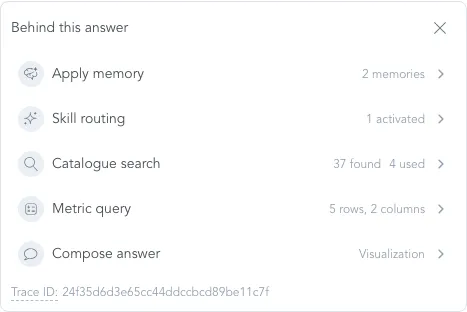
We built a panel for exactly this. It is currently called Behind this answer, it sits under every response in the Agent Builder preview, and it lists the steps the agent ran to produce that response: which skills it picked, which memories it applied, what it searched for and what it found, which metric it queried, how long each step took and how many tokens it used. A peek under the hood, without drowning you in details.
What Is Behind This Answer?
During user testing of the Agent Builder, people did the sensible thing. They configured an agent, opened the preview and asked it questions to check their work. Then they asked us the same three questions every time: Did it read my Knowledge files? Did my Memory instruction kick in? Why this skill?
We could not answer any of them from the product, and neither could they. A well-grounded answer and a plausible guess looked identical. That is a bad place to be when you are about to hand the agent to your customers.
"Behind this answer" is the fix. It is a small panel, but the mechanism under it is what the rest of this post is about.
Every Answer Is a Sequence of Steps
When the agent answers, it does several things in order. It decides which skills apply. It loads memories. It searches your knowledge base and the semantic catalogue. It usually runs a metric query, and finally it writes the answer. Each of these has an input, an output, a duration and a token cost.
So the runtime now emits one event per step: what ran, what it used, whether it worked and what it cost. The step categories follow the agent's internal workflow, applyMemory, skillRouting, knowledgeSearch, catalogSearch, metricQuery, composeAnswer, so you can filter on them.
The panel is a renderer over those events. The events are also stored, and that is the part that matters long term. Anything we build later about conversations, or about agents across a whole organization, reads the same records.
What the Panel Shows
Under each answer there is one small line, for example 21.2s / 97K tokens. Click it and the panel opens with one row per step. Each row has a one-line summary and a detail view.
Apply Memory
Which memories were set to Use always, which Use when relevant memories matched this question and how well, and how many were applied in total. If your instruction did not kick in, this is where you see it.
Skill Routing
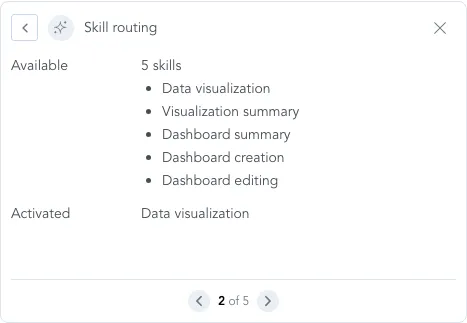
The skills the agent had available and the ones it activated for this answer. Routing can happen more than once per response. A skill that was available but never activated is the most common tuning discovery.
Knowledge Search
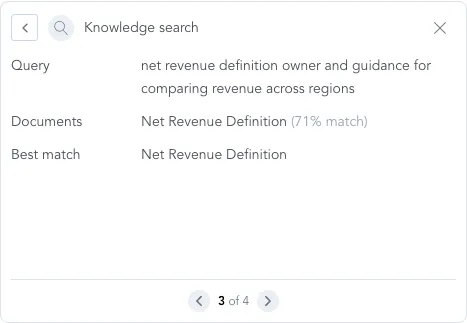
The query the agent actually sent, which is its own rephrasing of your question, the documents that came back above the similarity threshold with their scores, and the best match. This row answers "did it read my document?" directly.
Catalogue Search
The same for the semantic layer: query terms, which object types it searched, what it found and what it used.
Metric Query
Metrics, grouping, the visualization it produced, and the size of the result.
Compose Answer
The output type, the model, and how many follow-up suggestions it generated.
The footer shows the trace ID, so when someone asks in Slack why an answer looked odd, you can ask GoodData instead of guessing.
The panel does not replay the model's raw reasoning. The chat has a separate collapsible "Reasoning" element for that, and the panel sticks to facts about the run.
Panel Showing the Steps
Skill Routing Detail
Skill Routing Detail
Putting It Together
Here is what happened when we tested it on a fresh demo agent. We uploaded a document that defines net revenue, wrote "ground definitions in the organization knowledge base" into the agent's personality, and asked: How do we define net revenue, and what was it by region?
The answer came back with a correct definition and a bar chart. Nice.
The panel showed five steps: memory, routing, catalogue search, metric query, compose. No knowledge search. The agent had taken the definition from the metric's description in the semantic layer and never opened the document. The personality instruction was not strong enough to change that.
Without the panel, this is invisible. The answer is correct, the demo goes well, and you find out weeks later when a customer asks something only the document covers. With the panel, it is one missing row, and you fix the configuration before anyone else sees it.
For Developers: The Steps API
The panel is one consumer of the events. If you would rather have them as data, they are one GET away:
GET /api/v1/ai/workspaces/{workspaceId}/chat/conversations/{conversationId}/steps

{
  "steps": [
    {
      "stepId": "…", "responseId": "…", "stepIndex": 0,
      "durationMs": 5754,
      "tokens": { "input": …, "output": …, "total": … },
      "createdAt": "2026-08-04T…Z"
    }
  ]
}
A step carries only what belongs to the whole model call: order, duration, spend. What each step did is on the conversation items from the …/items endpoint. Each item has a stepId, and where a tool ran, a typed detail with the query and the results. Join the two and you have the same picture the panel draws, ready for your own dashboards or your own observability stack.
What We Got Wrong the First Time
The first cut stored each step as a conversation item, in the same table and stream as user messages and assistant replies. It was cheap to build. The items pipeline already handled persistence, streaming and reload, so the steps got all of that for free.
It had two costs.
Conversation items are what gets replayed to the model as history on the next turn. So every place that built the model's context had to filter the steps back out, and one provider adapter that did not know the content type rendered it as an empty block and got its request rejected. We were maintaining code to hide rows from the table we had just written them to.
The second cost was in the detail. One step can contain several tool calls, for instance two catalogue searches. Their details were merged into one summary on the step, so two searches that found different objects with different scores turned into one blurry entry. We could no longer tell which query had found which object.
So the step became its own entity, with its own table, its own stream event and the /steps endpoint above. It carries only what belongs to one model call. The details of each action live on the item that produced them, and each item points to the step it ran in. Two searches in one step are now two records with two scores.
The rule we took from this: if you have to filter something out of the collection you stored it in, it does not belong in that collection.
How We Think About It
The same events answer different questions at different scopes. For one response: did it use the right things? For one conversation: did the user have to rephrase, did the session end right after a failure? For one agent in one workspace: how often does it hit knowledge gaps, what goes unanswered? For one agent across workspaces: does it behave the same everywhere, or is a memory instruction missing in one of them? We built the single-response view first because the others read the same data.
The agent's own report is not enough. The agent knows things nobody else can see, such as "I searched the knowledge base and found nothing", and we record those. But an agent grading its own failures under-reports. So we also want detection from the outside: rules over the trace and the conversation that spot a user re-asking the same question or correcting the answer. Not every finding is a problem, either. A workspace where users keep thanking the agent tells you which configuration to copy.
This is not the usage dashboard. GoodData already shows AI usage as counts, feedback rates and adoption per workspace, built from metadata without any AI. The trace works on conversation content and step events. The dashboard tells you the negative feedback rate went up. The trace tells you which questions caused it and why. It also carries more sensitive data than aggregate counts, so access to it needs stricter rules.
The trace never goes back into the model. Whatever we record about a run must not change the run. That constraint is what exposed the first data model.
Beyond the Panel: What Comes Next
The panel is the first step. The stored events are there for the next ones, and we have prototyped enough to know roughly what they look like.
Tagging. Tag each conversation as it happens: what topic the answer was about, and whether the user had to ask again or correct the agent. In the prototype the agent emits these tags in the same final call that ends the turn, so there is no extra model round-trip. Free-text topics drift ("revenue forecast" and "revenue projection" end up as two buckets), so the plan is to store an embedding and cluster at query time. The analysis layer is then SQL plus vector search over tags, and the model cost is paid once per conversation.
Ask the data. We tried an admin-facing skill. You ask in chat "what topics came up most this week" or "where do users hit dead ends", and it answers from a fixed set of organization-scoped queries rather than free SQL. That was a quick way to find out which questions admins actually care about. The recurring ones can become reports.
From finding to fix. Suggest a memory instruction for a missing definition, a knowledge document for a missing topic, or, rarely, a change to the semantic layer. Today the agent can only read those, so the suggestions are advisory. Knowledge is the obvious first one to make one-click.
Trust in an AI agent comes down to one thing
Can the people responsible for it see what it did and fix it when it goes wrong? Behind this answer gives agent authors that view for a single response, and the events under it give us the base for the same view across conversations, workspaces and agents. The open questions there are about privacy, not plumbing: what conversation content an admin may see, and for how long we keep it.
Next time an answer in the preview surprises you, open the panel. Check which skill ran, which documents it found and used, and what it cost. Then fix the configuration instead of guessing.
Behind this answer is rolling out in the Agent Builder preview now.
Want to see what GoodData can do for you? Request a demo