Onboard your AI analyst
4 min read | Published

You start a new position at a new company. You join your first meeting. Acronyms are being thrown around. You try to deduce their meaning, but sometimes it is futile. You are lost. You have not absorbed organizational knowledge yet. But you will over time and begin to create your own as well.
Now imagine that your company starts adopting use of AI. You decide to start by exploring use of an AI assistant. You give it some prompts that contain acronyms and references to processes that are well known organizationally. The assistant is lost and either:
makes some uneducated guesses (hallucinates) or
gives up entirely
You can guide it, but it proves to be unreliable. And then new processes are defined, existing ones changed and you must re-teach the assistant what has changed. Its organizational knowledge is also limited to *your* organizational knowledge.
How can the AI have an always up-to-date brain containing all the organizational knowledge you need? That's the problem AI Knowledge solves.
Overview
In a recent chat with Peter Fedoročko (Field CTO at GoodData) and Vojta Bartoš about the state of AI and where things are headed, we landed on something that stuck: 2026 is the year of context. The models are powerful — that's no longer the bottleneck. What separates useful AI from frustrating AI is whether it has the right context: your data, your terminology, your organizational reality. The industry is seeing a shift from prompt engineering to context engineering — the focus is on giving AI the right information to reason with, not just better instructions.
AI Knowledge is how we're bringing that shift into GoodData.
What have we delivered?
The goal of AI Knowledge is simple: make the GoodData AI assistant as knowledgeable about your organization as your best people are. Instead of an assistant that guesses or gives generic answers, you get one that understands your processes, your terminology, and your business — and can cite its sources.
Here's what Milestone 1 includes:
Document ingestion
Upload text and markdown documents directly through the GoodData UI. Behind the scenes, each document goes through a processing pipeline: it is split into smaller passages using structure-aware chunking that respects your document's formatting — section headers, paragraph breaks, and logical boundaries. Each passage is then converted into a vector embedding, a numerical representation of its meaning, and stored for retrieval.
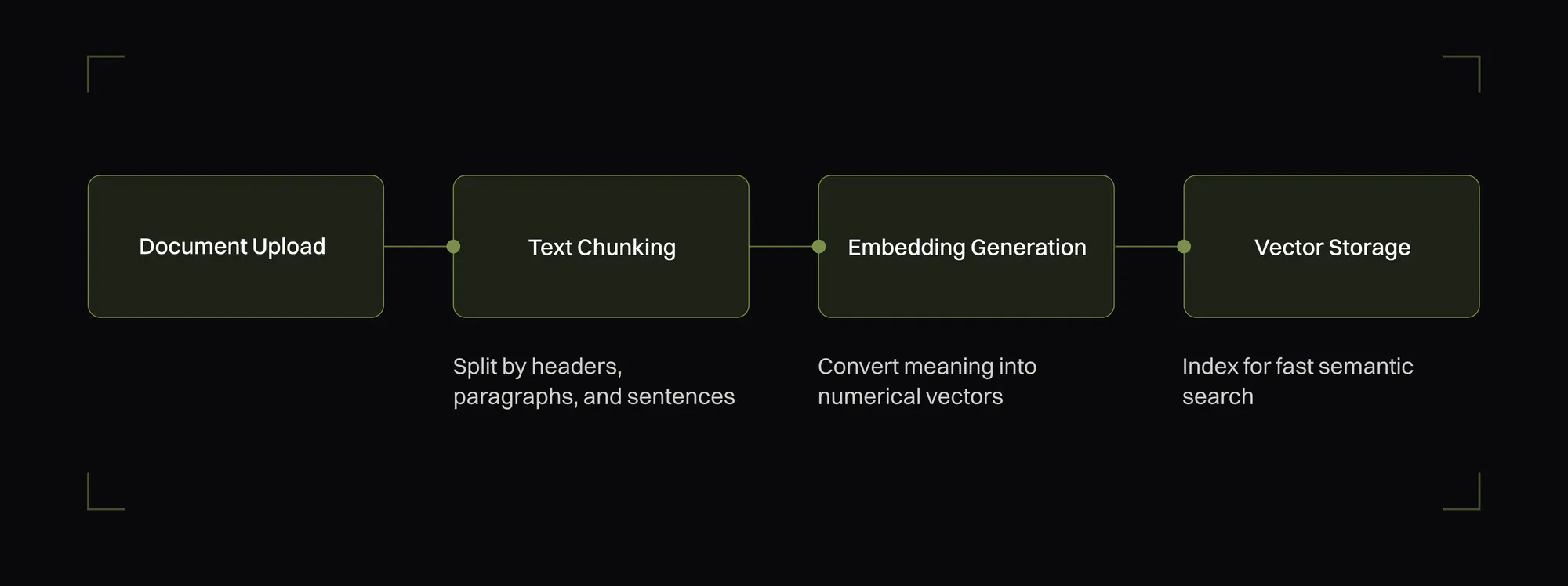
Organizational knowledge entering the system
This is how your organizational knowledge enters the system — onboarding guides, process documentation, internal policies, and more.
Semantic search
The AI doesn't match keywords; it understands meaning. Ask a question in natural language and it finds the most relevant passages across your documents. This means you don't need to know the exact terminology a document uses — the assistant bridges that gap for you.
This works because when you ask a question, it gets converted into the same kind of vector embedding as your documents. The system finds the passages whose meaning is closest to your question, ranked by relevance score.
AI Assistant Integration
This isn't a separate tool you need to learn. When you ask the GoodData AI assistant a question, it automatically determines whether your question might be answered by organizational documents. If so, it searches your knowledge base, retrieves the most relevant passages, and uses them to formulate a grounded answer — complete with source citations so you can verify the response.
For example: ask "How do we handle PTO for contractors?" Without AI Knowledge, the assistant either guesses from generic training data or tells you it doesn't know. With it, the assistant recognizes the question belongs to your HR documentation, pulls the relevant passages from the policy you uploaded, and answers in plain language — with a citation pointing back to the exact section, one click away.
The assistant can also expand its context: if a search result looks promising but is only part of a larger section, it can fetch surrounding passages from the same document to build a more complete answer.
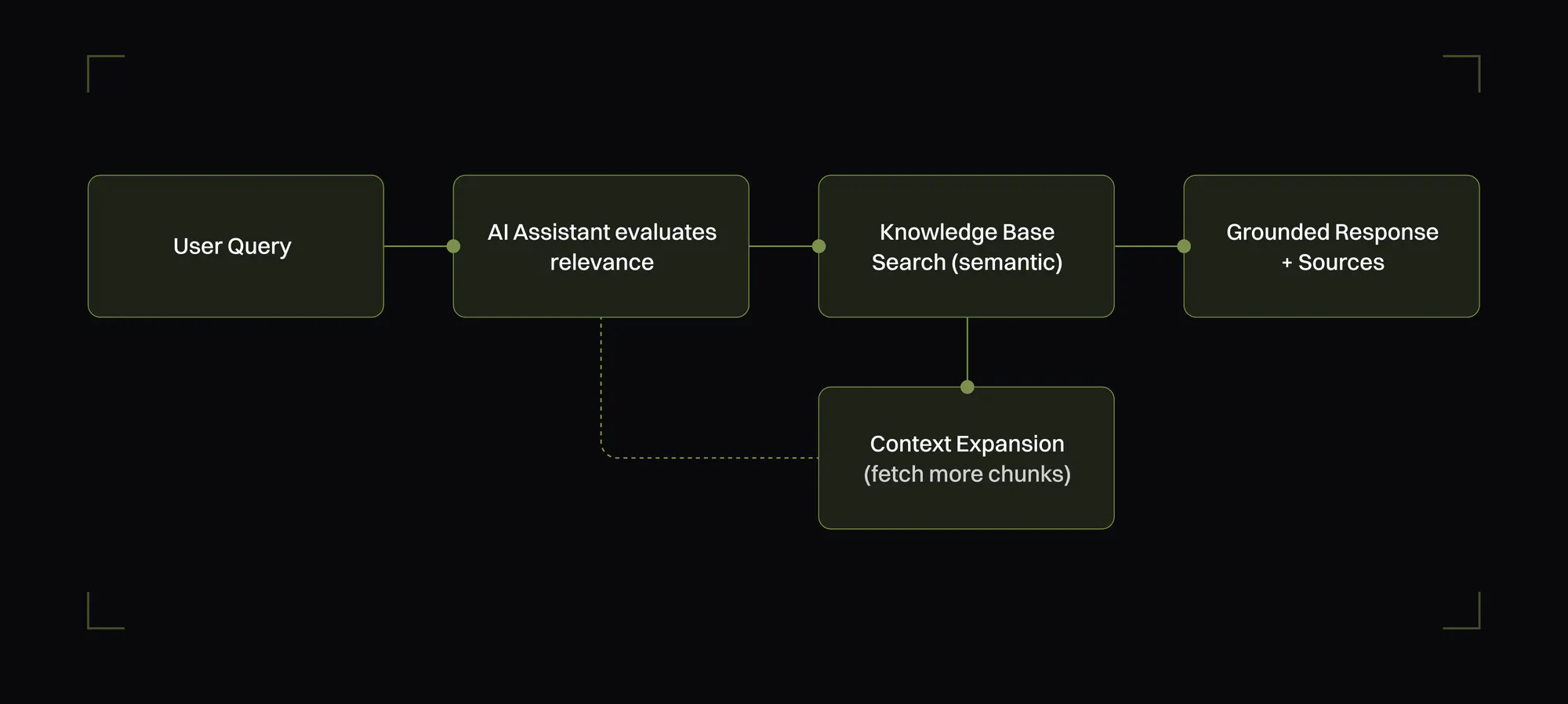
Simplified flow of what happens when you ask the assistant a question
Workspace scoping
Documents can live at the organization level (visible everywhere) or be scoped to a specific workspace. When you're working in a particular workspace context, workspace-level documents receive a relevance boost, so the answers you get are naturally tailored to where you're working. This lets teams maintain their own knowledge bases — finance has its policies, engineering has its runbooks — while still benefiting from shared organizational knowledge.
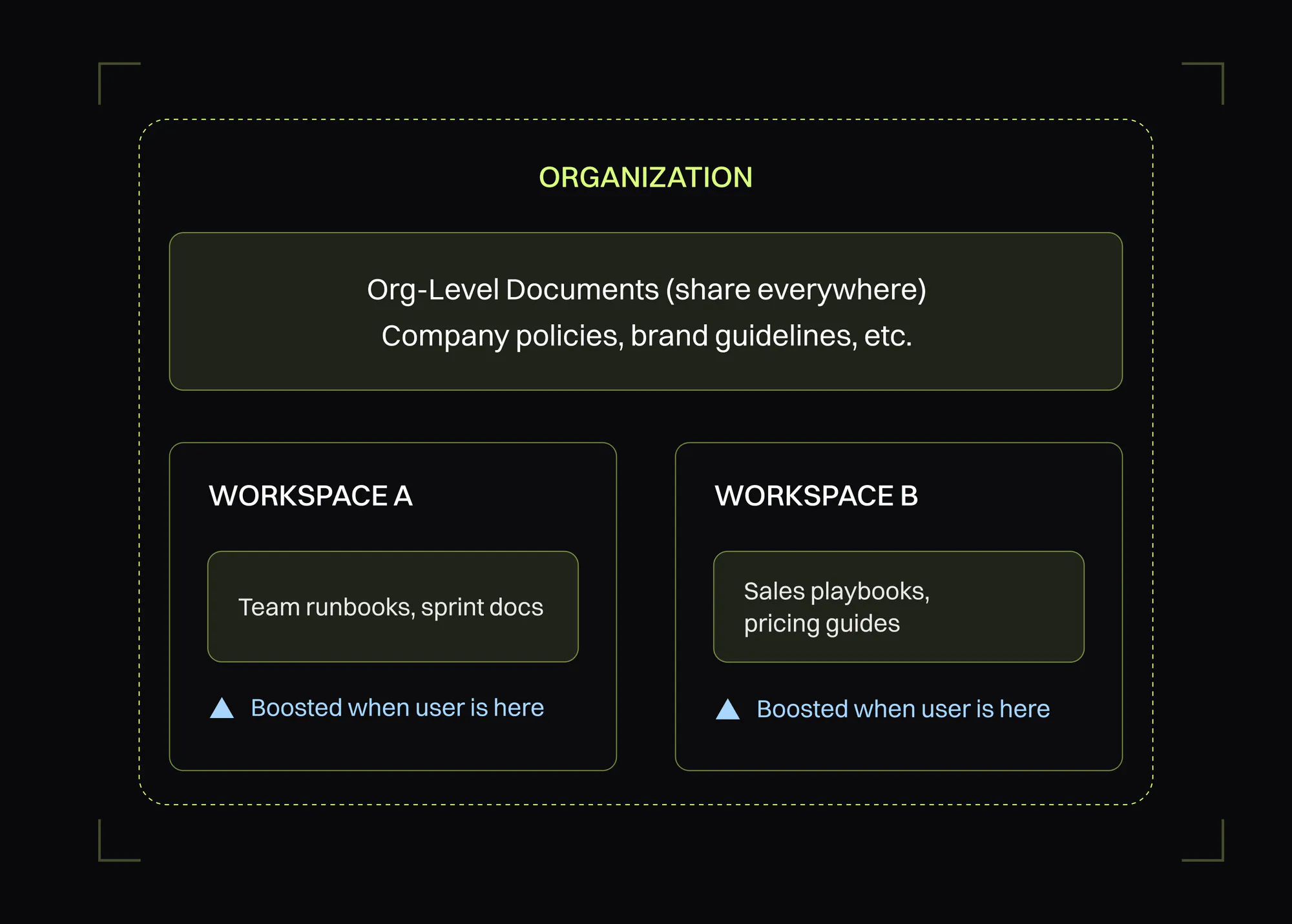
Workspace scoping
Permissions and governance
Read and write access is controlled through workspace permissions. Documents can be individually enabled or disabled for AI use, giving administrators fine-grained control over what the AI can and cannot reference. Disabled a document? It's immediately excluded from all search results — no reprocessing needed.
Audit logging
Document create, update, and delete operations are tracked, giving administrators visibility into how knowledge is being managed. You'll always know who changed what and when.
What's next?
This is Milestone 1 — the foundation. What we've delivered is semantic retrieval: AI that can find and cite your documents. Where we're headed is AI that *reasons* across them.
The vision goes beyond simple document retrieval toward what's known as GraphRAG — combining vector search with knowledge graphs to enable multi-hop reasoning. Narain Jashanmal described this well in his operational framework for AI discourse:
[It] Combines vector search (conceptual similarity) with knowledge graphs (explicit relationships). Enables multi-hop reasoning: connect a news event to a supplier to a production delay. This is the architecture for grounded, trustworthy AI.
Our own Marcelo Almiron explored this in depth in his article on GraphRAG, which I highly recommend:
GraphRAG bridges AI with analytics, enabling insights that go beyond "what happened" to "why it happened."
That last line is exactly why this matters for GoodData. We already answer "what happened" as well as anyone; AI Knowledge plus GraphRAG is how we get to "why" — grounding the assistant not just in your documents, but in the relationships between your data, your processes, and the people who run them.
On the roadmap: automated ingestion from connected data sources, search that spans across workspaces, and these deeper GraphRAG capabilities — AI that connects the dots between documents, people, and processes to surface insights you didn't think to ask for.